Mitel 6970 IP Conference Phone User Guide
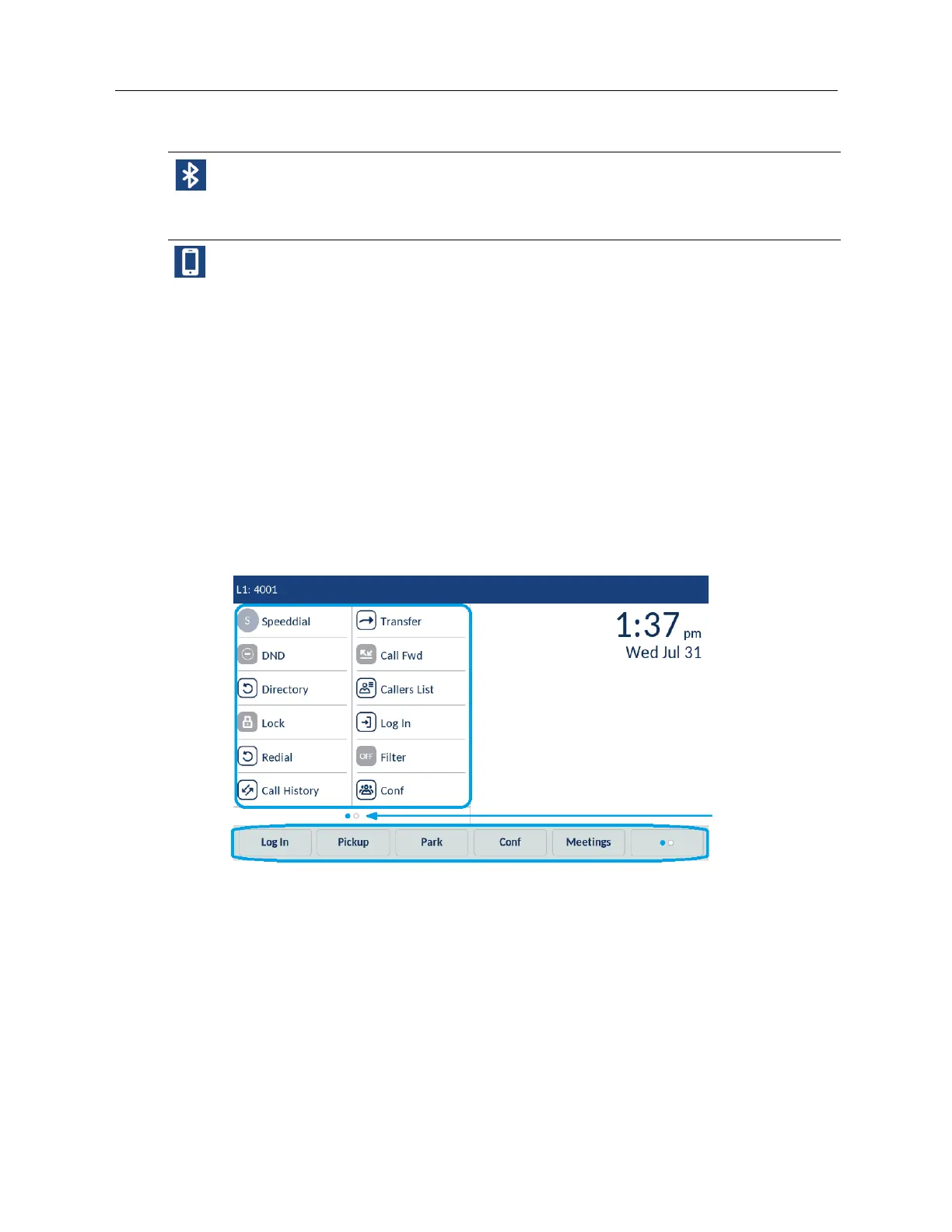
Top and bottom softkeys
Twelve top softkeys supporting up to 48 functions and six bottom softkeys supporting up to 30
functions are accessible on the Home screen. You can configure the bottom and top softkeys
displayed on the Home screen using Web UI if allowed by your system administrator.
The bottom softkeys change depending on the state of the phone and are used to perform different
functions when the phone is in an idle, connected, outgoing, or busy state.
The top softkeys are displayed on the Home screen. If you have 12 or more top softkeys configured,
the top softkey page indicators are displayed at the bottom of the screen. These dots indicate the
number of the top key pages and the page you are on. The phone supports up to 4 pages of 12
keys. To access additional pages, swipe left or right within the top softkey area.
Call screen
During an incoming or an outgoing call and during an active call, all the essential information
regarding the call is displayed on the screen, including the caller’s avatar, name, number, call duration
Bluetooth Enabled - The Bluetooth Enabled icon displays on the status bar when the
Bluetooth functionality has been turned on.
For more information, see “Bluetooth” on page 61.
Mobile Phone Connected - The Mobile Phone Connected icon displays on the status bar
when a mobile phone connection has been detected.
For more information, see “MobileLink” on page 61.
Icon Description
Top Softkeys
Top Softkey
Page Indicator
Bottom Softkeys



 To Next Page