ACCESS GATEWAY
System Administration 163
15.
Enable STMP Redirection to allow the specified user to have their SMTP traffic redirected by the global
SMTP redirect configuration.
16.
Click Add to add this device to the database, or click Restore if you want to reset all the values to their
previous state.
Adding a Group Type Profile
1.
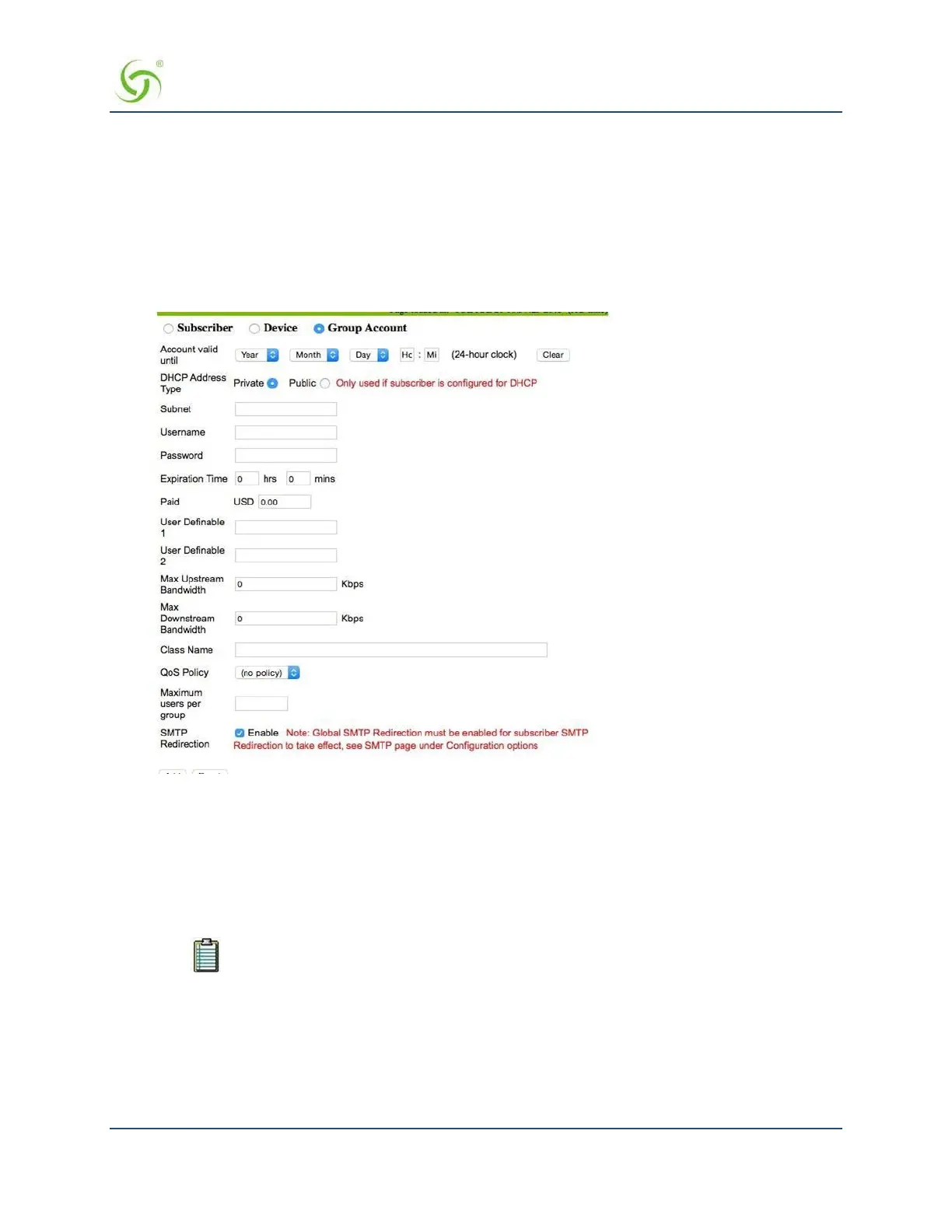
From the Web Management Interface, click on Subscriber Administration, then Add.
The Add a Subscriber Profile to the Database screen appears:
2.
Choose the Group Account type for this profile.
3.
Set the Account valid until field to set an expiration date for the group account.
4.
Define the DHCP Address Type: Public or Private (only used when the IP Upsell feature is enabled,
otherwise leave this set to “private”).
5.
Enter a valid Subnet address for this subscriber.
6.
In the Username field, enter a user name for this subscriber.
User names and passwords are required for Group Accounts.
7.
If you assigned a user name, you must now assign a Password.
8.
In the Expiration Time field, define the duration (in hours and minutes) for the
subscriber’s authorized
access time. When the assigned time expires, the subscriber must “re-subscribe” to the service.
9.
Enter an amount in the Paid field.
10.
The next two fields (User Definable 1 and User Definable 2) are optional. Use these fields for
simple notations about the subscriber.



 To Next Page