ACCESS GATEWAY
System Administration 173
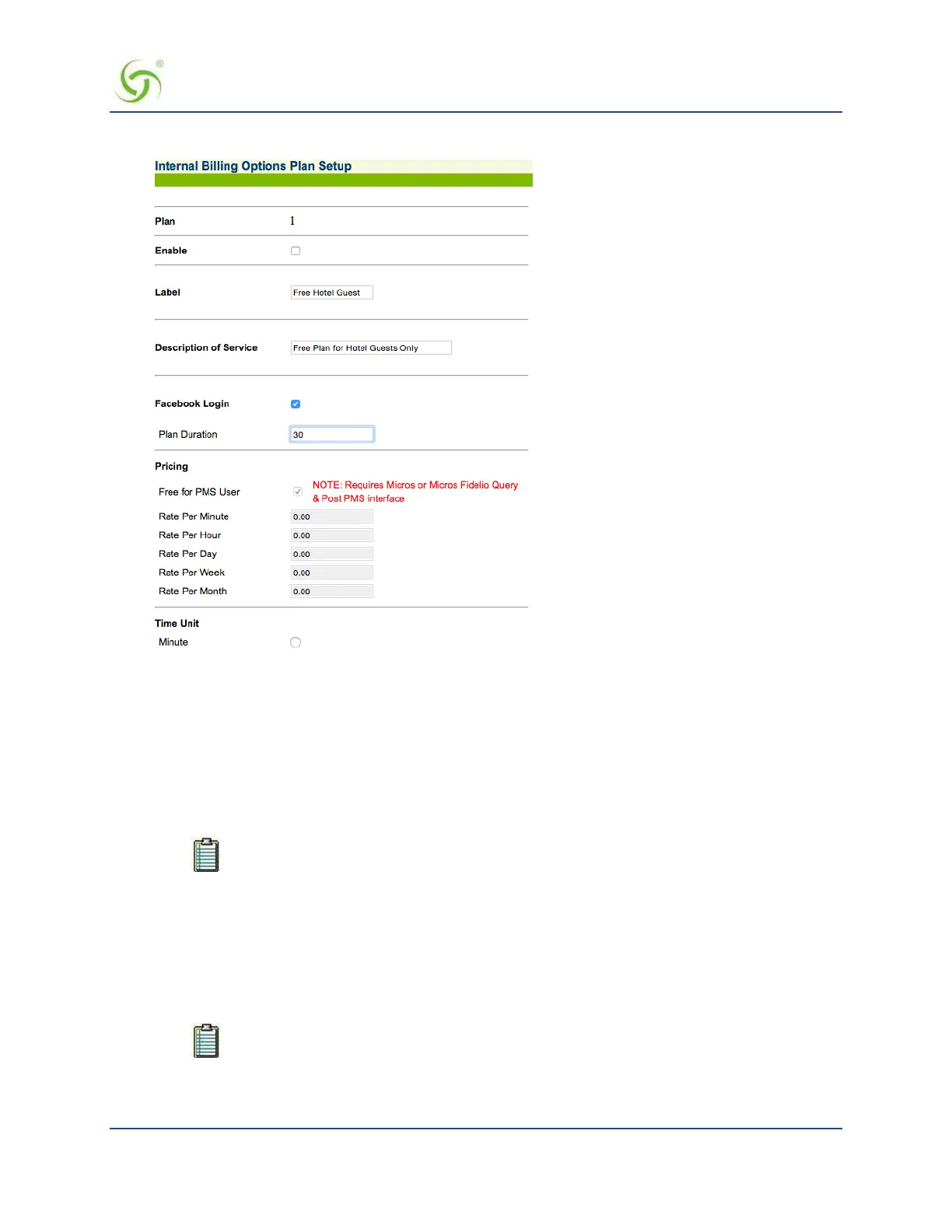
Sample of Internal Billing Options XoverY Plan Setup Screen:
Depending on the type of plan you want to set up, go to:
Setting Up a “Normal” Billing Plan on page 173.
Setting Up an X over Y Billing Plan on page 174.
Setting Up a “Normal” Billing Plan
1.
If required, click on the Enable check box to enable (make active) this billing plan.
2.
Define a “label” for this billing plan in the Label field.
Each plan must have a unique label, different from other plans.
3.
Enter a description for this billing plan in the Description of Service field.
4.
If desired, enable Facebook Login and specify a plan duration.
5.
Define the Pricing schemes for this billing plan (rate per minute, per hour, per day, per week, and per
month).
6.
Define the Time Unit of the billable event (either Minute, Hour, Day, Week, or Month). One time unit is
assigned to each billing plan.
The Access Gateway allows you to define multiple billing plans with different time units
at the same time. For example, you can define one billing plan that changes by the hour
(e.g. $2.95 per hour) and a second plan that charges per day (e.g. $12.95 per day).
7.
Define the Up (to network) and Down (to subscribers) bandwidth range for this billing plan.


 To Next Page