Problem solving 273
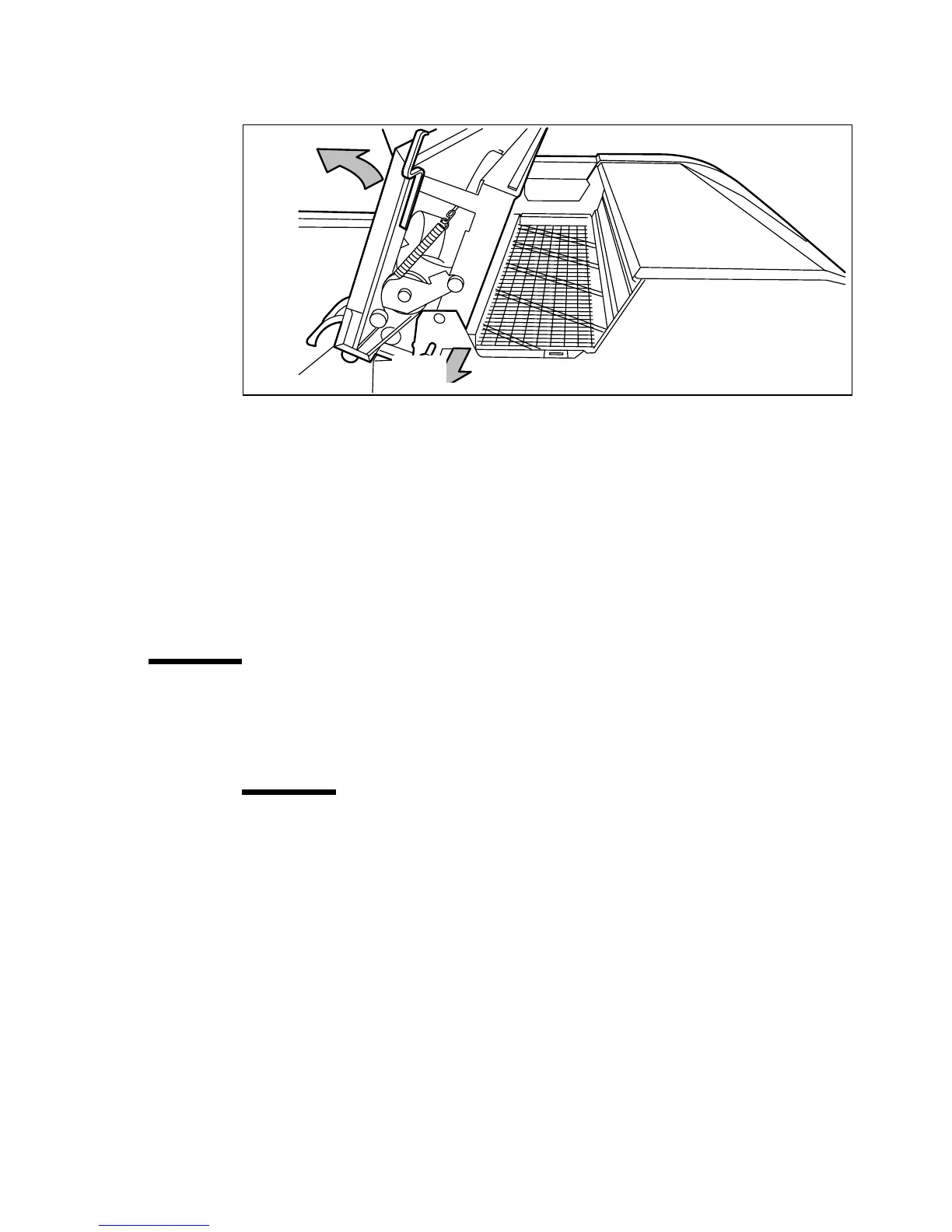
5 Open the fuser section cover by lifting the cover by the green handle (see
figure 167).
[167] Opening the fuser section cover
6
Remove any jammed printing material from the fuser section.
Note:
If the printing material is visible for the manual feed section, remove
it from the front side of the Océ TDS600 Printer.
7
Pull the green knob to release the fuser section cover and close the cover with
the help of the green handle.
8 Close the cover.
9 Switch the printer on again.
Paper jam at the integrated receiving tray
▼
▼▼
▼
How to clear a jam at the integrated receiving tray
1
Open the manual feeder to release the printing material.
Attention:
If you fail to do so, the OPC drum might get damaged when you
remove jammed material.
2 Open the cover on the left side (see figure 166 on page 272).
3 Open the fuser section cover by lifting the cover by the green handle (see
figure 167).
4 Remove any jammed printing material from the Integrated Receiving Tray.
5 Pull the green knob to release the fuser section cover and close the cover with
the help of the green handle.


 To Next Page