Basic Operation
OPERATION GUIDE 3-53
3
4
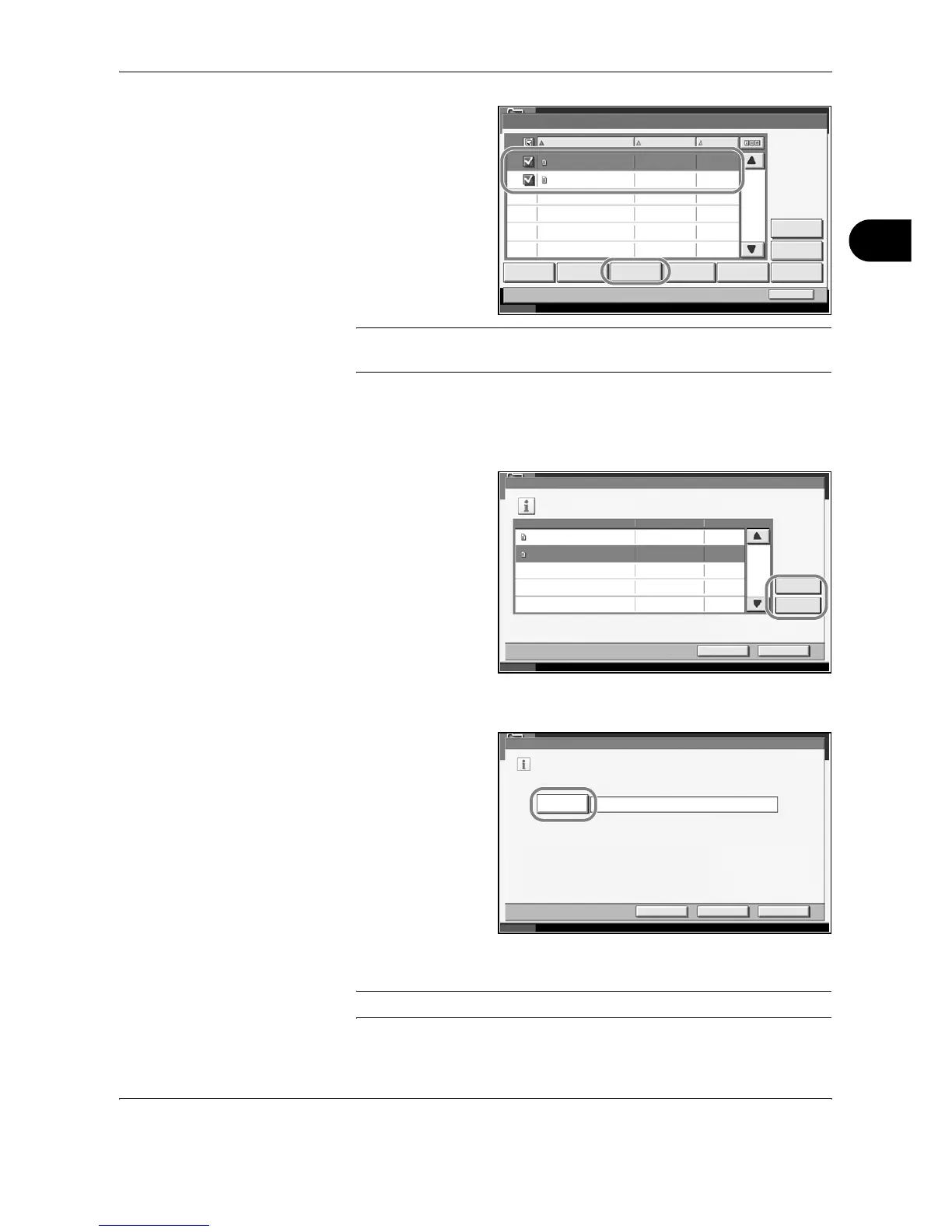
From the list, select
the checkbox to
indicate the
documents to be
joined. Up to 10
documents can be
joined. The selected
documents are
indicated by a
checkmark in the
checkbox.
NOTE: To cancel the selection, press the checkbox and remove the
checkmark.
5
Press [Join].
6
Arrange the documents in the desired order.
Press the document
to be rearranged.
The document will
be highlighted.
Press [Up] or [Down]
to move the
document up or
down according to
the order to be in.
7
Press [Next].
8
Press [File Name].
9
Enter a new file name for the documents to be joined, and press [OK].
NOTE: Refer to the Appendix for entering characters.
Status 10/10/2007 10:10
Program Detail:
Detail
001/001
Name Date and Time Size
Join Move DeletePrint Send Store File
Close
0001 Document 1 05/05/2007 11 :11 MB1
0002 Document 2 05/05/2007 11 :12 MB1
Preview
Status 10/10/2007 10:10
Join
001/001
Confirm the order of documents to combine.
File Name
NextCancel
Up
Down
Date and Time Size
Document 2 05/05/2007 10:15 MB1
Document 1 05/05/2007 10:10 MB1
Join
Enter file name for combined document.
JoinBack
File Name
Cancel
Status 10/10/2007 10:10




 To Next Page