Basic Operation
3-54 OPERATION GUIDE
10
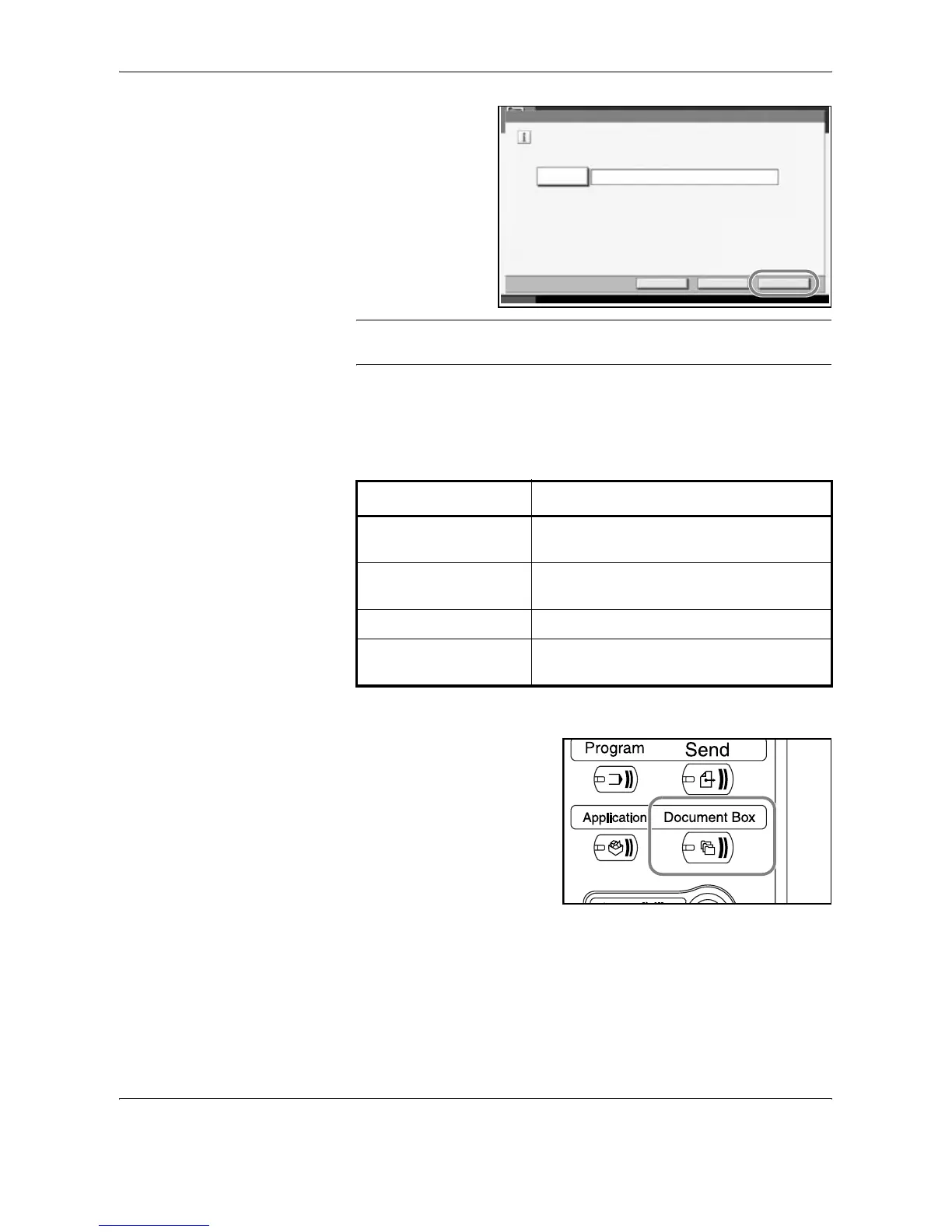
Press [Join].
Pressing [Yes] in the
confirmation screen
joins the documents.
NOTE: Original documents before joining are retained. Delete them if
they are unnecessary.
Printing Documents Stored in the Job Box
Print documents stored in the job box. The following boxes and documents
are contained in the job box.
The procedure for printing documents in the Job Box is explained below.
1
Press the Document Box key.
2
Press [Job Box].
Join
Enterfilenameforcombineddocument.
JoinBack
File Name
Document12
Cancel
Status 10/5/2006 10:10
Type of box contained Documents stored
Private Print/Stored Job Print jobs stored by using Private Print or
Stored Job functions.
Quick Copy/Proof and
Hold
Print jobs stored by using Quick Print or
Proof and Hold functions.
Repeat Copy Copy job with Repeat Copy setting.
Form for Form Overlay
(Copy)
Form data used for Form Overlay (Copy).




 To Next Page