Chapter 7: Operation
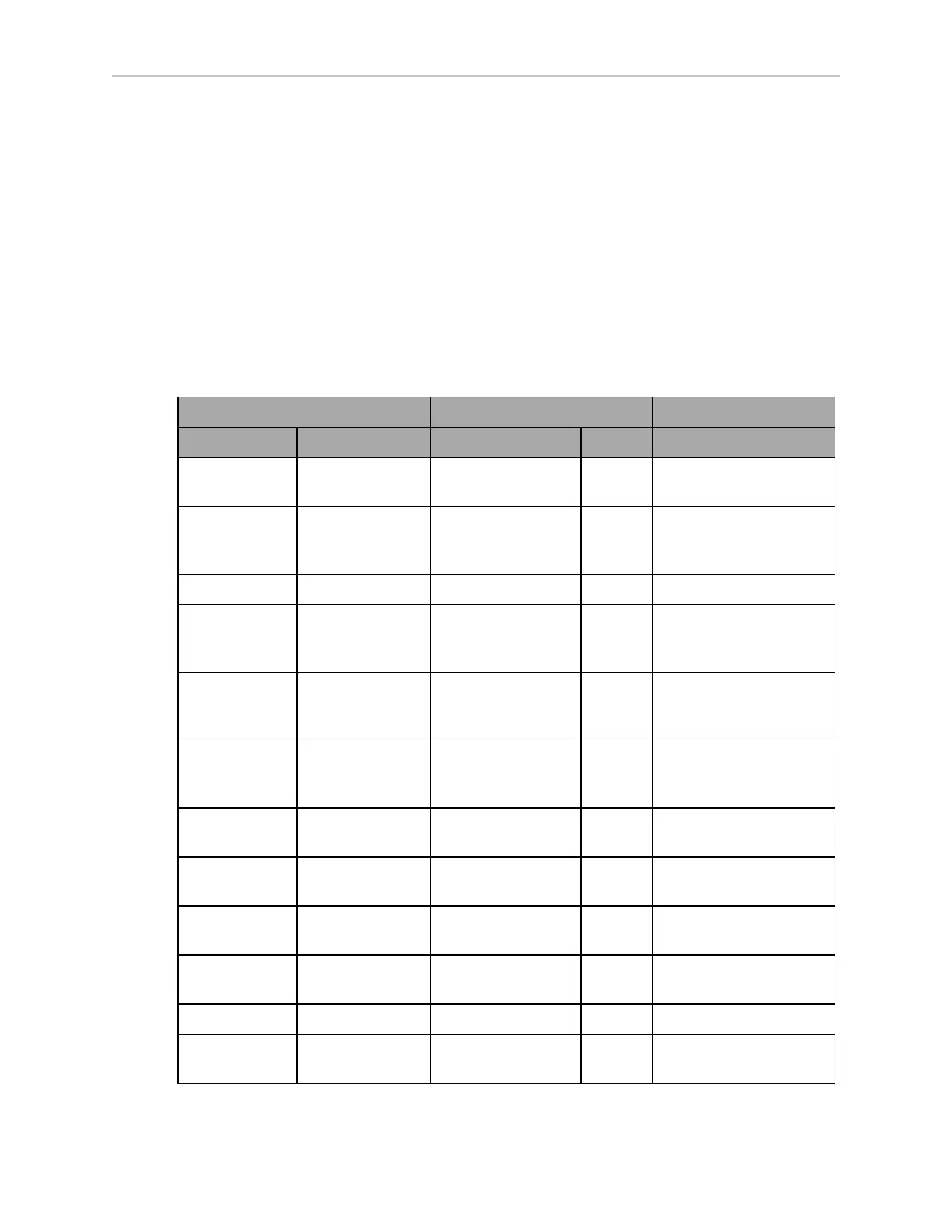
In the following table:
l
Blink indicates that a disc or light is on for a period, then off for a period.
l
Pulse indicates a 0.25 Hz fade on and off.
l
Circle indicates that the lights appear to be going in a circle.
l
Half-circles indicates two arcs, moving opposite each other between the top and bottom.
l
Solid indicates that a light is on continuously.
l
Alt indicates that the optional beacon switches between different lights, with no pause.
Two lights with Alt means one light is always on, but not two at once.
Table 7-2 Indicator Meanings
Light Disc Optional Beacon (If Used) Meaning
Color Pattern Color Pattern
Blue Moving
Circle
Green Blink Driving straight,
all ok
Blue/
Orange
@front
Moving
Circle/
Blinking signal
Green Blink Turning > 30° in dir-
ection of orange turn
signal, all ok
Blue Pulse Green Solid Stopped, all ok
Orange Moving
Circle
Green
/Yellow
Alt Drive with warning,
doesn't prevent driving
e.g. low battery
Orange/Orange
@front
Moving
Circle/
Blinking signal
Green
/Yellow
Alt Turn with warning
Blue/
Orange
Moving
Circle/
Blinking signal
Green Blink Driving slowly,
<300 mm/s
Orange Pulse Green/Green/Green
/Yellow
Alt Stopped with warning
Yellow Blink Yellow Blink Object detected in safety
zone
Orange Left+Right
Half-circles
Yellow Blink Lost
Green/White
arc
Partial Circle/-
moving small arc
Green normally,
Red if E-Stopped
Blink Charging
Red Blink Red Blink E-Stop, stops driving
Blue Left+Right
Half-circles
Green/Yellow/Red Alt Booting
20472-000 Rev B LD-250 Platform User's Guide 131









 To Next Page