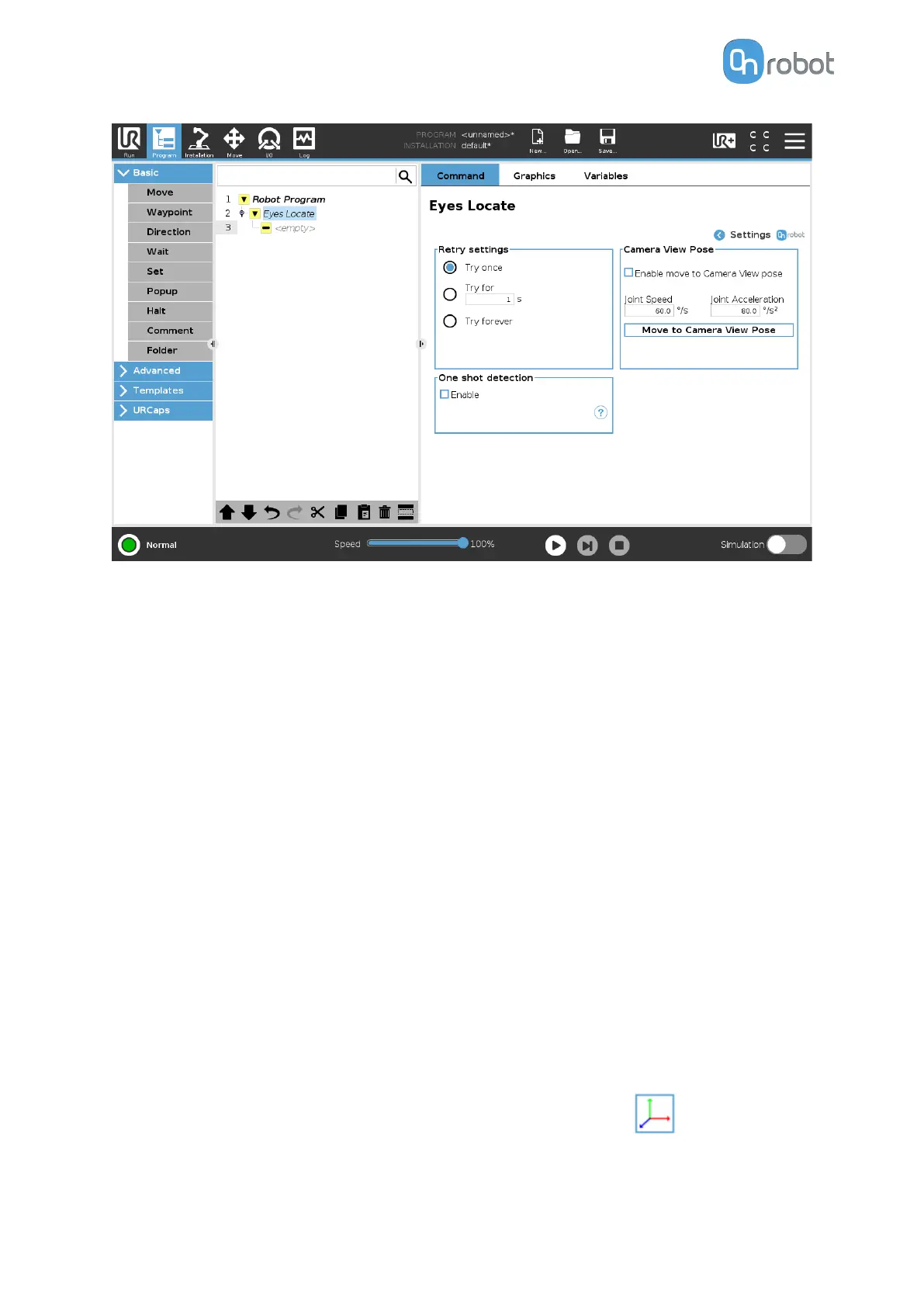
Retry settings
The user can select how long the Eyes Locate command will try to locate workpieces. The
options are:
•
Try once: The Eyes Locate command will try only one time.
•
Try for (s): The user can input how long in seconds the Eyes Locate command will try to
locate workpieces.
•
Try forever: The Eyes Locate command will never stop trying to locate workpieces.
One shot detection
If enabled, the Eyes will attempt to identify all target workpieces at once saving their pose and
type. The section of the program inside the Eyes Locate node will execute as many times as
workpieces were detected by the Eyes. In this way, it is possible to handle all workpieces
without acquiring more images and thus, reducing cycle time.
Camera View Pose
If enabled, Eyes Locate will move the robot to the associated camera view pose of the
selected task. This camera view pose is saved while creating the camera view for the
application. The move applied is a joint move. Joint Speed and Joint Acceleration can be
adjusted.
Pick
Oset Edit
A new page with the Pick
Oset setting will be shown by pressing on .
OPERATION
66


 To Next Page
 Loading...








