•
Color is important (Useful for workpieces with similar shapes): Select it if the task is
meant to inspect the color of workpieces. If selected Color threshold is used to decide
whether a workpiece passes or fails the inspection task.
•
Press .
•
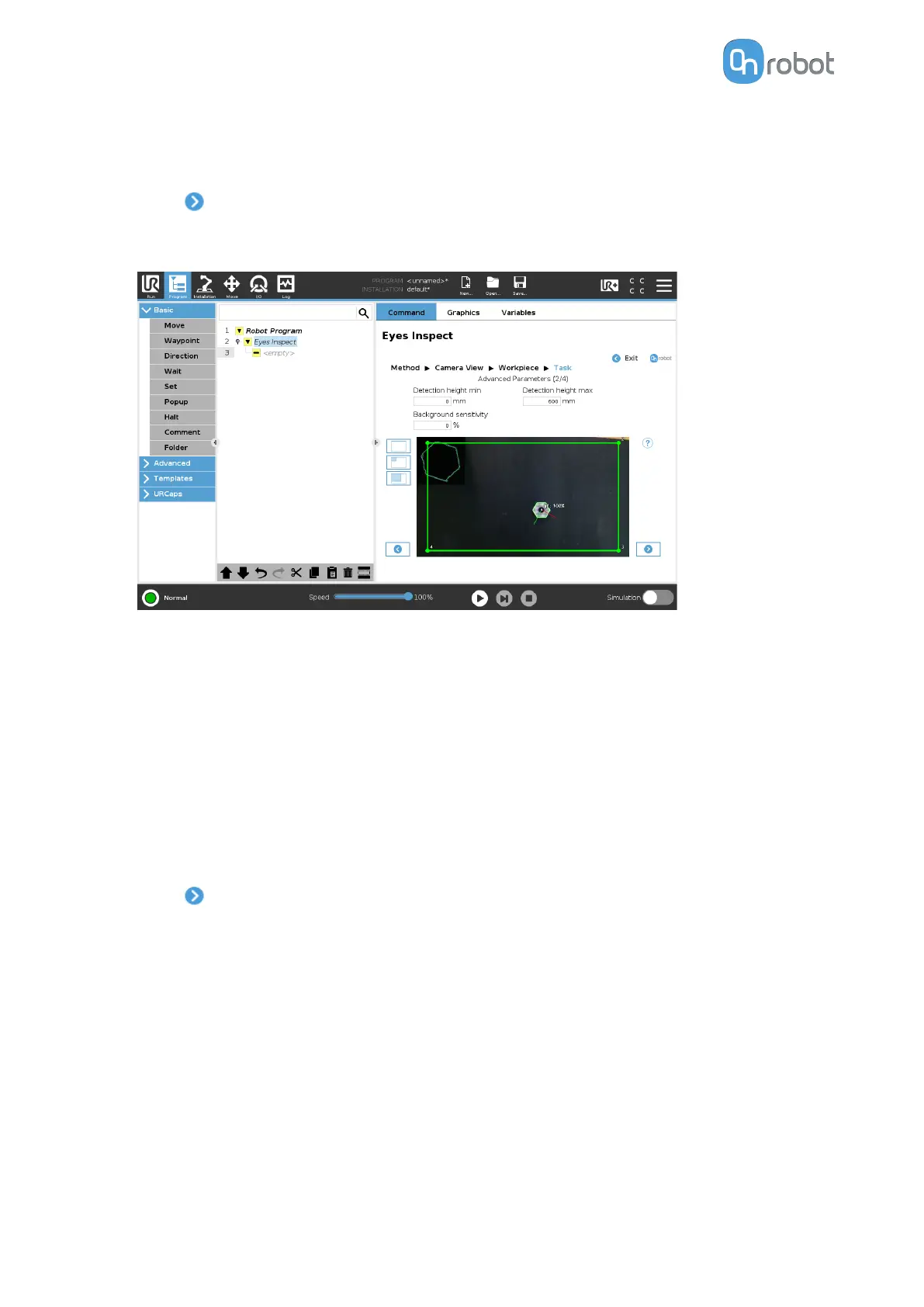
Adjust the inspection by setting the Detection height min, Detection height max, and
Background sensitivity parameters.
•
Detection Height: This parameter ensures that only objects inside of a given height
range from the camera view plane will be detected as possible workpieces. Use the
parameter when detecting tall workpieces, so that only the top part is used to compute
the position of the workpiece. Increase the robustness to disturbances like shadows or
reflections, as these usually appear at camera view plane level. It is recommended to
have a range large enough to allow variations in the height of the workpieces. The
eect can be seen in the textured zone in the image feed, which indicates the
foreground.
•
Background sensitivity: This parameter makes the task detect the workpieces that are
more similar in color to the background. Use the parameter with care as the greater its
value is, the less robust the detection is to lighting changes and shadows. The eect
can be seen in the textured zone in the image feed, which indicates the foreground.
•
Press
.
•
Adjust the inspection by setting the Use
fixed pick height, Pick priority, and Gripper
clearance parameters.
OPERATION
82


 To Next Page