14
Note
* After programming the date by pressing [CASH], the system will automatically move to the
next programming item, if you need to confirm the previous step, please press [↑] key to go
back and check the display content. After confirmation, press [↓] key to go to the next item
* If you need to print confirmation of the date, press [PRNT] key.
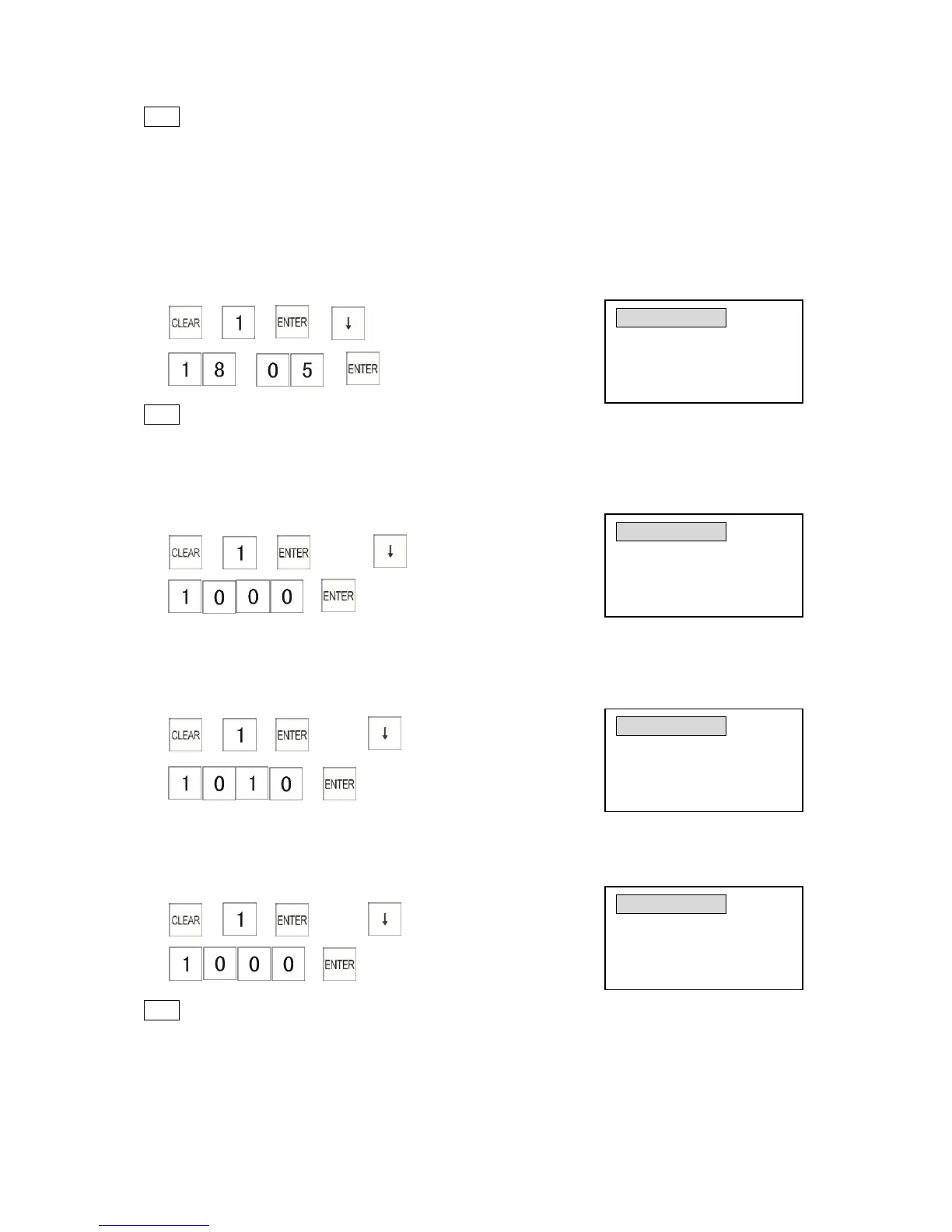
3.1.2 Programming the Time
Example: Program the time to 18:05
1) → → →
2) → →
(24-hour clock, enter 4 digits for hour & minutes)
Note
* To check the date and time, turn the key to the “R”position and press the [X/TIME] key.
3.1.3 Programming the Transaction Number
Example: Program the initial transaction number to 1000.
1) → → → press twice
2) →
(Transaction No.)
3.1.4 Programming the Machine Number
Example: Program the machine number as 1010.
1) → → →press key 3 times
2) →
(Machine number)
3.1.5 Programming the X 1 Report Number
Example: Program the first X1 report number as 1000.
1) → → →press key 4 times
2) →
(X1 number)
Note
* You can set the first number used when printing reports, once it is set, the number is
increased by one each time a report is issued. Please refer to Chapter 8 “Read and Reset
Reports”.



 To Next Page