EasyManua.ls Logo

Optimas OP-680 - Changing Transaction Name; Changing Transaction Words; Print Transaction Words Table

Default Icon
76 pages
Print Icon
To Next Page IconTo Next Page
To Previous Page IconTo Previous Page
Loading...
32
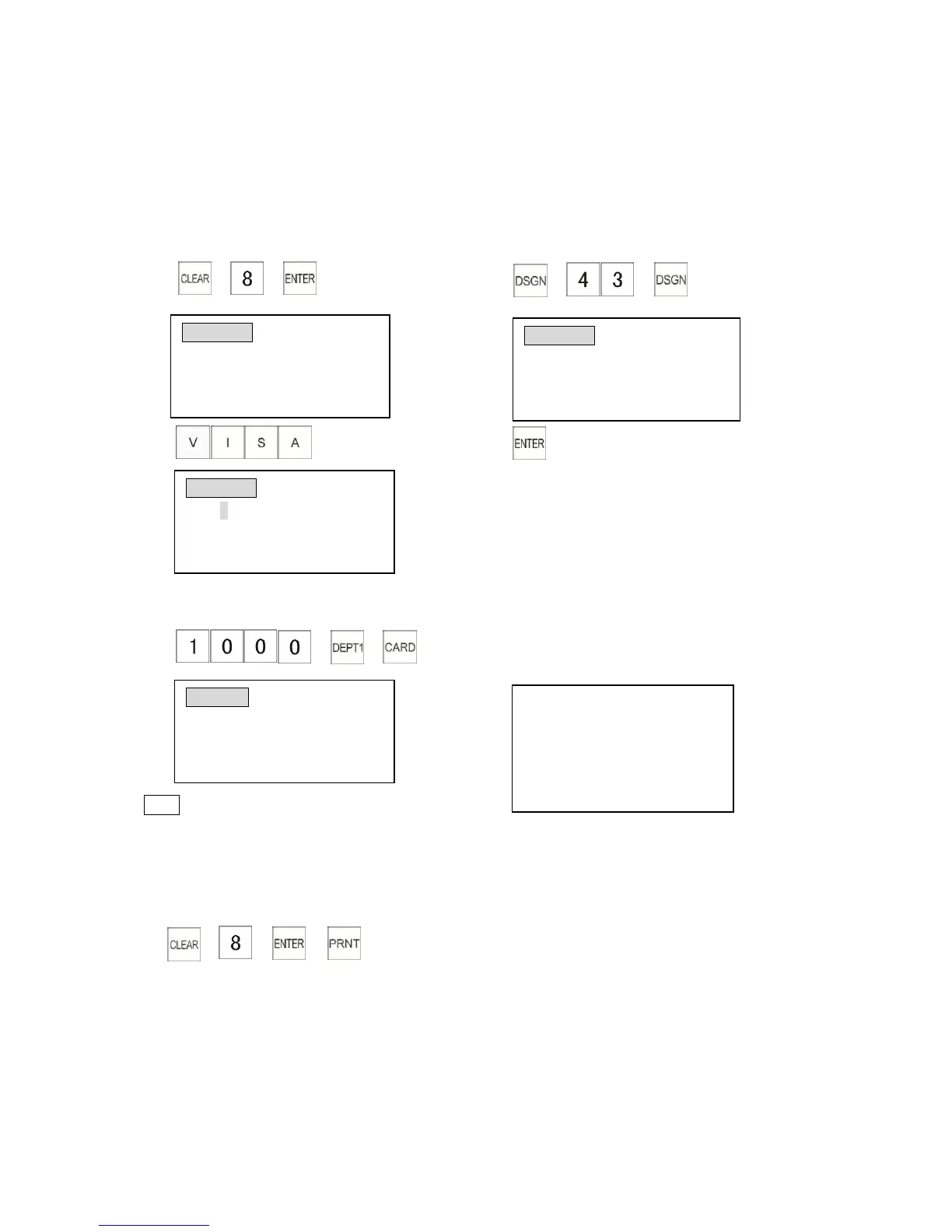
3.8 Changing Transaction Name
3.8.1 Changing Transaction Words
Transaction words are descriptions applied to function keys and words on the reports. A maximum
8 digits of single size, 4 digits of double size.
Example: Change transaction word CARD1 to VISA.
1) 2)
(Transaction word number)
3) 4)
In Rposition, when the customer pays by card, the receipt will show as below.
1)
The receipt shows:
Note
* For characters input method, please refer to Chapter 3.17.1 Input Method.
3.8.2 Print Transaction Words Table
Control Lock: P
TRANWORD0001 (ABCD)
WORD
DEPT TTL
Enter alpha characters:
[A to O]
TRANWORD
0033
(ABCD)WORD
CARD1
Enter alpha characters:
[Uppercase]
TRANWORD
0033
(ABCD) WORD
VISA
Enter alpha characters:
[Uppercase]
DEPT0001 $10.00
------------------------------------------
ITEM CT 1
------------------------------------------
VISA $10.00
CLERK 01 0.00
PAYMENT
10.00
CARD: 10.00
CHANGE: 0.00

Table of Contents