36
3.13 Password Programming
Note
Please remember or store your password in a secure place as it will not be possible to use the
respective operation without the password programmed as described below.
3.13.1 Programming the X Report Password
You can program a password to prevent a report being issued without the required password. The
password can be a maximum 4 digit number.
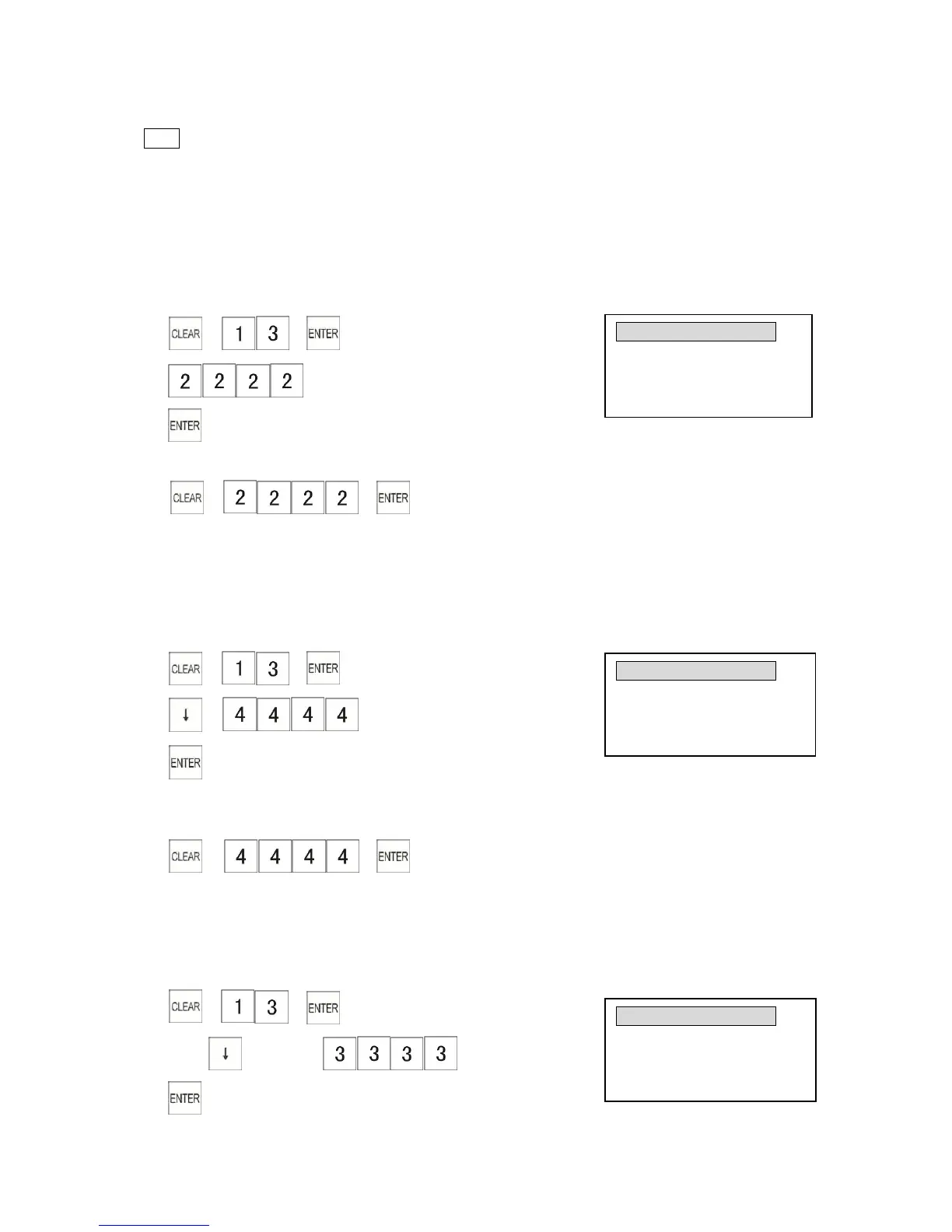
Example: Program the password of X-Report to “2222”
1) → →
2)
3)
To enter the X password, the key sequence is:
Control lock: X position (for operation)
→ →
3.13.2 Programming the Z Report Password
You can program a password to prevent a report issued without the required password. The
password can be a maximum of 4 digit number.
Example: Set the password of Z-Report as “4444”
1) → →
2) →
3)
To enter the Z password, the key sequence is:
Control lock: Z position (for operation)
→ →
3.13.3 Programming the Training Password
This sets the password to access training mode.
The password can be a maximum of 4 digit number.
Example: Program the password of training mode to “3333”
1) → →
2)Press key twice→
3)



 To Next Page