Do not send to kitchen printer 4
Send to kitchen printer 4
Do not send to kitchen printer 3
Send to kitchen printer 3
Do not send to kitchen printer 2
Send to kitchen printer 2
Do not send to kitchen printer 1
Send to kitchen printer 1
Disable negative department
Enable negative department
Disable single item cash sale
Enable single item cash sale
3.2.4 Programming a Department Group
You can assign a department to a group from 1 to 9. Classified departments according to groups
can help you to check and indicate the sales for each group.
For example, ballpoint pens belong to Department 2 and notebooks belong to Department 3, you
can group them together and you can check sales information from the group “stationery”.
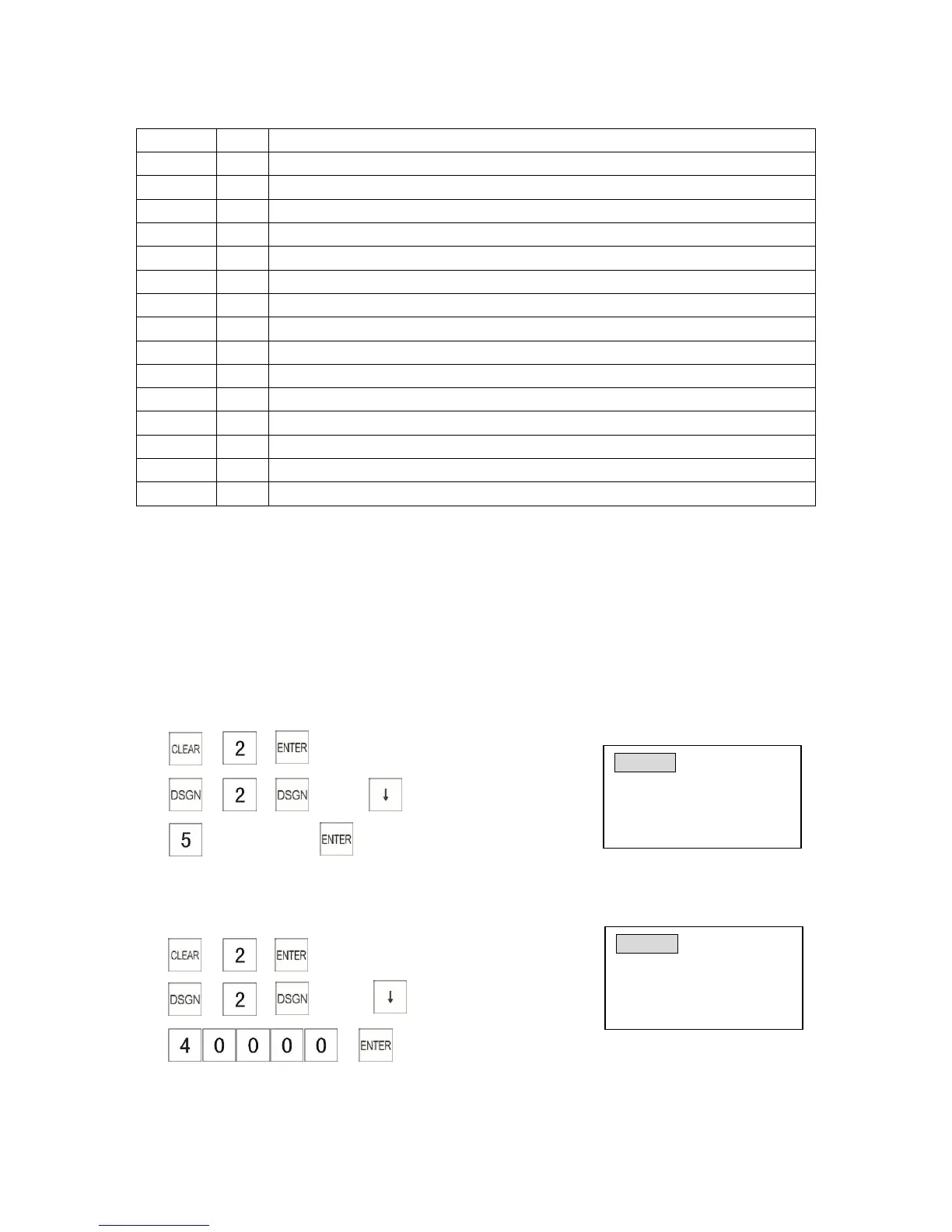
Example: Program Department 2 to Group No.5.
1) → →
2) → → →press key 4 times
3) (Group No. )→
3.2.5 Programming a HALO
Example: Program Department 2 maximum unit price to $400.00.
1) → →
2) → → → press key 5 times
3) →
Dept0002 DEPT HALO
HALO Price 0.00
Enter price (7 digit max)
Input # then [enter]
Dept0002 DEPT GROUP
DEPT Group # 0
Group # (0-9)
Input # then [enter]



 To Next Page