18
3.3 PLU Programming
This section explains how to program PLUs. A PLU is an item/product. A maximum of 6000 PLU
codes can be programmed.
You must enter a unit price and assign a department to which the PLU belongs.
The PLU programming includes PLU code, PLU name, PLU unit price and PLU linked department.
3.3.1 Programming a PLU Barcode
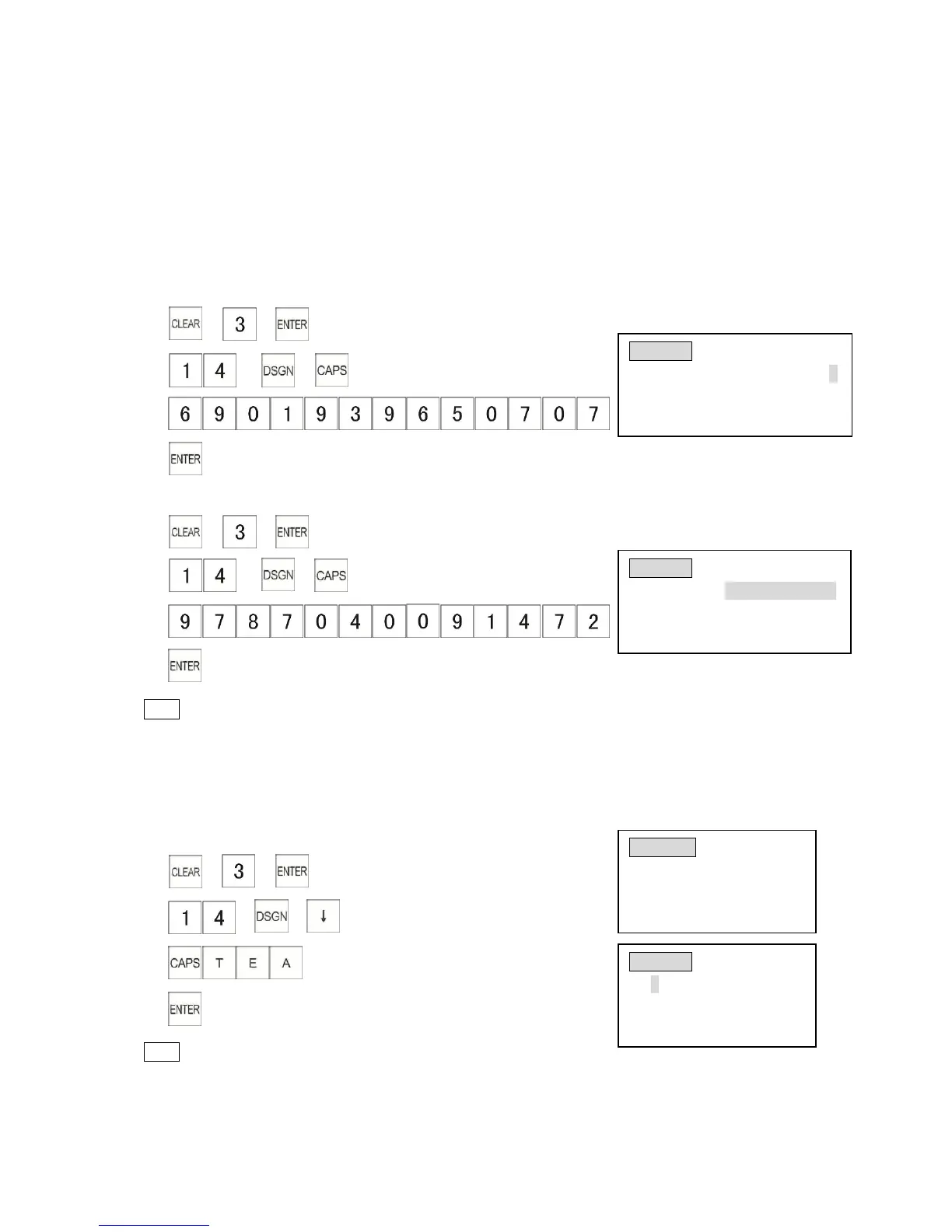
Example: Program the PLU14 to 6901939650707.
1) → →
2) → →
3)
4) (or you can scan barcode with your scanner)
Example: Change the PLU14 barcode 6901939650707 to 9787040091472
1) → →
2) → →
3)
4)
Note
*[CAPS] key must be pressed before entering barcode otherwise the barcode is
programmed at the first available PLU, not a specified PLU.
3.3.2 Programming a PLU Name
Example: Program the name of PLU No.14 as “tea”.
1) → →
2) → →
3) (tea)
4)
Note
* You cannot move to another PLU programming page when you input symbols.
* PLU names can be set as 1-16 characters.



 To Next Page