EasyManua.ls Logo

Optimas OP-680 - Programming the [-] Key; Programming the [-] Key Flags; Programming the [-] Key Limit

Default Icon
76 pages
Print Icon
To Next Page IconTo Next Page
To Previous Page IconTo Previous Page
Loading...
22
Functions of various flags of [+%] and [-%] are as follows:
#8
Not use
#7
Not use
#6
Not use
#5
Not use
#4
0
Tax rate 4 unavailable
1
Tax rate 4 available
#3
0
Tax rate 3 unavailable
1
Tax rate 3 available
#2
0
Tax rate 2 unavailable
1
Tax rate 2 available
#1
0
Tax rate 1 unavailable
1
Tax rate 1 available
Note
* The discount and surcharge rate should be entered in two bits of decimal form.
For example, entering [1] [5] [0] means 1.50%.
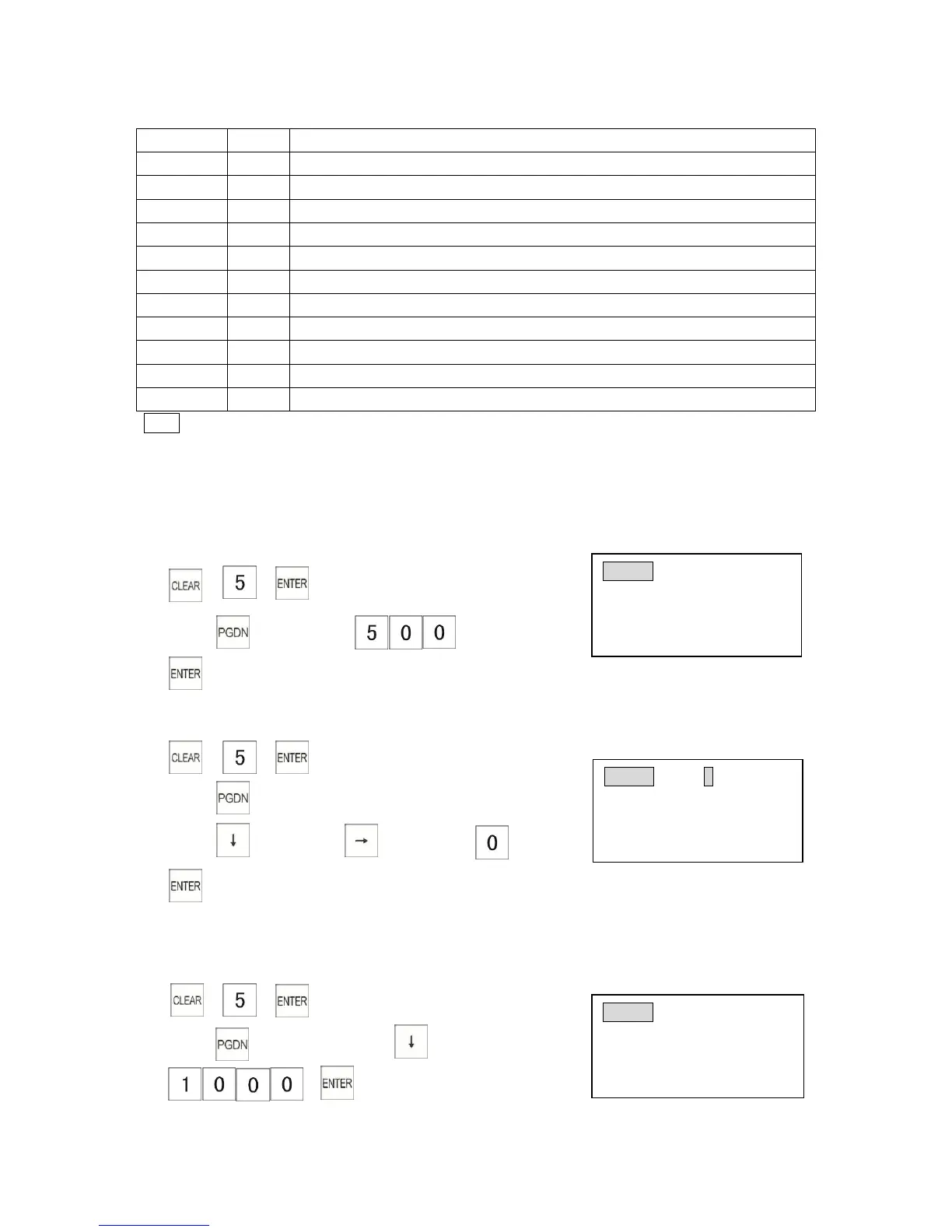
3.5.5 Programming the [-] Key
Example: Program the [-] key to $5.00
1)
2) Press key 5 times
3)
3.6.6 Programming the [-] Key Flags
1)
2) Press key 5 times
3) Press key → press key 4 times
(Tax4 unavailable)
4)
3.5.7 Programming the [-] Key Limit
Example: Program [-] key high amount lock out to $10.00.
1)
2) Press key 5 timespress key twice
3)
([-] Key HALO $10.00)
CPN 01 AMOUNT
Preset Coupon $ 0.00
Enter price(4 digit max)
Input # then [enter]
CPN 01 #400000000TX SET
Tax4 selection:
0=Tax4 OFF 1=Tax4 ON
Input # then [enter]
CPN 01
COUPON H
Coupon HALO 0.00
Enter price(7 digit max)
Input # then [enter]

Table of Contents