20
3.4 Tax Programming
You can program up to four tax rates. We call these four taxes TAX1, TAX2, TAX3 and TAX4. To
program a tax rate, you must select a taxation system and enter the rate for that tax. For
instructions on how to add these programmed taxes to an item, see section 3.2.3.
“Programming Department Flags”
Add-on tax
This system calculates tax by using a tax rate you enter and it automatically adds the tax to the
unit price or the price entered.
VAT (Value Added Tax)
The Value Added Tax is a European tax system. It calculates tax by using the tax rate you enter
and includes the calculated tax in the unit price or the price entered.
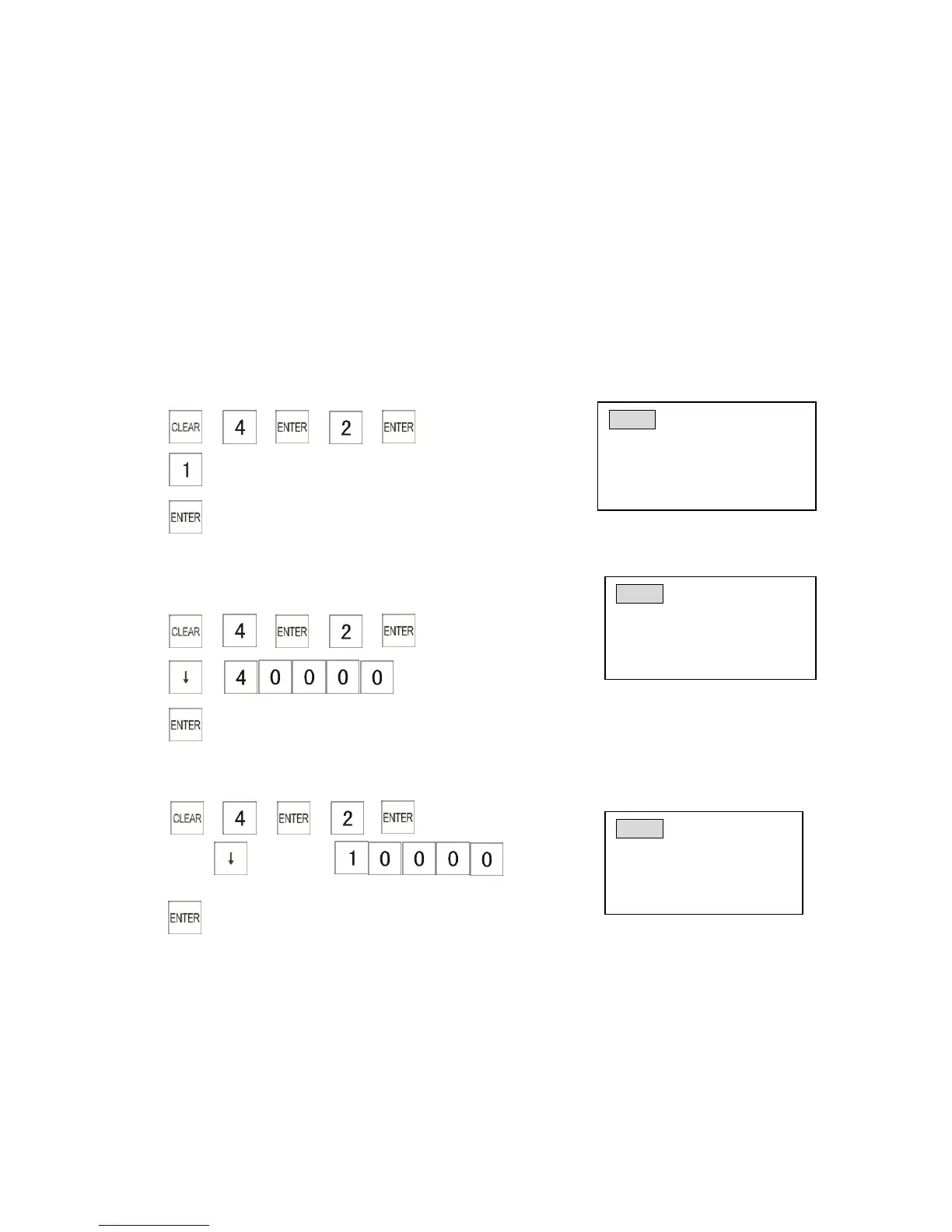
3.4.1 Programming a Tax Type
Example: Program the Tax 2 as VAT
1) → → → →
2) (VAT)
3)
3.4.2 Programming a Tax Rate
Example: Program the Tax 2 rate of 4.0000%
1) → → → →
2) → (Tax rate is 4%)
3)
3.4.3 Programming a Tax-Free Amount
Example: Program the tax-free amount of tax 2 to $100.00
1) → → → →
2) Press key twice→
(Non-taxable amount: less than 100.00)
3)



 To Next Page