EasyManua.ls Logo

Optimas OP-680 - Change Calculation; Subtract with the [-] Key; Single Item

Default Icon
76 pages
Print Icon
To Next Page IconTo Next Page
To Previous Page IconTo Previous Page
Loading...
50
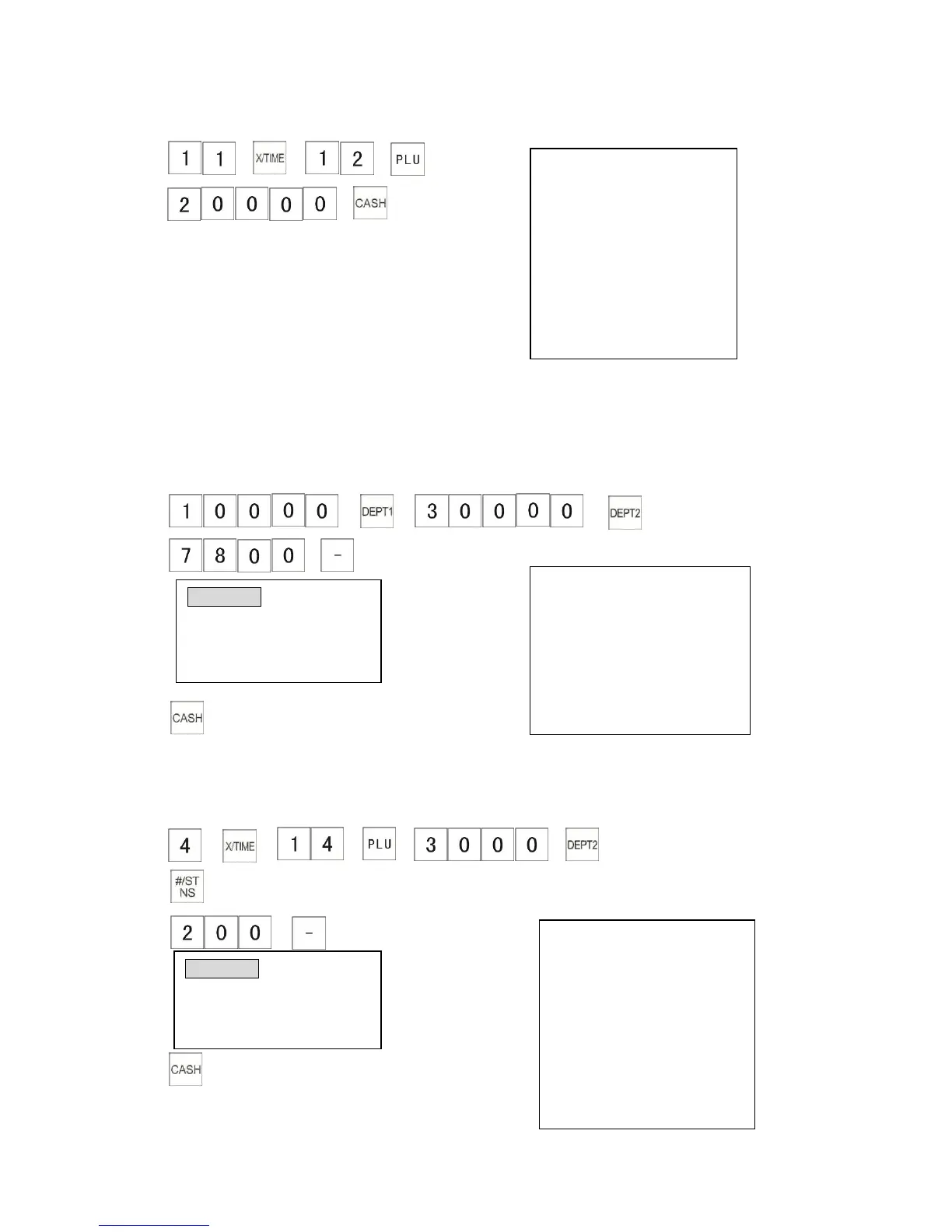
Example: (If the preset price of PLU 0012 is $10.00).
The receipt shows:
1)
2)
4.1.9 Subtract with the [-] Key
This section explains how to operate the cash register when subtracting from the amount of an
item. You can either use a preprogrammed [-] amount or you can enter the amount manually.
4.1.9.1 Single Item
Example: The following example shows how to give a discount amount of $78.00 for an item.
1)
2) The receipt shows:
3)
4.1.9.2 Operation for the Total Sale
Example The following example shows how to give a discount amount of $ 2.00 to the total sale.
(If the preset price of PLU 0014 is $ 20.00)
1)
2)
The receipt shows:
3)
4)
DEPT0001 $100.00
DEPT0002 $300.00
COUPON N $78.00
--------------------------------------
ITEM CT 2
--------------------------------------
CASH $322.00
4X $20.00
PLU0014 $80.00
DEPT0002 $30.00
SUB-TTL $110.00
COUPON G $2.00
-------------------------------------
ITEM CT 5
-------------------------------------
CASH $108.00
CLERK 01 0.00
COUPON N1N -78.00
TOTAL 322.00
11X $10.00
PLU0012 $110. 00
-----------------------------------
ITEM CT 11
-----------------------------------
TOTAL
$110.00
CASH TD $200.00
CHANGE $90.00
CLERK 01 0.00
COUPON N1G -2.00
TOTAL 108.00

Table of Contents