EasyManua.ls Logo

Optimas OP-680 - LOGO Message Programming; Programming the Number of Lines for Logo Message; Programming Logo Message Content

Default Icon
76 pages
Print Icon
To Next Page IconTo Next Page
To Previous Page IconTo Previous Page
Loading...
33
3.9 LOGO Message Programming
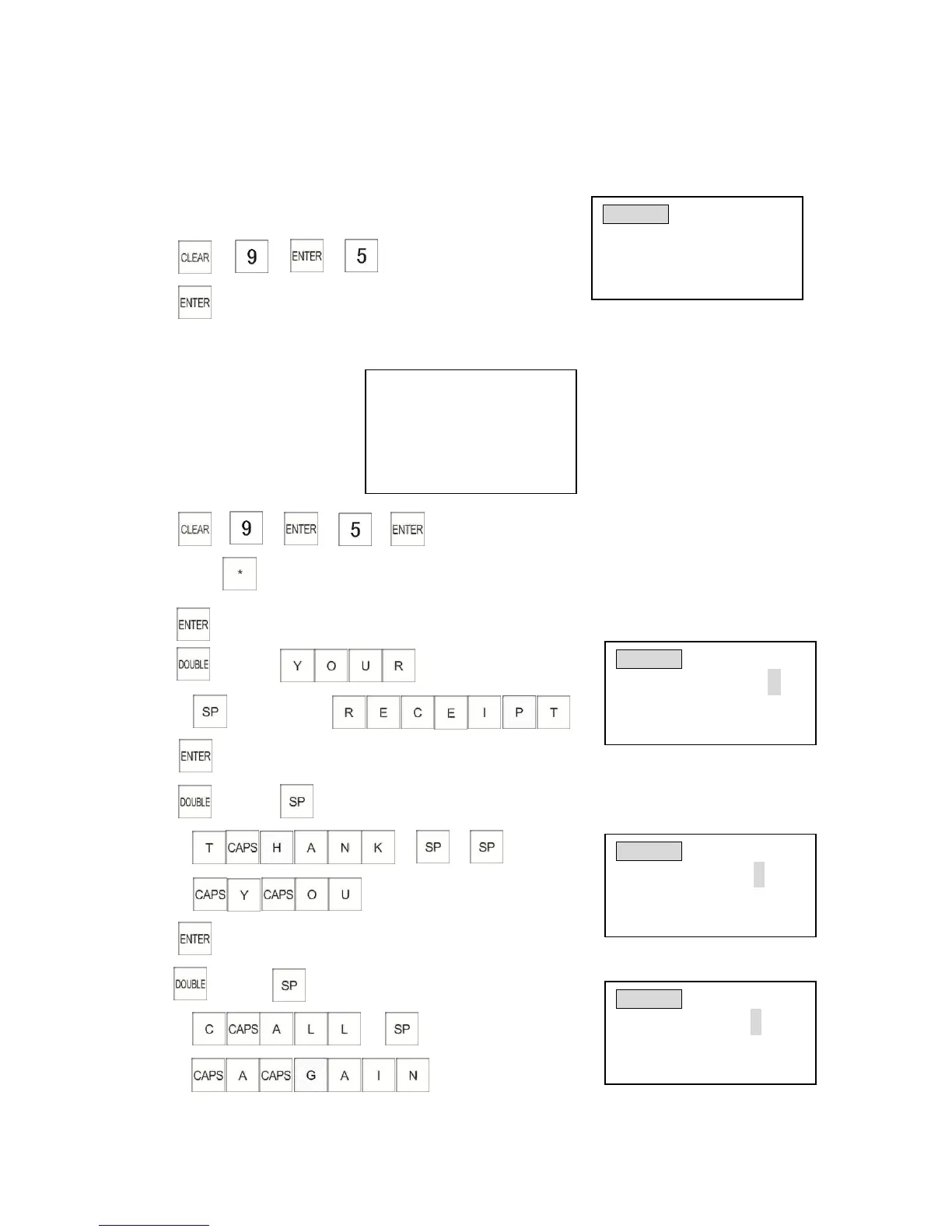
The cash register can be programmed with a maximum 10 lines (240 characters) logo message.
3.9.1 Programming the Number of Lines for Logo Message
Example: Input number of lines (maximum 10)
1) (5 lines)
2)
3.9.2 Programming Logo Message Content
Example: The receipt shows
1)
2) press key 24 times
3)
4) (Wide)
(Space key)
5)
6) (Wide) (Space key)
7)
8) (Wide) (Space key)
(Space key)
************************
YOUR RECEIPT
Thank You
Call Again
************************
HEADER LINE
Length: 5
# of lines :( 3-10 )
Input # then [enter]
HEADER
(ABCD) 02LN
YOUR RECEIPT
Enter alpha characters:
[Uppercase] WIDE
WIDE
HEADER
(abcd) 03LN
Thank You
Enter alpha characters:
[Lowercase] WIDE
HEADER
(abcd)04LN
Call Again
Enter alpha characters:
[Lowercase] WIDE

Table of Contents