15
3.1.6 Programming the X 2 Report Number
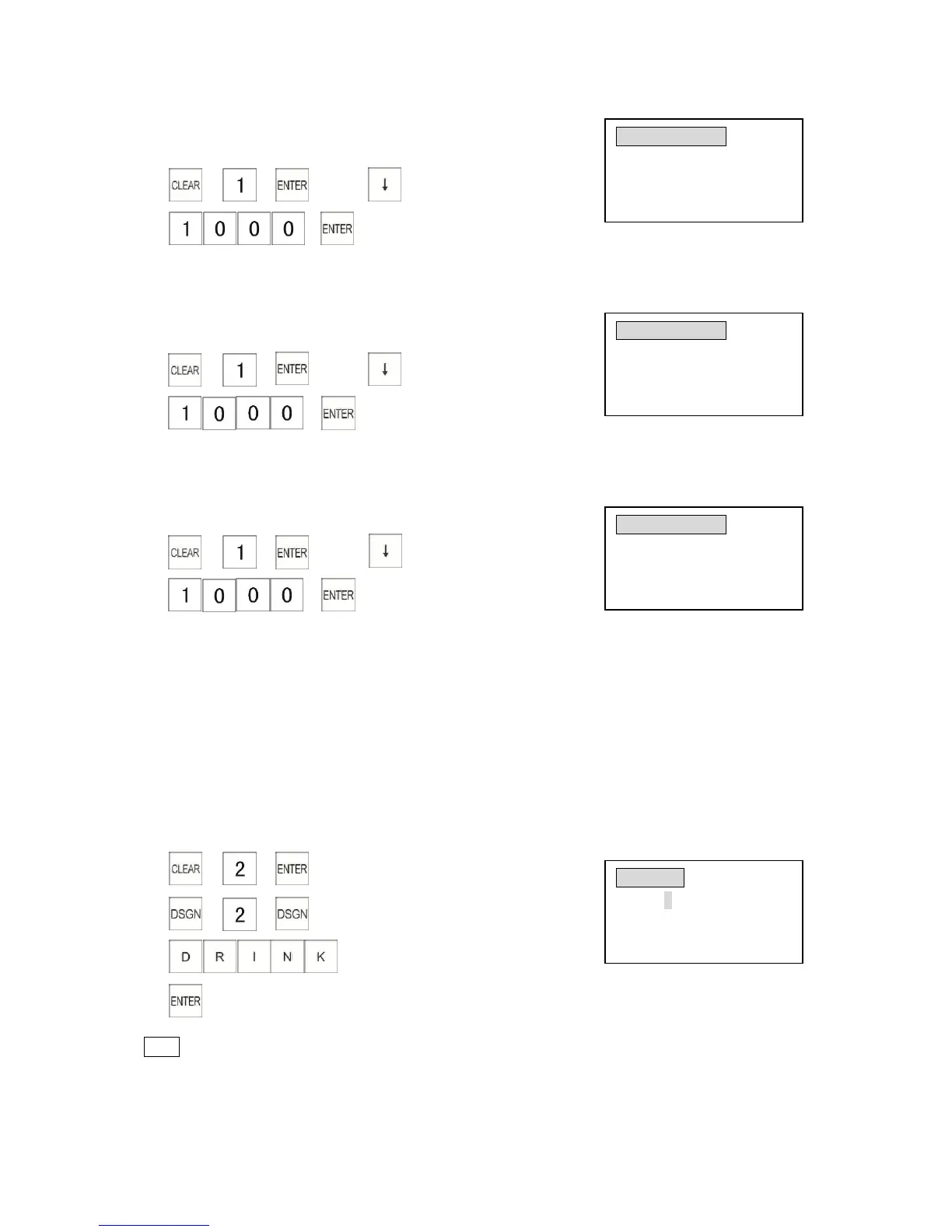
Example: Program the first X2 report number as 1000.
1) → → →press key 5 times
2) →
(X2 number)
3.1.7 Programming the Z 1 Report Number
Example: Program the first Z1 report number as 1000.
1) → → →press key 6 times
2) →
(Z1 number)
3.1.8 Programming the Z 2 Report Number
Example: Program the first Z2 report number as 1000.
1) → → →press key 7 times
2) →
(Z2 number)
3.2 Department Programming
This section explains how to program departments. A maximum of 100 departments can be
programmed.
You must classify products by assigning them to a department. The sales amount and quantity are
reported by department on reports. You can set a price, function flag to control features such as
single-item sale, tax, HALO (High Amount Lock Out) etcetera to each department.
3.2.1 Programming a Department Name
Example: Program the name of Department 2 as “DRINK”.
1) → →
2) → →
3)
4)
Note
* You cannot move to another department programming page when you input symbols.
* Press [PRNT] key to print names of all the departments, and press [FEED] key to stop
printing.



 To Next Page