37
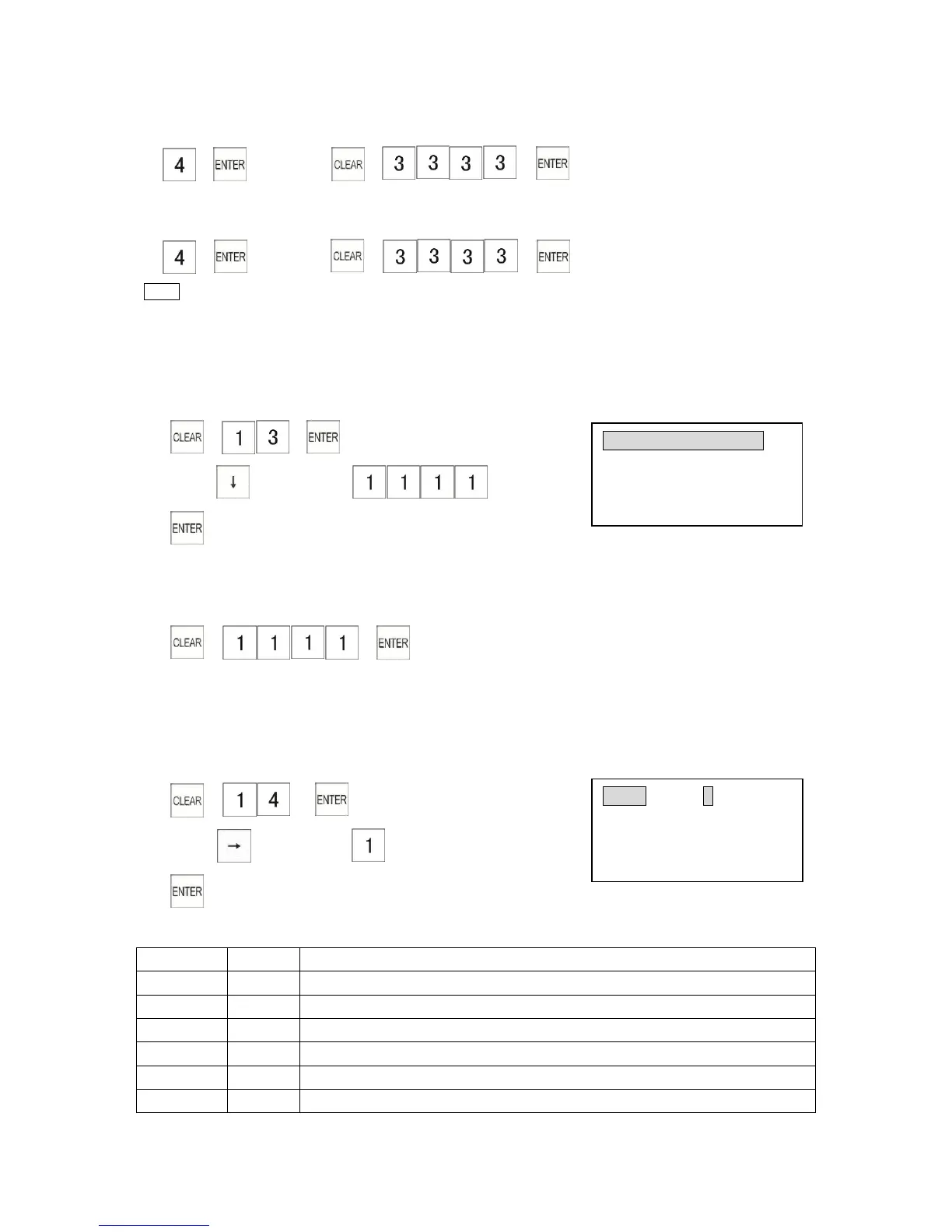
Control lock: X position To go to the training mode:
1) → 2) → →
Control lock: X position To leave the training mode:
1) → 2) → →
Note
*If you want to use Training Mode, please refer to 5.7 “Training Mode”
3.13.4 Programming the Manager Password
This is the password for Programming mode.
The password can be a maximum of 4 digits.
Example: Program the password to “1111”
1) → →
2) Press key 3 times→
3)
To enter the manager password, the key sequence is:
Control lock: P position (for operation)
→ →
3.14 Kitchen Printer Programming
Max. link four CP-100 kitchen printer of machines at the same time.
3.14.1 Programming Kitchen Printer Flags
Example: Programming print LOGO of No.1 kitchen printer
1) → →
2) Press key 4 times→
3)
Kitchen Printer Flag 01



 To Next Page