EasyManua.ls Logo

Optimas OP-680 - Using the [↑] Key and the [↓] Key; Using [ESC] Key; Using [PGUP] and [PGDN] Key; Using [BKSP] Key

Default Icon
76 pages
Print Icon
To Next Page IconTo Next Page
To Previous Page IconTo Previous Page
Loading...
42
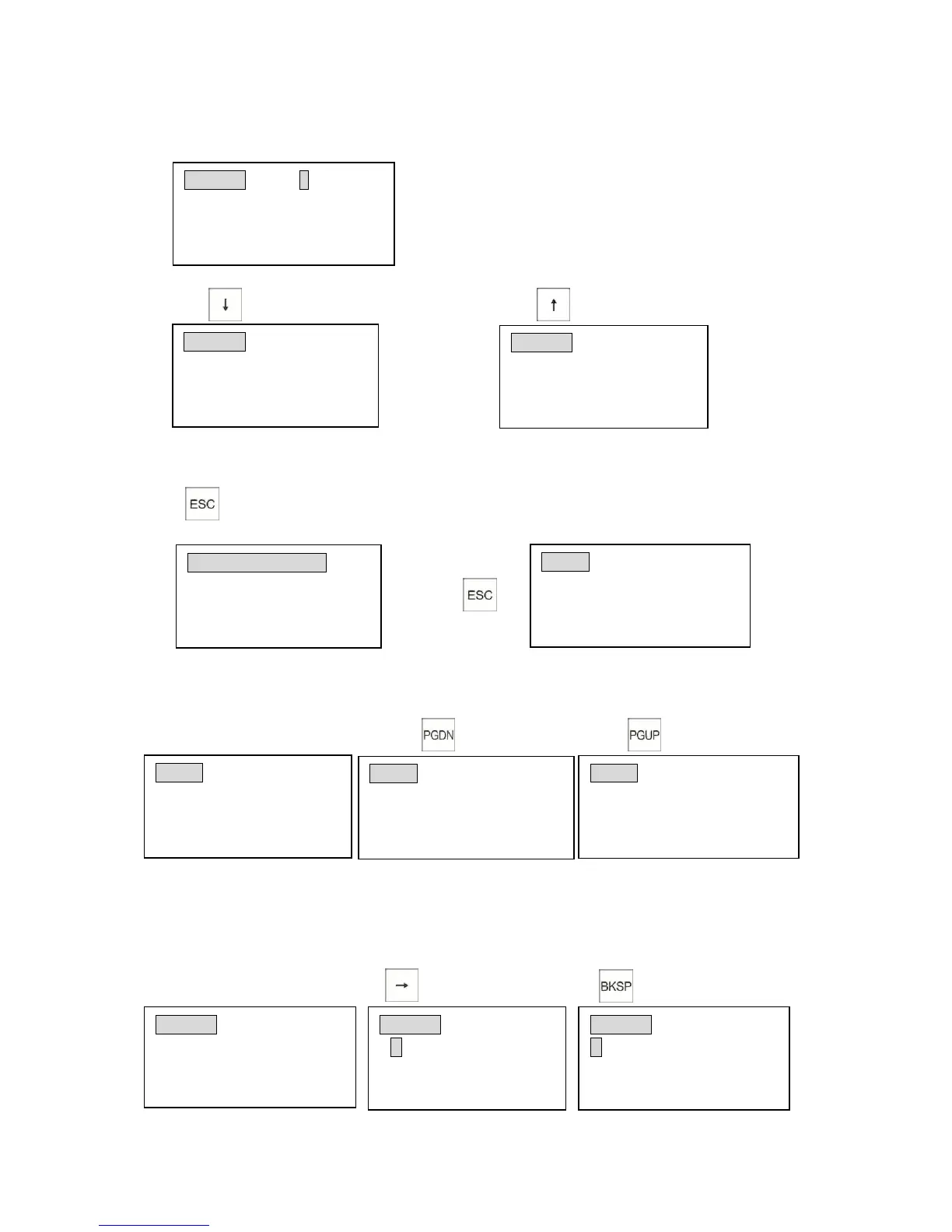
3.18.3 Using the [] Key and the [] Key
Example: When you program Department 1 flag04, display shows
If you want to program the department HALO:
1)Press key 3 times . 2) Press key
(Programming the department unit price) (Programming the department group)
3.18.4 Using [ESC] Key
Press key to return to the previous menu
Example: When you program the tax, the display shows as follows:
Press the key
3.18.5 Using [PGUP] and [PGDN] Key
Example: In the main screen in P position
Press key 3 times. Press twice
3.18.6 Using [BKSP] Key
To delete the character preceding the cursor.
For example: to program a department name, the display shows:
1) 2)

Dept0001#300000000 SETUP1
Tax3 selection:
0=Tax3 OFF 1=Tax3 ON
Input # then [enter]
Dept0001
DEPT
GROUP
DEPT Group # 0
Group # (0-9)
Input # then [enter]
Dept0001
DEPT
HALO
HALO Price 0. 00
Enter price(7 digit max)
Input # then [enter]
TAX RATE SETTINGS
1)TAX1 3)TAX3
2)TAX2 4)TAX4
Input # then [enter]
PRGM 4)Tax Rate Settings
5)Discount Settings
6)Config. Options
Input # (1-16)+ [enter]
PRGM 1)System Options
2)Dept. Settings
3)PLU Settings
Input # (1-16)+ [enter]
PRGM 10)Receipt Footer
11)FC Settings
12)Clerk Settings
Input # (1-16)+ [enter]
Dept0001 (ABCD)NAME
DEPT0001
Enter alpha characters:
[Uppercase]
Dept0001 (ABCD)NAME
DEPT0001
Enter alpha characters:
[Uppercase]
Dept0001 (ABCD)NAME
EPT0001
Enter alpha characters:
[Uppercase]
PRGM 4)Tax Rate Settings
5)Discount Settings
6)Config. Options
Input # (1-16)+ [enter]

Table of Contents