830D
6.12 READ DECODE CIRCUIT ADJUSTMENTS
Read
decode test and adjustment procedures (Read
/Wrlte
Assembly No. 103751) are
contained in Paragraphs 6.12.1 through 6.123.
NOTE
The
oscilloscope time base
must
be calibrated either via
exterior calibration device
or
using the
10
MHz oscillator
on the Logic PCBA.
6.12.1 READ PULSE NARROW (RPN) PULSEWIDTH ADJUSTMENT
6.12.1.1 Test Configuration
(1)
Remove the interface connector and Terminator PCBA from connector
J101
and
J1
02 on the
Logic
PCBA.
(2)
Connect a
disk
exerciser having
read/write
capability
to
J101
or
J102 on the Logic
PCBA.
(3)
Apply power
to
the exerciser and
the
disk
drive. Observe that the READY indicator
is illuminated;
allow a 5-minute warm up period.
(4) Write
an
all-zeros pattern via the disk exerciser.
(5) Connect
oscilloscope Channel 1 probe
to
TP25. Connect the test probe ground
clip
to
ground reference TP17.
(6)
Set sync
to
internal, normal mode.
(7)
Set oscilloscope
to
trigger on the position slope
of
RPN.
6.12.1.2 Test Procedure
(1)
Establish
test
configuration described in Paragraph 6.12.1.1.
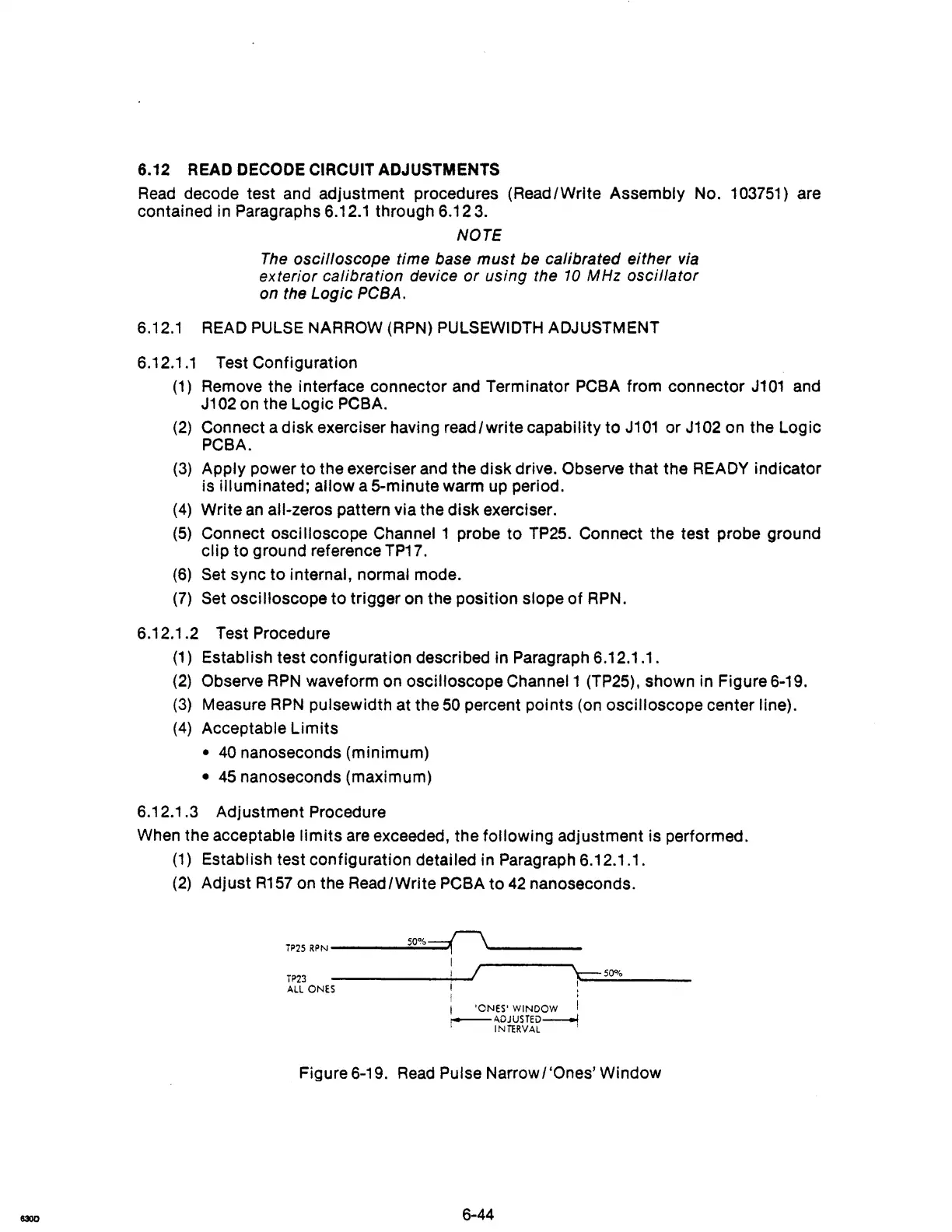
(2) Observe
RPN
waveform on oscilloscope Channel 1 (TP25), shown in Figure 6-19.
(3) Measure
RPN
pulsewidth at the
50
percent points (on oscilloscope center line).
(4)
Acceptable
Limits
•
40
nanoseconds (minimum)
• 45 nanoseconds (maximum)
6.12.1
.3
Adjustment Procedure
When the acceptable
limits
are exceeded, the following adjustment is performed.
(1)
Establish test configuration detailed in Paragraph 6.12.1.1.
(2)
Adjust
R157
on the Read/Write PCBA
to
42
nanoseconds.
T~25
R~N
___
....;.;50.;.;;.%-==-0
____
_
I
j I
\--=:-
50%
T~3
-----~I.~·
I~--~~------
ALL
ONES
I '
i 'ONES' WINDOW I
r-----ADJUS
TED---i
INTERVAL
Figure 6-19.
Read
Pulse Narrow I 'Ones' Window
6-44



 To Next Page