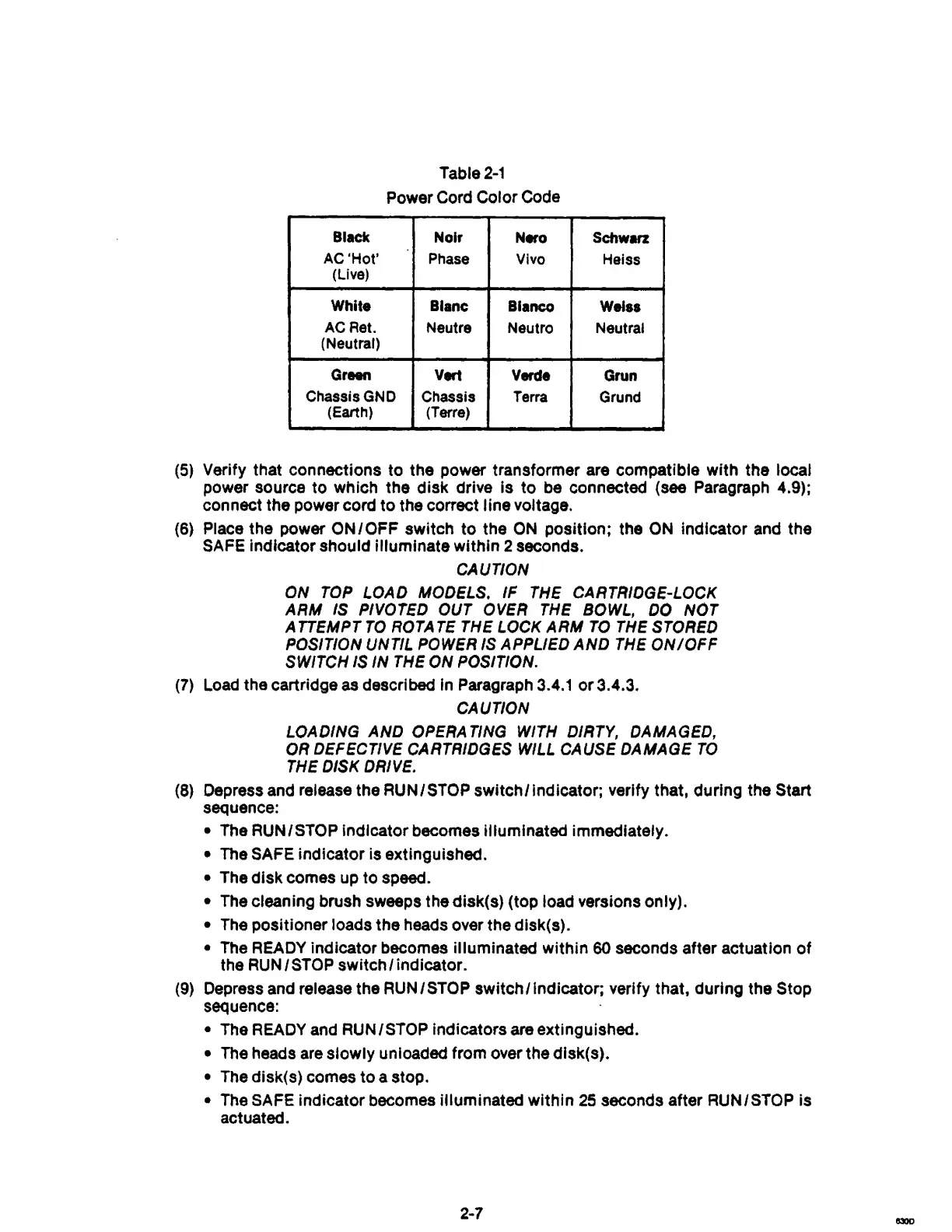
Table
2-1
Power Cord
Color
Code
Black
Nolr
Nero
Schwarz
AC'Hot'
Phase
Vivo
Heiss
(Live)
White
Blanc Blanco
Wels.
ACRet.
Neutre
Neutro Neutral
(Neutral)
Green
V.-l
Verde
Grun
ChassisGND
Chassis Terra
Grund
(Earth)
(Terre)
(5) Verify that connections to
the
power transformer are compatible
with
the
local
power source
to
which
the
disk
drive
is
to
be connected (see Paragraph 4.9);
connect
the
power cord
to
the correct
line
voltage.
(6)
Place
the
power
ON/OFF
switch
to
the
ON
position;
the ON Indicator and
the
SAFE indicator should
illuminate
within
2 seconds.
CAUTION
ON TOP LOAD MODELS.
IF
THE CARTRIDGE-LOCK
ARM
IS PIVOTED OUT OVER THE BOWL,
DO
NOT
A TTEMPT
TO
ROTA
TE
THE LOCK
ARM
TO
THE STORED
POSITION UNTIL POWER IS APPLIED
AND
THE
ON/OFF
SWITCH IS IN THE
ON
POSITION.
(7)
Load the cartridge as descrt bed in Paragraph 3.4.1
or
3.4.3.
CAUTION
LOADING
AND
OPERA TING WITH DIRTY, DAMAGED,
OR DEFECTIVE CARTRIDGES WILL CAUSE DAMAGE
TO
THE DISK DRIVE.
(8) Depress and release the RUN/STOP
switch/indicatori
verify that, during the Start
sequence:
• The RUNISTOP Indicator becomes illuminated immediately.
• The SAFE
indicator
is extinguished.
• The
disk
comes up
to
speed.
• The cleaning brush sweeps
the
disk(s) (top load versions only).
•
The
positioner
loads
the
heads over
the
dlsk(s).
• The READY
indicator
becomes illuminated
within
60 seconds after actuation
of
the
RUN
/ STOP switch / indicator.
(9) Depress and release the
RUN/STOP
switch/Indicator;
verify that, during
the
Stop
sequence:
• The READY and RUN /STOP indicators are extinguished.
• The heads are
slowly
unloaded from over
the
dlsk(s).
• The disk(s) comes
to
a stop.
• The SAFE
indicator
becomes illuminated
within
25
seconds after RUN/STOP is
actuated.
2-7



 To Next Page