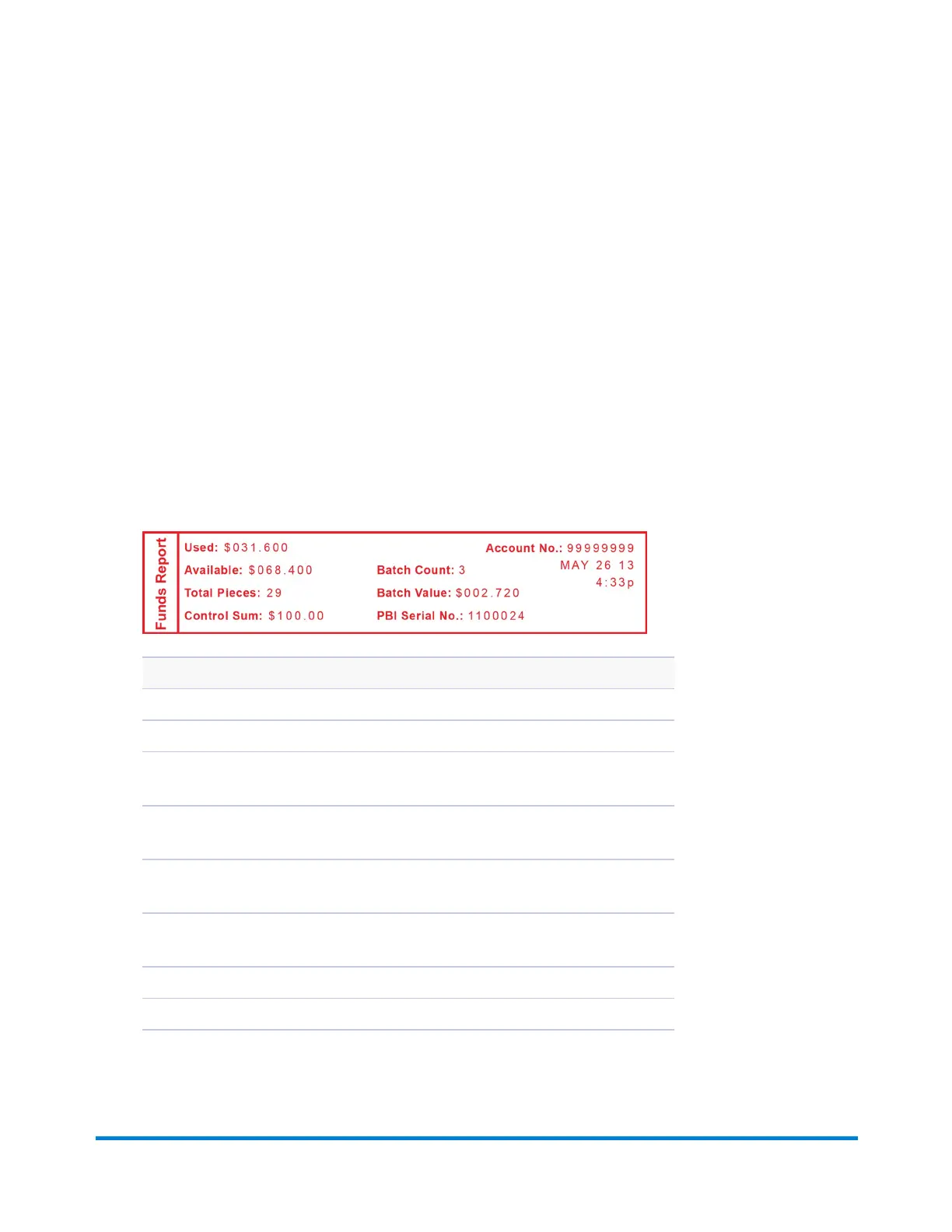
Funds Report
A funds report allows you to print a record of how much postage has been used and how much is
remaining in the machine.
1. Press Reports.
2. Select Printable report.
3. Select Register Report.
4. When prompted, insert tape sheet or envelope into the machine. The report is printed (see sample
below).
5. Press Clear (back arrow key) to return ot the Reports menu, or press Home to return to the Home
screen.
Description
Used: the total of all postage ever used in the meter.
Available: the amount of postage left in the meter.
Total Pieces: the total number of mail pieces run through the meter that had
postage applied.
Control Sum: the total of all postage refills for the meter and equals the amount
Used plus Available.
Batch Count: the number of mail pieces that had postage applied since the last
time the batch count was cleared.
Batch Value: the amount of postage applied since the last time the batch value was
cleared.
PBI Serial No: serial number of this meter (normally meter number).
Account No: your Postage By Phone® system account number.
Reports
Pitney Bowes Operator Guide February, 2017 Page 86 of 226












 To Next Page