SV63136 Rev. A
3-7
Basic Operation • 3
Once you select the job that you want to run, you need to set up the system
to run it. This consists of doing the following:
• Attaching Trays to the Feeder Tower, if prompted.
• Loading Material into the Trays as directed by the Mail Piece Icon Tree
and the loading instructions for the selected job.
• Loading the HCEF (High Capacity Envelope Feeder), if necessary.
The following sections provide more detail about these tasks.
NOTE: If a HCSF (High Capacity Sheet Feeder) is present, you will need to
load material into it. Refer to Adjusting the HCSF Guides in Chapter 7 for more
information.
Setting Up
Feeders and
Loading
Materials
The procedure for attaching either type of tray to the feeder tower and the
loading instructions for either type of tray are essentially the same:
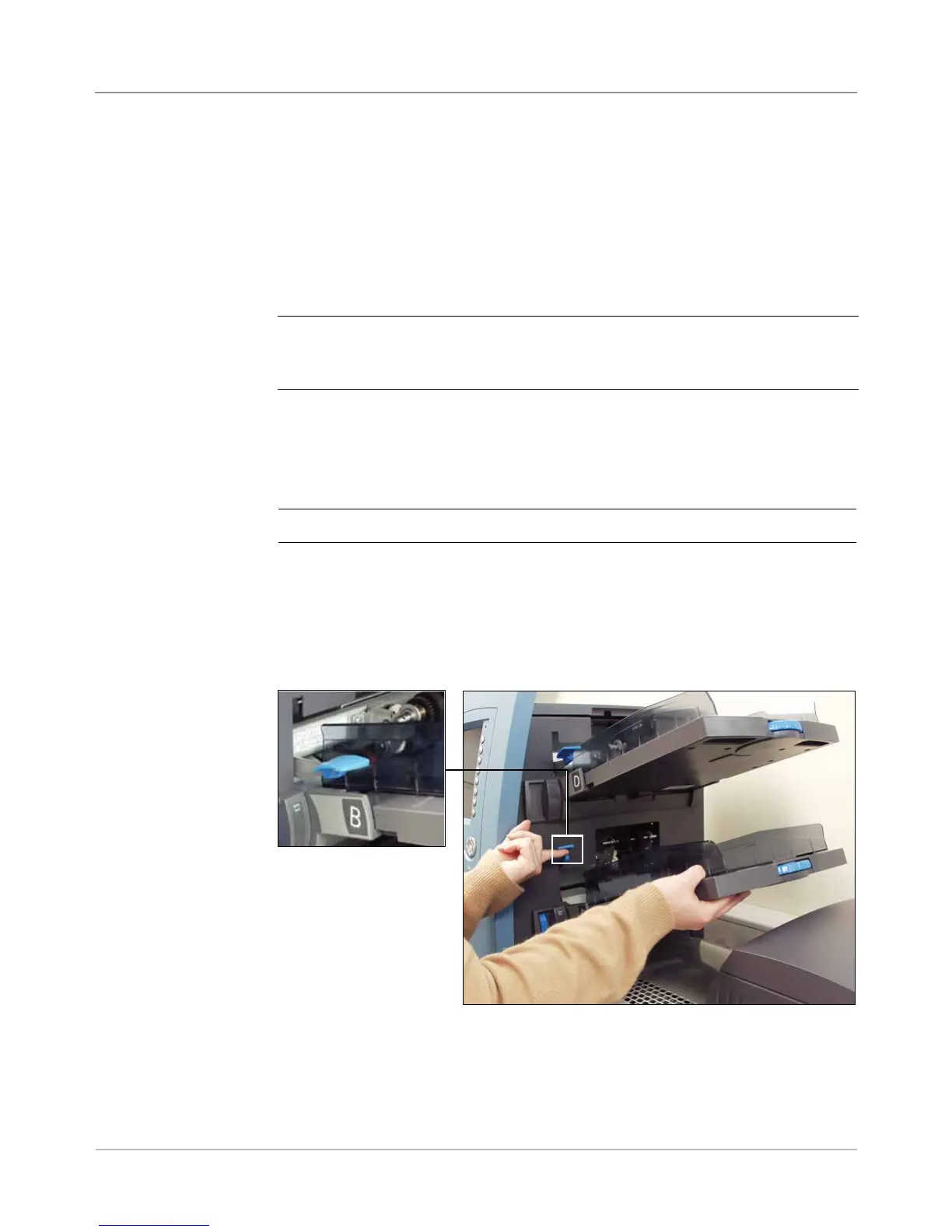
NOTE: Use both hands when attaching or removing a tray.
1. Align the back end of the tray with the tray mounts in the feeder tower.
2. Lift the separator by pushing up on the separator lift Lever (located on
the side of the feeder tower).
Attaching Trays
to the Feeder
Tower
Figure 3.1.1: Lift the Separator and slide the Tray into the tray mounts.
Push the lever up to
lift the separator.



 To Next Page