Setup & User Guide
61 |
DOC-246-GDE-Pivot3 Acuity 2.3 Setup & User Guide-v1.0.docx
Section 9 Create a Pivot3 vPG
Creating a Pivot3 vPG involves assigning Pivot3 Nodes to a new Pivot3 vPG, naming the vPG, and setting up IP addresses
for the nodes in the vPG.
In this section:
• Discover Pivot3 Nodes in the Acuity Domain
• Create a vPG
Required items for this section:
• The user name and password for the vPG Administrator
• The name to be assigned to the Acuity vPG
• The IP addressing information (IP addresses, subnet masks, and any applicable default gateways) for the SAN
Networks
Discover Nodes
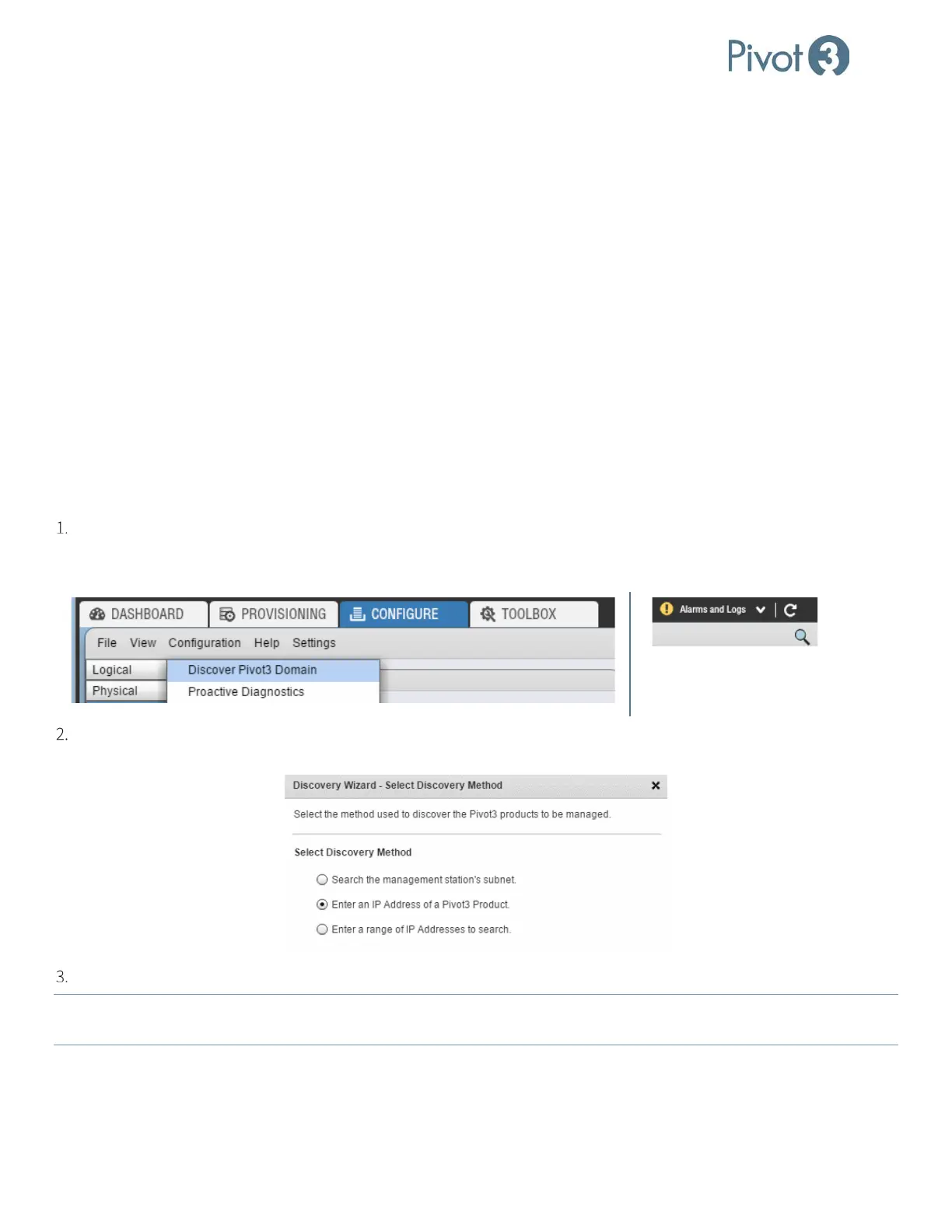
To discover vSTAC, N5, and Acuity X-Series nodes available to the Pivot3 vCenter Plugin, select the Configure tab and
click Configuration > Discover Pivot3 Domain. Alternatively, this can be done by clicking on the magnifying glass at
the upper right corner of the Configure tab underneath the Alarms and Logs dropdown.
Click the radio button next to the desired Discovery Method (Enter an IP Address of a Pivot3 Product
recommended) and click Next. Follow the wizard as prompted until the desired IP addresses are chosen.
If the information entered is accurate, the node will now be visible in the Physical view of the Configure tab.
NOTE:
If the vSMS Web Service is installed directly on the vCenter Server Appliance, perform a targeted IP discovery or IP
range discovery each time the vCSA is restarted.



 To Next Page