Setup & User Guide
75 |
DOC-246-GDE-Pivot3 Acuity 2.3 Setup & User Guide-v1.0.docx
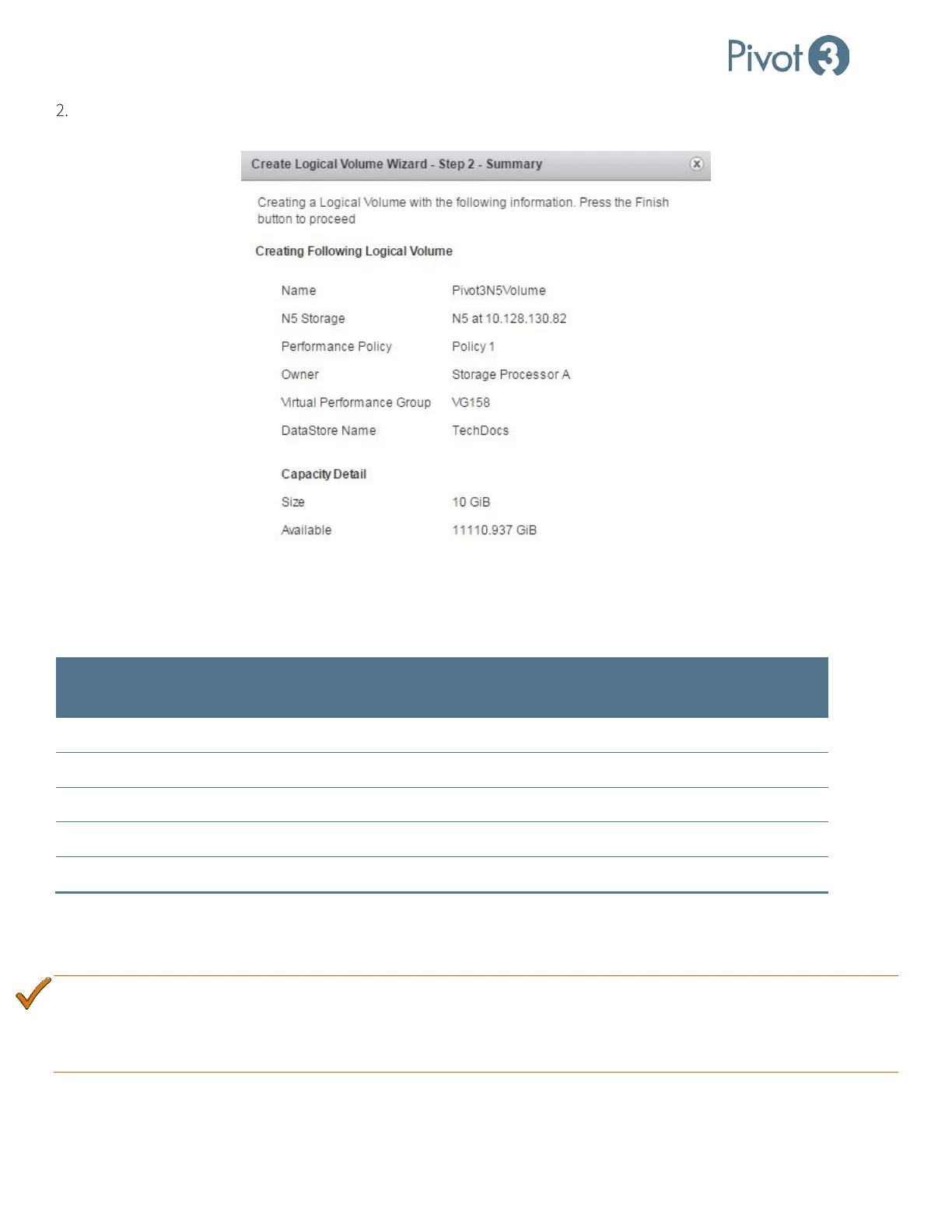
Review the summary page and click Create to complete volume creation. To change any of the input, click Back to
edit settings.
Performance Policies
Performance policies are a way of associating specific performance parameters with volumes. There are five performance
policies. The table below summarizes the performance targets.
Service Level Policy Name
IOPS Min Target
(IO/s)
Throughput Min
Target (MB/s)
Latency Max
Target (ms)
Policy 1 100,000 750 5
Business Critical
Policy 2 50,000 375 10
Policy 3 20,000 150 25
Policy 4 10,000 75 50
Non-Critical
Policy 5 2,000 38 100
To view the attributes of a specific performance policy, navigate to the Provisioning tab’s Data Services View and click
on the Performance QoS tab and choose the vPG in the upper-right corner of the screen. This view also shows the
number of volumes available for each Policy within the selected vPG.
BEST PRACTICE:
Carefully consider distributing volumes evenly across policies rather than assigning all of them to a single
policy. Configuring all volumes to the same policy negates Acuity’s ability to provide targeted performance
to a volume. This is especially important when volumes are provisioned by application in a mixed workload
environment.



 To Next Page