Setup & User Guide
131 |
DOC-246-GDE-Pivot3 Acuity 2.3 Setup & User Guide-v1.0.docx
Resolve Host Identifiers & iSCSI Aliases
In vSphere Web Client
Resolution of Host Identifiers and iSCSI Aliases must be done through vSphere Web Client’s UI.
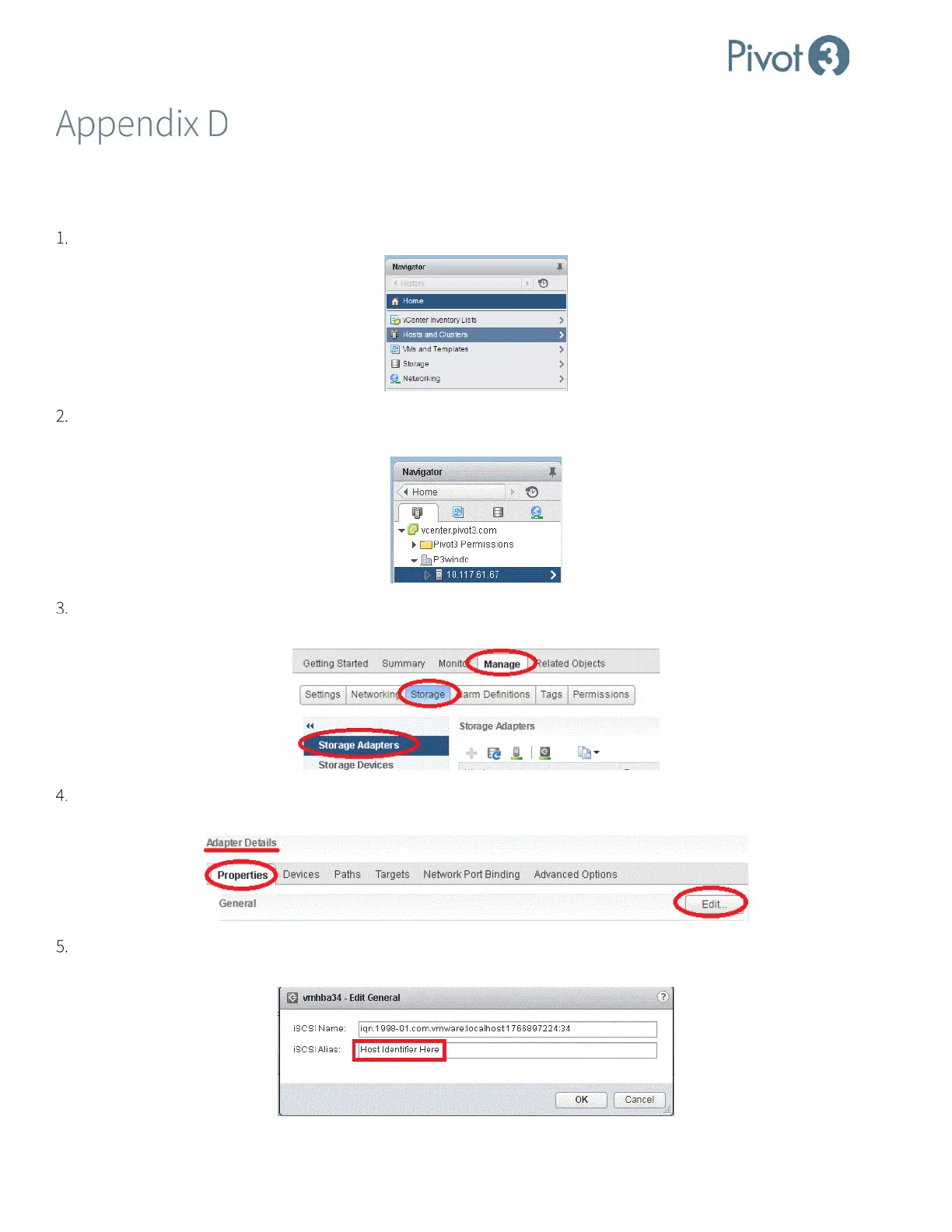
In the Navigator Panel, select Hosts & Clusters.
This will display a tree with the domain’s data down to ESXi host. Click to expand the datacenter and/or cluster
level(s) to find the ESXi host’s IP address.
In the panel to the right, ensure the Manage tab is selected and click Storage as shown below. Then click to highlight
Storage Adapters.
In the Adapter Details area, ensure Properties tab is selected. On the far right of the General line item, click the Edit
button.
A pop-up box will provide an opportunity to edit the iSCSI Alias. Enter the desired information in the second line and
click OK.



 To Next Page