Setup & User Guide
| 132
DOC-246-GDE-Pivot3 Acuity 2.3 Setup & User Guide-v1.0.docx
Uninstall or Upgrade the vCenter Plugin
Unregister Plugin Using Installer File for Windows
To uninstall the Pivot3 vCenter Plugin, first the Plugin must be unregistered and then the files deleted. This must be done
via the Pivot3 vCenter Plugin Installer .exe file. Follow Steps 3 and 4 of sub-section Follow Installation Wizard in Section
4, then continue as instructed below.
NOTE: To upgrade the Pivot3 vCenter Plugin, skip to sub-section Upgrading Pivot3 vCenter Plugin
.
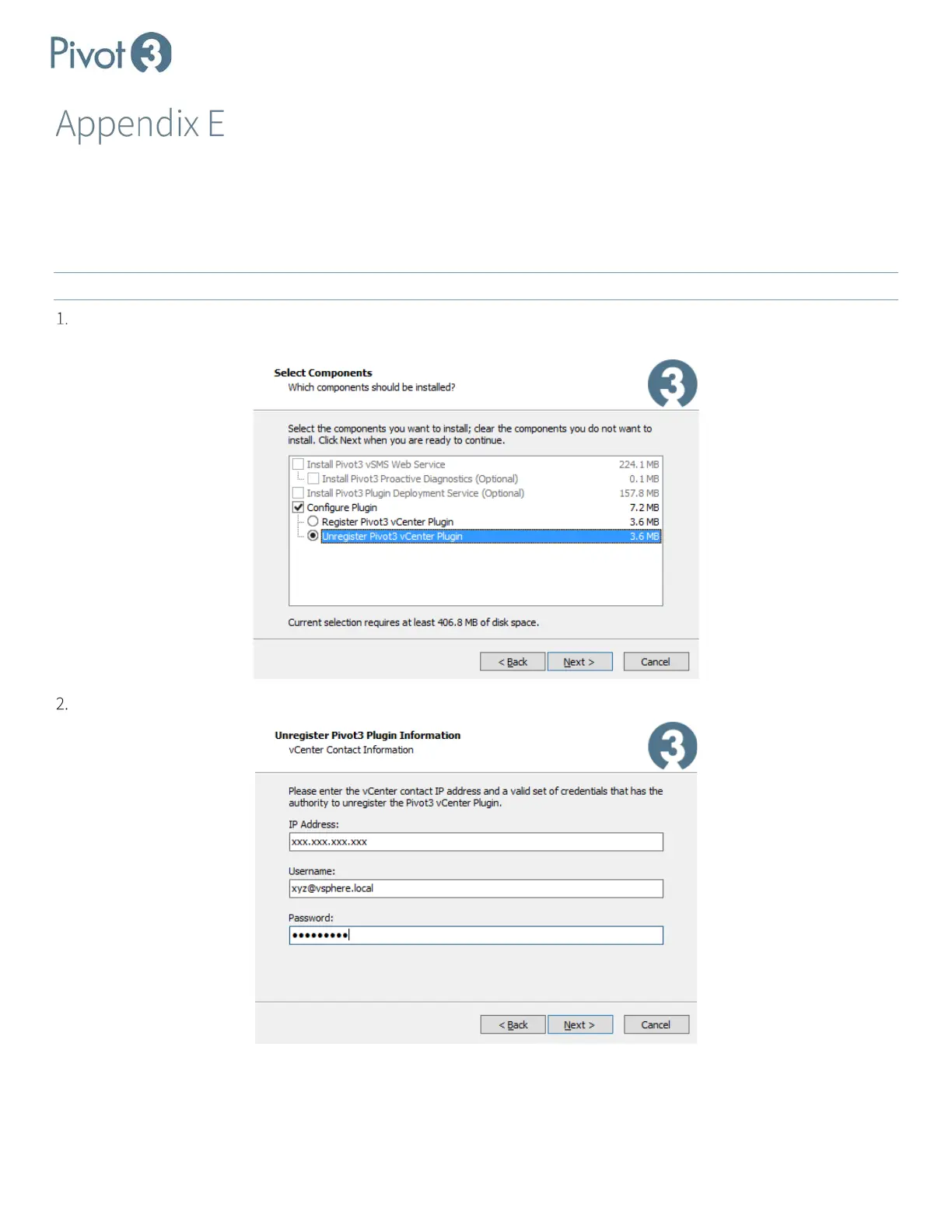
In the Select Components wizard screen, select the radio button next to Unregister Pivot3 vCenter Plugin and click
Next.
At the next screen, enter the vCenter IP address along with credentials to unregister. Click Next and then OK.



 To Next Page