Setup & User Guide
| 58
DOC-246-GDE-Pivot3 Acuity 2.3 Setup & User Guide-v1.0.docx
Changing VMware vCenter Credentials
If the user credentials used for the VMware login needs to be changed for any reason, the credentials in the vCenter Plugin
must be changed first to retain functionality once the VMware credentials are altered.
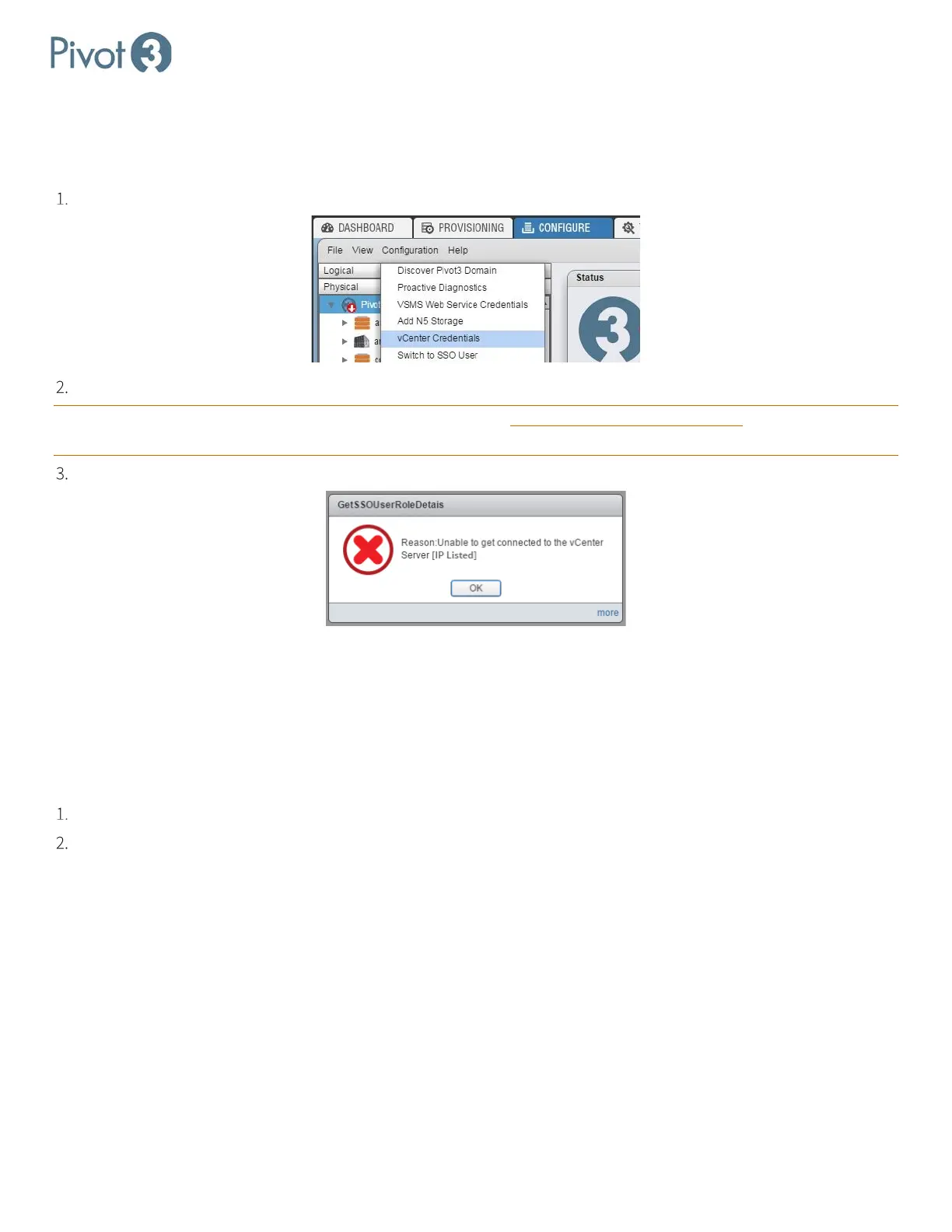
From the Domain level on the Configure tab, select Configuration > vCenter Credentials.
Enter the new username and password expected to be used for the VMware Administrator login.
CRITICAL: The credentials in the vCenter Plugin must be changed before the credentials in vCenter are altered, or access
to the plugin will not be possible.
If this order is not adhered to during credential changes, an error message will appear:
Plugin Troubleshooting
Flash Storage Limitation
When the plugin uses its available storage space, it will provide a popup that prompts the user to increase storage space
or block the write operation. If this popup is not attended to, it can consume all available memory and cause the browser
to terminate the plugin. This can be avoided a couple ways:
Refresh the browser page occasionally (approximately once an hour) to free up the browser memory
Alter the browser’s Global Storage Settings to Unlimited or check the box labeled Never Ask Again.



 To Next Page