X-Series Hyperconverged Nodes Powered by Acuity
Setup & User Guide, v1.0
| 38
DOC-246-GDE-Pivot3 Acuity 2.3 Setup & User Guide-v1.0.docx
Section 7 Navigating the Plugin
Log In to vSphere Web Client
In a preferred web browser, navigate to the IP address of the server hosting vCenter and log in to the vSphere
Web Client.
NOTE: Microsoft Internet Explorer is not recommended; Google Chrome or Mozilla Firefox seem to offer a
smoother plugin experience.
NOTE: To prevent sync issues, Pivot3 recommends only using a single management utility (one vSMS or one Pivot3
Plugin) to configure the domain. Multiple users can be logged in simultaneously, but only one plugin or client
should manage the entire domain.
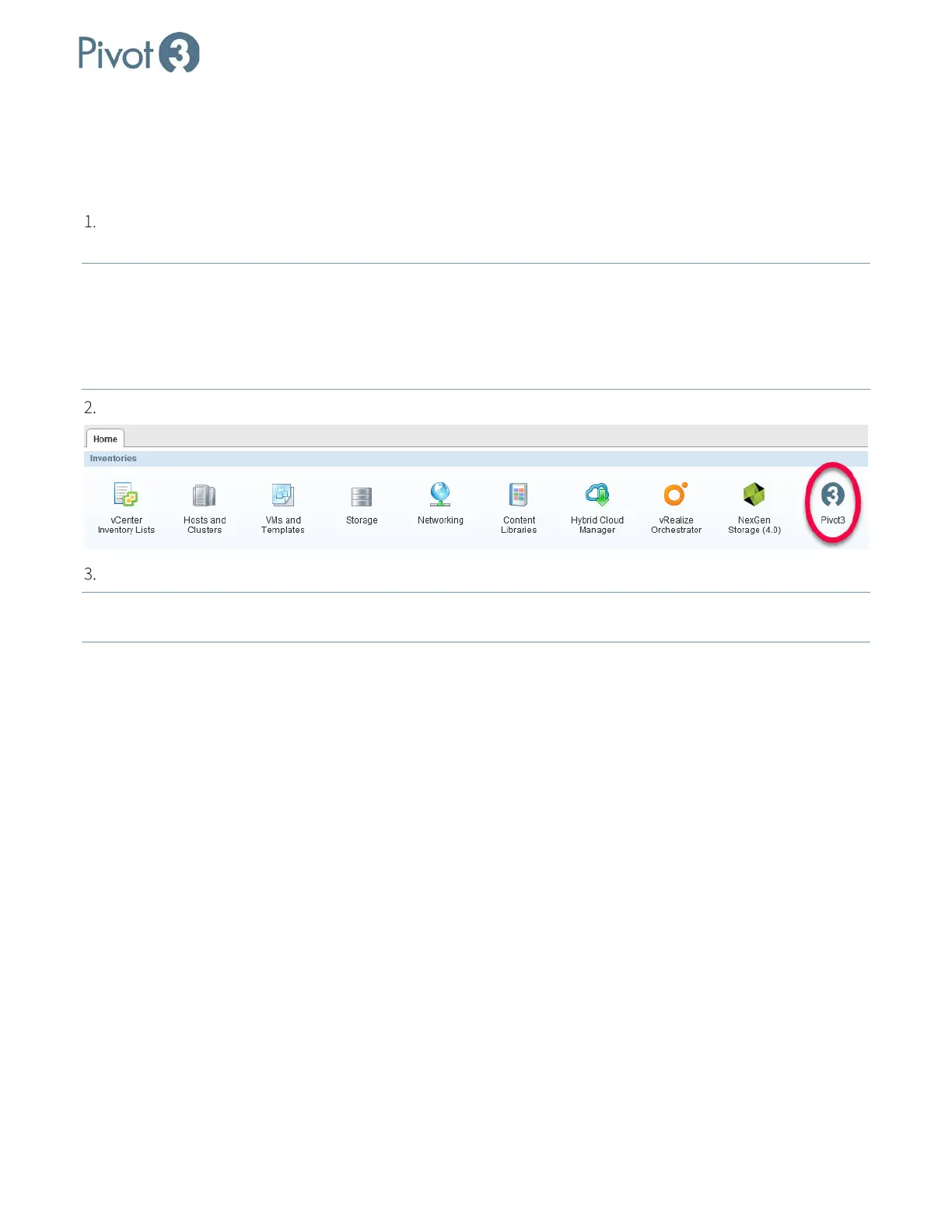
Click the Pivot3 icon located in the Inventories section of the Home tab as shown below.
Log in with the same Pivot3 credentials entered in Section 3, Step 8.
NOTE:
If Single Sign-On was configured during installation, Pivot3 credentials will not be required at this step and
users will be taken directly to the plugin home page.
Dashboard Overview - Home
The Dashboard section of the plugin is designed to show a quick overview of the domain from two perspectives:
Home, an overall perspective; and virtual Performance Group, information which is broken down as it relates to
each vPG available on the domain



 To Next Page