Setup & User Guide
83 |
DOC-246-GDE-Pivot3 Acuity 2.3 Setup & User Guide-v1.0.docx
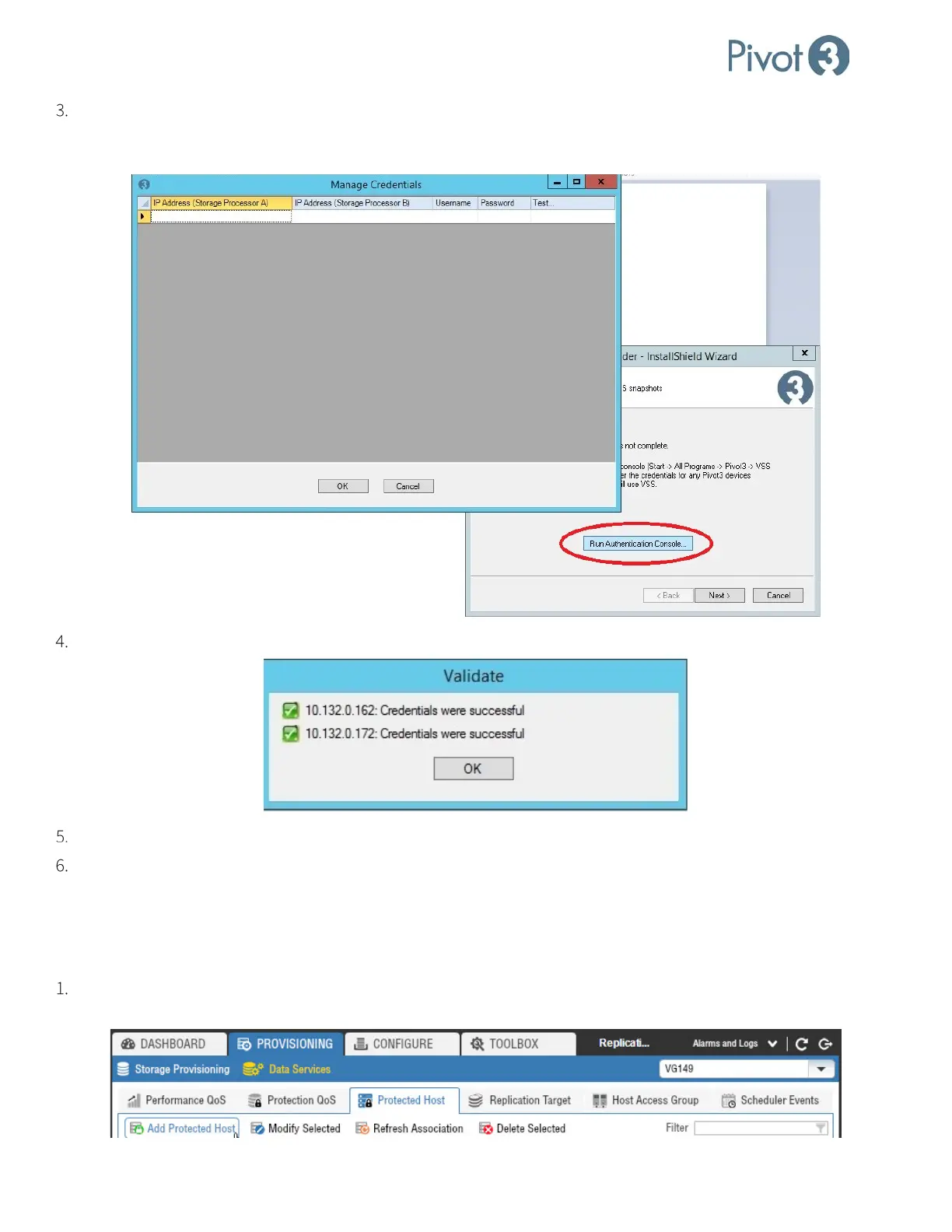
Follow the wizard to the Install step. After clicking Install, run the Authentication Console by clicking the Run
Authentication Console button. Provide the Pivot3 Management IPs and Administrative user authentication for both
accelerated nodes and click OK.
Validate the Authentication Settings.
Select OK to exit the Authentication Console and Finish to close the wizard.
To open the VSS Provider Authentication Console after the installation has completed, navigate to
C:\ProgramFiles\Pivot3\VSS Provider\AuthConsole.exe. Execute the file to set and validate the
Management Credentials as needed.
Add a Protected Host - Pivot3 vCenter Plugin
Log in to the plugin. Navigate to Provisioning tab > Data Services view > Protected Host tab. Select a vPG and click
Add Protected Host.



 To Next Page