233
Polyend Tracker Mini Manual
232
Polyend Tracker Mini Manual
NOTESNOTES
Master Effects
10
Master Effects
10
10.1 Effects Overview
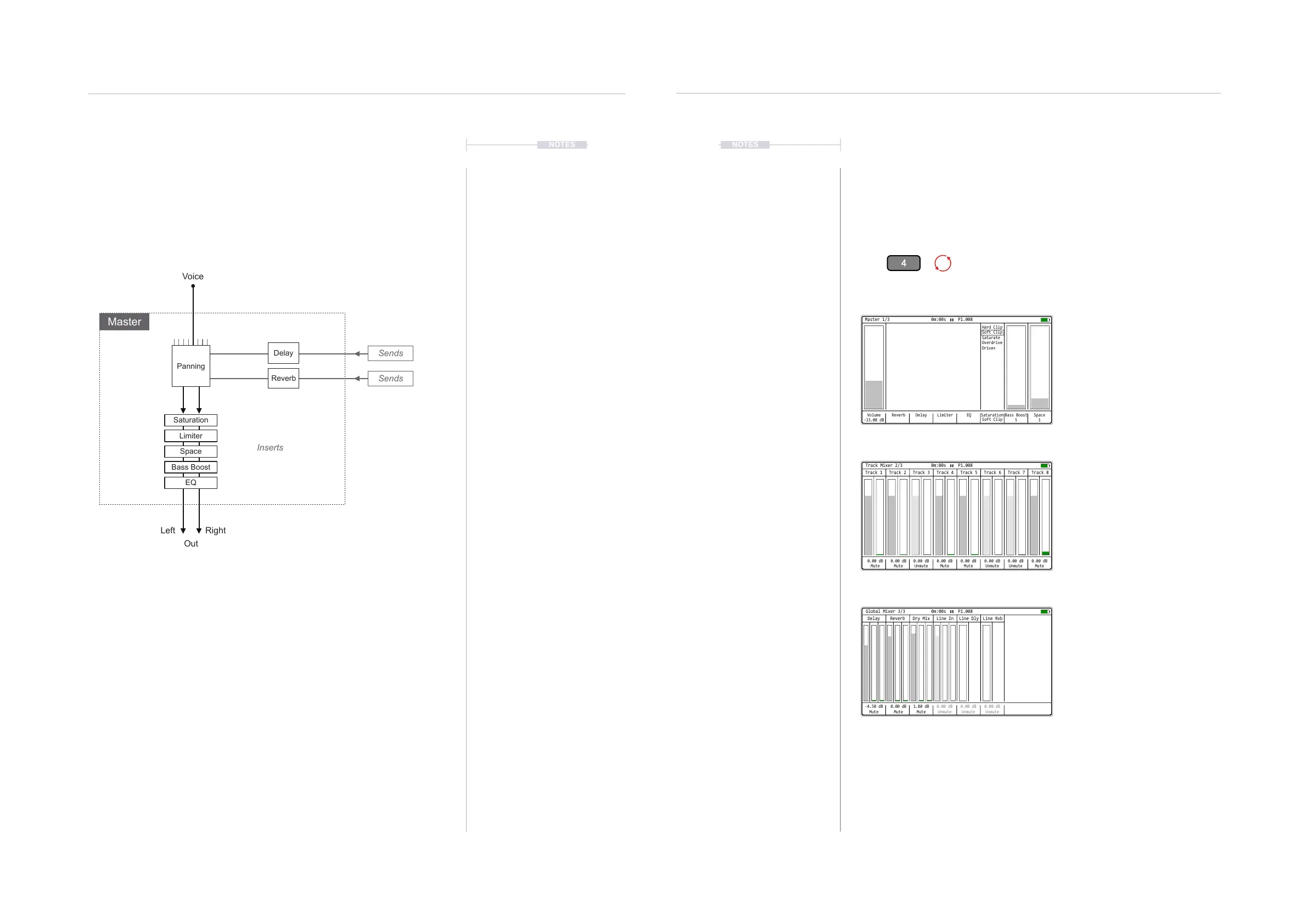
Tracker Mini has 8 voices. Each voice is represented by each of the 8
tracks when playing. The common processing of the voices comes together
at the master stage where the voices are mixed and the master effects
applied. Also any Delay and Reverb ‘send’ audio is mixed into the main out.
The diagram shown is for illustration purposes and does not constitute an
exact or ofcial schematic of Polyend’s Tracker Mini circuitry. It does
however serve to give an insight into the signal path and identify the seven
master effects covered in this section.
The reverb and delay send effects can be sent pre-fader or post-fader in the
global mixer. This is set in the ‘Cong’ settings accessed with the [Menu].
This means the effect audio is sent before being adjusted by the the volume
fader or after the volume fader adjustment.
10.2 Master Pages
The 7 master effects are located in the master section of Tracker Mini. This
is accessible with the assigned button [4] which opens to 3 mixer / master
pages. The [Menu] can also be used to access the Master section. The
main effects settings are contained within this pages.
To adjust the effect parameters, select the page then use the screen
buttons or use (Left) or (Right) to select the parameter. Screen buttons
select some pages such as delay, reverb etc. Press [+] / [-] or (Up), (Down)
to change the selected parameter value. Multiple track mixer levels can be
adjusted when holding the screen buttons simultaneously.
Volume
-33.08 dB
Reverb Delay EQ Saturation
Soft Clip
Hard Clip
Soft Clip
Saturate
Overdrive
Drive+
Bass Boost
5
Limiter Space
1
Master 1/3 0m:00s P1.008
0.00 dB
Mute
0.00 dB
Mute
0.00 dB
Unmute
0.00 dB
Unmute
0.00 dB
Mute
0.00 dB
Unmute
0.00 dB
Mute
0.00 dB
Mute
Track 2 Track 6Track 3 Track 7Track 4 Track 8Track 1 Track 5
Track Mixer 2/3 0m:00s P1.008
-4.50 dB
Mute
0.00 dB
Mute
1.80 dB
Mute
0.00 dB
Unmute
0.00 dB
Unmute
0.00 dB
Unmute
Reverb Line RvbDry Mix Line InDelay Line Dly
Global Mixer 3/3 0m:00s P1.008
Press [4] to select the Master section.
Each Press of [Master] will cycle through 3 master pages:
Page 1 is Master; Page 2 is Track Mixer and Page 3 is Global Mixer.
Master - Page 1/3
Direct access to the master output Volume level,
Saturation, Bass Boost and Space effects. Each
of which is directly adjustable when selected
using the [+] / [-] or the (Up) or (Down) Buttons.
The Delay and Reverb send effect, Limiter and
EQ parameter pages are accessible when using
the respective screen buttons.
Track Mixer - Page 2/3
Access to all of the individual track levels to allow
mixing of the entire song. Hold one or more
screen buttons and us [+] / [-] or (Up) (Down)
buttons to adjust the setting.
Mute and Solo can be set here. Editing the track
names when [Rec] is active is also possible.
Global Mixer - Page 3/3
The main output delay and reverb levels are
visible and can be adjusted. The main dry and
wet mix between the main audio and effect audio
is also provided.
Control for pass through of line inputs. Reverb
and Delay can be applied to this audio signal.
Pre-fader or post-fader options are congurable.
All settings accessible with the screen buttons
Limiter
Saturation
Space
Bass Boost
EQ
Sends
Inserts
Sends
Out
Voice
Left Right
Master
Delay
Reverb
Panning



 To Next Page