121
Polyend Tracker Mini Manual
120
Polyend Tracker Mini Manual
NOTESNOTES
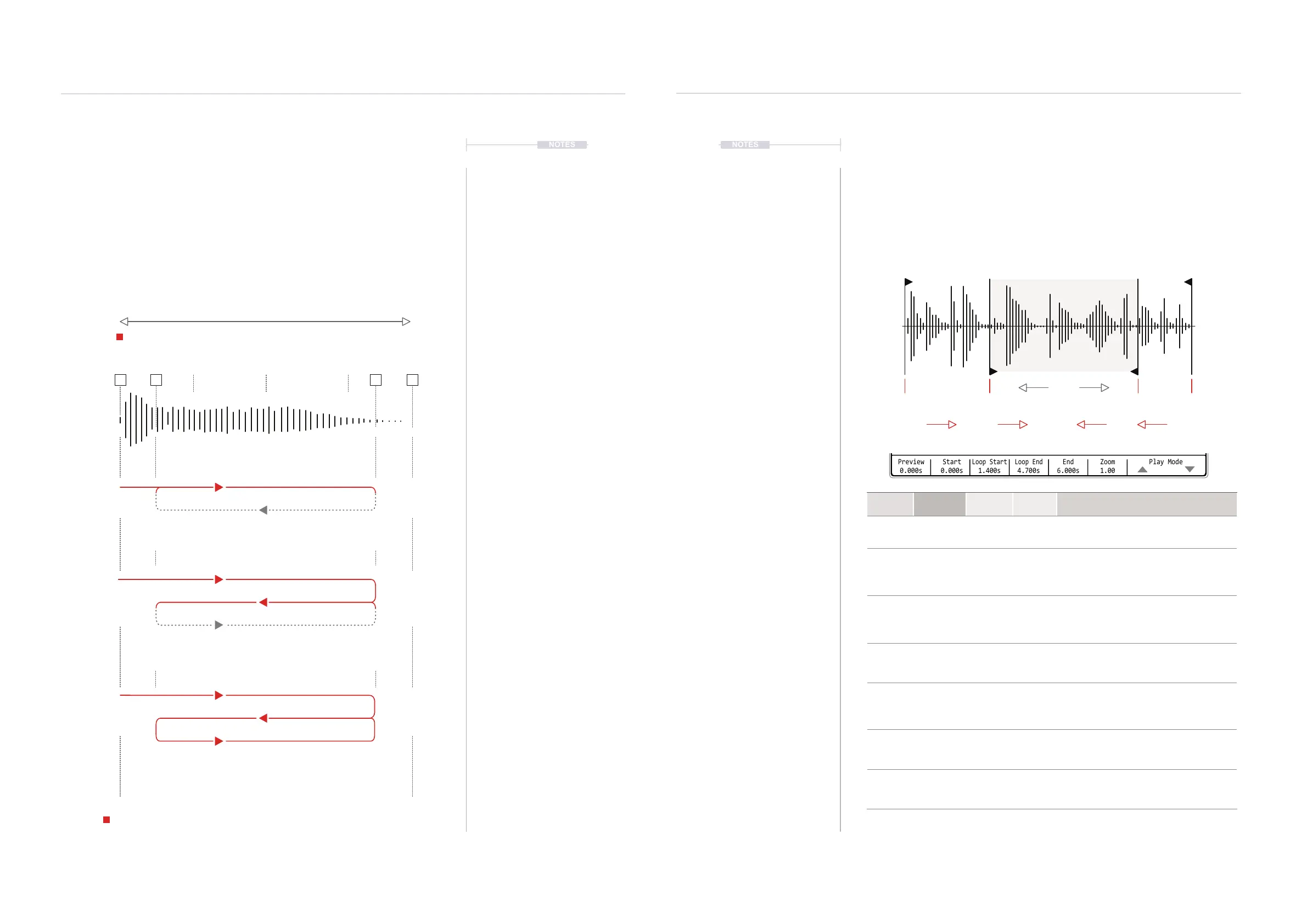
Loop Parameters
The parameters for the forward loop, reverse loop and pingpong loop play
are identical across these play modes. Options are start / loop start, end /
loop end plus the zoom visual aid. Navigate and select using the Screen
Buttons. Also navigate using the (Left) (Right) buttons to select the
parameter and (Up) (Down) or [+] / [-] to adjust the value.
Forward Pingpong Backward
Instruments
6
Instruments
6
6.8 Loop Play Modes
Three loop playback modes exist, forward loop, backward loop and
pingpong loop. All of these three play modes have similar functions and
only differ in their playback direction.
The note value, tempo and pattern length will also affect how the sample
plays. A higher note value will play the sample faster. A lower note value will
play the sample slower. Triggering the instrument step will trigger the sample
once and it will continue to play for its duration in loop until another trigger is
initiated or the pattern ends.
Steps
S LS ELE
Sample
Forward
Loop
Backward
Loop
Pingpong
Loop
Sample plays forwards from start to the end, then restarts back to the start.
Playback continuously loops start to end until another trigger or the pattern ends
Sample plays from the start position to the loop end, then restarts from the loop
end, playing in reverse. Playback continuously loops in reverse within the loop
start / end points until another trigger or the pattern ends
Sample plays from the start position to the loop end, then plays in reverse to the
the loop start, then plays forwards to the loop end. Playback continuously loops
forward and backwards through this cycle until another trigger or the pattern ends
Sample playback is initially triggered and while ever the pattern plays it will continue to loop.
1 2 3 4 5 6 7 8 9 10 11 12 13 14 15 16
Start
* Start / End, Loop Start / End Positions cannot cross over. Start is always before end.
Loop Start Loop End End
Zoom
Preview
0.000s
Start
0.000s
Loop Start
1.400s
Loop End
4.700s
Zoom
1.00
End
6.000s
Play Mode
Sample Playback 0m:00s P3.002
1-Shot
Slice
Forward loop
Beat Slice
Backward loop
Wavetable
Pingpong loop
Granular
16.hh3
Function Parameter
Screen
Button
Range Description
Edit Play Mode 7th & 8th
Modes
Selects the play mode to apply. Includes forward
loop, backward loop, pingpong loop as well as 1-
Shot and wavetable / granular synths.
Aid Zoom 6th
Variable
Zooms in horizontally to the visual display for more
precise editing. Does not affect playback. Zoom
reference point is based on the previously adjusted
parameter i.e. Start.
Aid Preview 1st
Variable
Hold to play the sample. The number below the
screen button label indicates current play position
in seconds. Preview playback will run for approx 1
sec after releasing the preview button.
Edit Start 2nd
* Lower
than End
Adjusts and edits the sample start point. This is the
starting position when the sample is rst triggered
in a pattern or when previewed. Red marker turns
green if a zero crossing point is detected.
Edit Loop Start 3rd
* Higher
than Start
Adjusts the sample loop start point. This is the start
position used on the 2
nd
and subsequent playback
cycles, playing from loop start to loop end. Value
will always be same or higher than start position.
Red marker turns green at a zero crossing point.
Edit Loop End 4th
* Lower
than start
Adjusts the sample loop end point. This is the end
position used for playing a loop. Value will always
be same or lower than end position. Red marker
turns green at a zero crossing point.
Edit End 5th
* Higher
than Start
Adjusts and edits the sample end point. The
ending position, outside of a loop when a sample is
triggered in a pattern or when previewed. Red
marker turns green at a zero crossing point.
Time
1
st
Cycle & Loop
1
st
Cycle
1
st
Cycle
Loop
Loop



 To Next Page