189
Polyend Tracker Mini Manual
188
Polyend Tracker Mini Manual
NOTESNOTES
Audio
8
Audio
8
8.6 Sampling
Everyone will develop a personal workow for sampling and the process
may differ due to the source to be recorded. Polyend Tracker Mini allows
approx 45 seconds of recorded audio time per sample and each project has
a total of over 700 Seconds, almost 12 Mins of mono sample time or 6 mins
of stereo sampling time. The internal sampler engine operates at 44.1kHz,
16, 24, oat 32 Bit, Mono or Stereo, WAV audio les
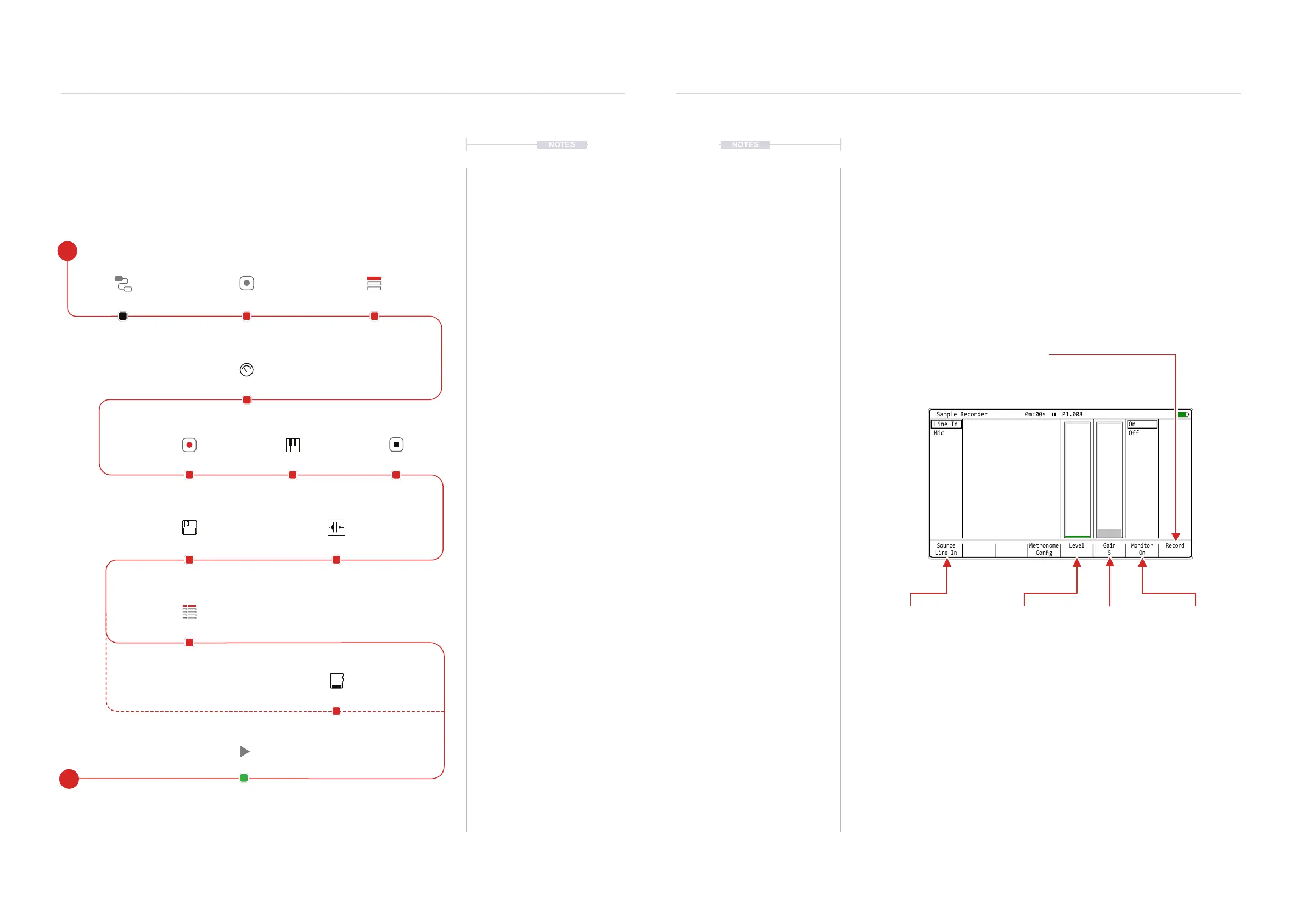
The main page used at the sampling stage is the ‘Sample Recorder’
accessed via the [Menu]. Here the parameter settings can be adjusted pre
sampling. The selected source will determine the available options.
Controlling the start and stop recording process is triggered from this page.
Source
Line In
Gain
5
Monitor
On
RecordLevel
Metronome
Cong
On
Off
Line In
Mic
Sample Recorder 0m:00s P1.008
Monitor.
Will allow the audio source to
be previewed at the output.
Source
Select the input to record
in the sampler.
Gain
Boosts the signal
level
Recording
Starts Recording [Record].
Also button becomes [Stop] while recording in is in progress.
Metronome Cong
The metronome cong screen button gives direct access to the metronome settings. This page can also be
accessed from the [Menu] option > Cong > Metronome.
Level
Visual indicator of source
volume level.
8.5 Recording Audio Workow
Sampling in Tracker Mini takes place in the ‘Sample Recorder’ page. This is
the rst step in the process and is followed by editing the audio captured.
Sampling in this page can be from the Line In or Mic audio sources.
Connect an external synth,
audio source or microphone.
Open the [Sample Recorder]
page to set up for sampling.
Select the source to record from.
Options are; Line In or Mic.
Save Only to the SD
Card.
Save to the SD Card
and also load into the
instrument list.
Program using the
instrument into a pattern.
Adjust gain to set to a
suitable level.
Play the connected
audio source.
Press [Record] to capture
the audio sample.
[Stop] sampling.
Max 45 sec audio sample.
Save the sample. Trim the start and end
of the sample to select
the area to save.
Connect Gear Sample Recorder
Gain
Play
Save
Record
Crop
Stop
Select Source
Save to SD
Save & Load
Pattern
E
S



 To Next Page