267
Polyend Tracker Mini Manual
266
Polyend Tracker Mini Manual
Performance Mode
12
Performance Mode
12
12.1 Performance Mode Overview
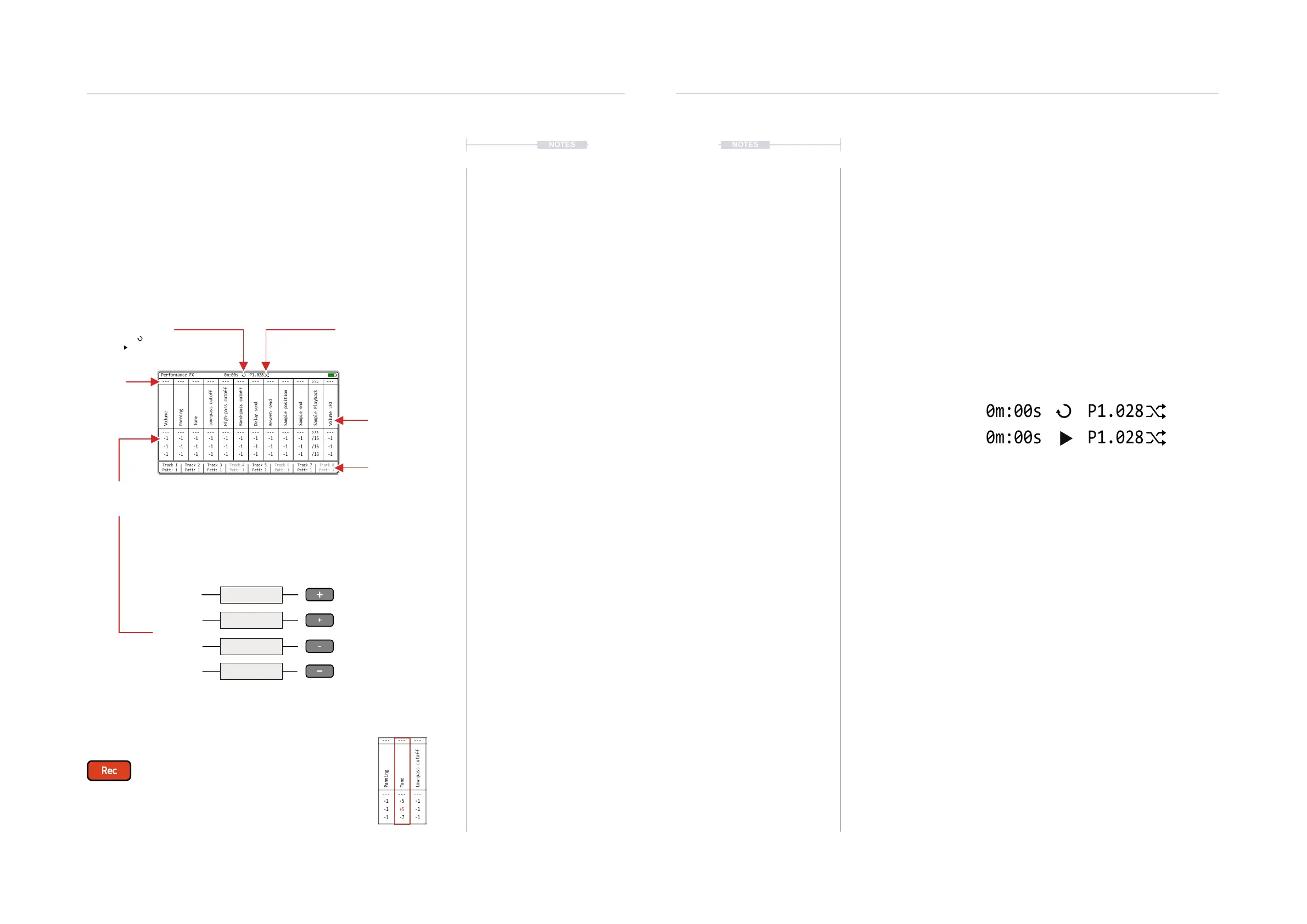
Performance mode allows real time improvisation control over tracks,
patterns and songs adding variation and interest when playing live. This is
normally handled in the [Menu] ‘Perform’ page although MIDI Input can also
be set to control the performance parameters.
Track 1
Patt: 1
---
---
-1
-1
-1
---
---
-1
-1
-1
---
---
-1
-1
-1
---
---
-1
-1
-1
---
---
-1
-1
-1
---
---
-1
-1
-1
---
---
-1
-1
-1
---
---
-1
-1
-1
---
---
-1
-1
-1
---
---
-1
-1
-1
>>>
>>>
/16
/16
/16
---
---
-1
-1
-1
Track 2
Patt: 1
Track 3
Patt: 1
Track 4
Patt: 1
Track 6
Patt: 1
Track 5
Patt: 1
Track 7
Patt: 1
Track 8
Patt: 1
Performance FX
Volume
High-pass cutoff
Sample end
Tune
Delay send
Sample Playback
Panning
Band-pass cutoff
Low-pass cutoff
Sample position
Reverb send
Volume LFO
0m:00s P1.028
Punch In Effects
12 Congurable
performance effect slots
MIDI CC
Indicates the top row, MIDI
CC controllable values.
Track Selection
Selects which tracks will be
affected by the performance
effects applied, indicated red.
Punch In Parameters
4 Effect parameter values.
Triggered by [+], [+], [-], [-]
Perform Slot Trigger
Each [+] / [-] buttons trigger the respective effect value row.
The effect values are congurable with row 1, by default set to off (- - -).
Performance Mode
Press [Menu] to access and navigate the options. Select the ‘Perform’ option and display the performance mode
screen. Editing parameters and conguring the effects is handled in [Rec] record mode]. It is possible to cycle
between pattern and song pages while performance mode is active.
REC Mode
Press [Rec] to edit the perform conguration. The selections will be
indicated red as will the effect selection bounding box. Effects can
be congured and the values edited when in Rec mode of Perform.
Track 1
Patt: 1
---
---
-100
+100
-50
---
---
-1
-1
-1
---
---
-5
+5
-7
---
---
-1
-1
-1
---
---
-1
-1
-1
---
---
-1
-1
-1
---
---
-1
-1
-1
---
---
-1
-1
-1
---
---
-1
-1
-1
---
---
-1
-1
-1
>>>
>>>
/16
/16
/16
---
---
-1
-1
-1
Track 2
Patt: 1
Track 3
Patt: 1
Track 4
Patt: 1
Track 6
Patt: 1
Track 5
Patt: 1
Track 7
Patt: 1
Track 8
Patt: 1
Performance FX
Volume
High-pass cutoff
Sample end
Tune
Delay send
Sample Playback
Panning
Band-pass cutoff
Low-pass cutoff
Sample position
Reverb send
Volume LFO
0m:00s P1.028
Selected effects are indicated green or red (if editing) on the Tracker Mini screen
Playback Status
Shows pattern loop playback
or full song playback
Perform Status
Shows Performance Mode
is active.
12.2 Perform - Quick Start
Assuming the effects are set up, values in place then real-time
improvisations can be performed. Think of performance effects as applying
parameter value variations as an offset from the current setting.
▌ WORKING LIVE WITH THE PERFORM
1. Press [Menu] and open the ‘Perform’ Page for Performance Mode.
2. Press [Track 1] - [Track 8], screen buttons to select the tracks for
applying effects On (red) or Off. Only the selected, red lit tracks will be
affected by the triggered performance effects.
3. Press [Play] to play a pattern or [Shift] + [Play] to play a song, also
toggles between song and pattern play. The display header will show
the pattern or song playback symbol and the perform mode symbol.
4. To punch in an effect:-
• Select an effect slot to punch in, Press (Left] (Right) to navigate to
the target effect column.
• Press one of the four [+] [+] [-] [-] buttons to apply the effect value
change. The buttons represent top to bottom, the effect row values.
The top [+] represents top row 1 and the lower [-] represents bottom
row 4.
• Multiple effect values can be applied at the same time by selecting
the column slot and and value for triggering using [+] / [-]
5. The effect is retained once pressed. To clear the effect, Press the upper
[+] button for the effect, row 1. Top row 1 is reserved for restoring the
default, i.e. effect off. The top row value cannot be changed.
6. To temporarily play and adjust a value on the y ensure [Rec] mode is
off. Hold [+] / [-] for any of the 4 values to change then (Up) or (Down).
The value is reset to its original state when the buttons are released.
7. The effect will apply an offset to the current value of the parameter
affected. The value to apply will be as stated in the parameter row. For
example, set pitch offsets for lead or bass tracks.
8. Hold [Shift] + Press [Track x], Screen buttons to Mute / Unmute.
Pattern Play
Song Play
NOTESNOTES
- - -
-5
+5
-7
Row 1 Value
Row 2 Value
Row 3 Value
Row 4 Value



 To Next Page