197
Polyend Tracker Mini Manual
196
Polyend Tracker Mini Manual
NOTESNOTES
Audio
8
Audio
8
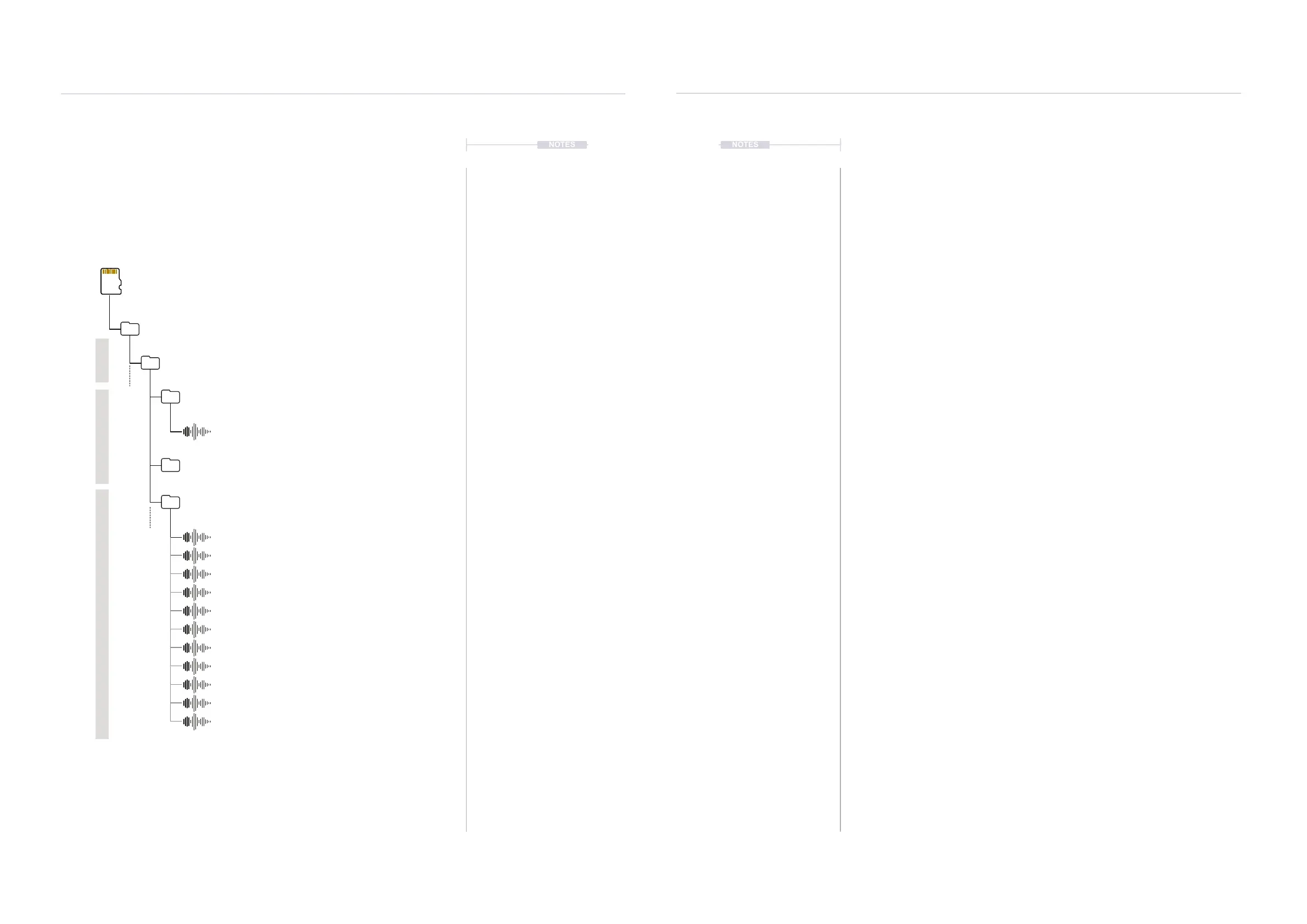
Rendered Pattern Locations
Rendered les are exported to the /export folder and new sub-folders are
created for patterns and pattern stems. These are accessible from the
sample loader function pages.
Full Pattern ExportsPattern Stem Exports
Sub Folders
Represents the Project
Project, Pattern number, Sequential render number
Rendered Audio le for the selected project, pattern
Stems Render 11 Audio Files.
Rendered Audio stems for each track in stereo,
also the delay and reverb send audio in stereo.
Additionally a stereo master track is rendered.
Rendered les are 44.1kHz, 16 bit.
Project, Pattern number, Sequential render number
Project, Pattern number, S = Stems + Sequential number
SD Card
/Root Directory
/Export
/ProjectName
/ProjectName_P3_0001
Master.wav
delay.wav
track 1.wav
track 4.wav
master.wav
track 2.wav
track 5.wav
track 7.wav
reverb.wav
track 3.wav
track 6.wav
track 8.wav
/ProjectName_P3_0002
/ProjectName_P3_S0001
▌ RENDER AND EXPORT A FULL SONG
1. Press [Shift] + [3] or Press [Menu] to select the le options page.
2. Press [Export], 7
th
Screen button to select the export specic options.
3. Press [Export Song], 1
st
Screen button to render and export.
4. The current song will be rendered and exported. Any muted tracks are
not rendered and therefore remain silent in the exported audio le.
5. A folder is created on the SD Card that represents the render. This is
located in the /Export sub folder. The le itself will be called ‘master.
wav’. Each time the song is exported a new folder is created. The folder
naming convention is:-
Project name_Song_Sequential render number
▌ RENDER AND EXPORT ALL SONG STEMS
1. Press [Shift] + [3] or Press [Menu] to select the le options page.
2. Press [Export], 7
th
Screen button to select the export specic options.
3. Press [Export Song Stems], 2
nd
Screen button to render and export.
4. All tracks plus the delay and reverb audio will be rendered in stereo and
exported. Also a stereo master le is rendered of all tracks. Any muted
tracks are not rendered and will remain silent in the exported audio le.
5. A folder is created on the SD Card that represents the render. This is
located in the /Export sub folder. The 11 les will be called ‘track 1.wav’
etc, ‘delay.wav’, ‘reverb.wav’ and ‘master.wav’. Each time the pattern is
exported a new folder is created. The folder naming convention is:-
Project name_Song_S for Stems + Sequential number
Project



 To Next Page