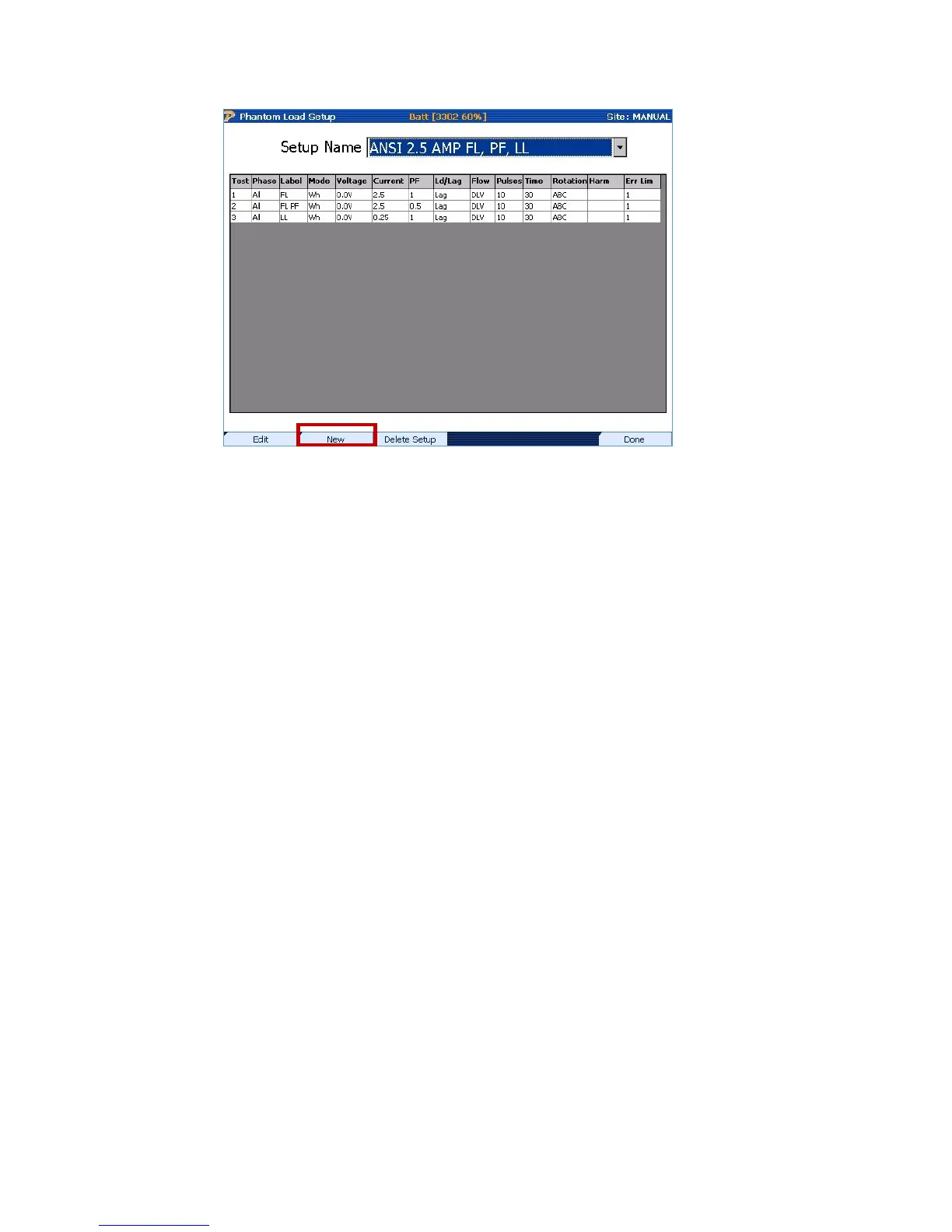
From the phantom load setup, select F2 (new) to create a new Phantom load test.
Create a name for your specific test, then press F4(New Row) to begin building the test.
Columns are as follows:
1. Test: Numeric order the test will run.
2. Phase: Selectable A, B, C or all.
3. Label: Abbreviation indicating the test being ran.
4. Mode: Watt Hour, VA hour, or VAR hour test.
5. Voltage: Not Enabled on the 335.
6. Current: 0-5Amps.
7. PF: Power factor of the test being performed.
8. Ld/Lag: Rotation of the current in relationship to the voltage. Ld=Lead, Lag=Lag.
9. Flow: Direction of the current in relationship to the load. DLV=Delivered (typical),
RCD=Received. Typical for reverse power.
10. Pulses: Number of pulses wanted to receive.
11. Time: How long the test will run. Test will run till either all pulses are counted or time runs
out.
12. Rotation: Phase Rotation. ABC or CBA.
13. Harm: Allows Selection of Harmonic Wave form.
14. Err Lim: 1
Rev 1.5 146


 To Next Page
 Loading...