10.1.5 Customer Load Demand Register
Functionality:
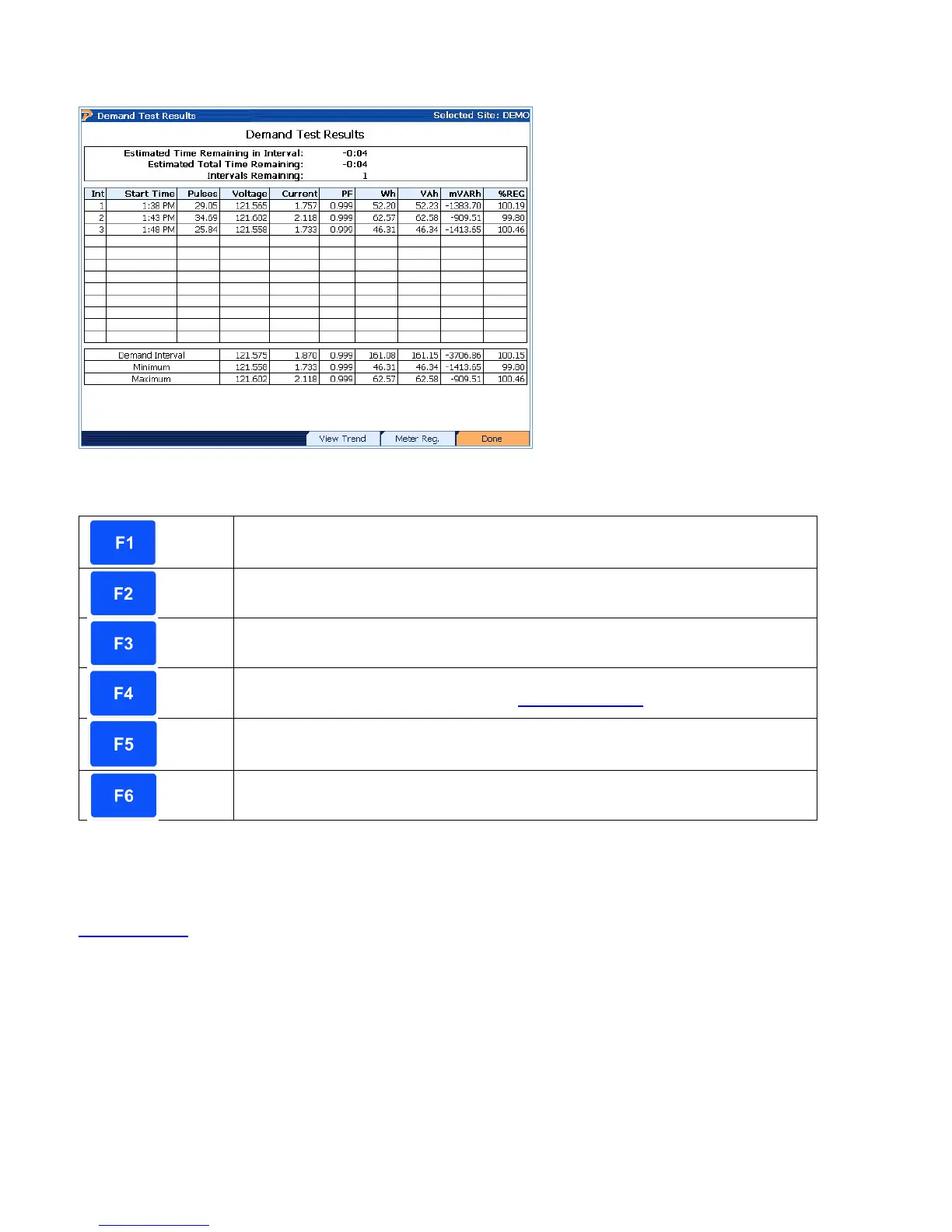
Clears all data and restarts demand test
Quits data collection and returns to the Meter Testing menu
Views the voltage, current, and power (W, VA, VAR) data during the total
time interval for the meter test. See section 10.1.5.1.
Views the meter registration during the entire demand test
Completes demand test and saves data
Description:
When entering this screen, the PowerMaster
®
begins the demand test. The screen updates at
every five (5) minute interval from start time. Based on the “Demand Period” selected (see
Section 13.9.1
), the demand test will stop after time is relinquished. For example, if a 15 minute
demand period is selected, the test performs for the next 15 minutes and displays values at each
5 minute interval (15 minutes = 3 intervals). Meter registration is also displayed at each interval.
Synchronize Test to Clock (End-to-End Testing)
When using the “Synchronize Test to Clock (End-to-End Testing) feature, the first demand
interval (5 min) begins when the PowerMaster
®
clock is at a minute mark that is divisible by 5.
For example, if the demand test starts at 11:03am, the first interval will not start until 11:05am.
Rev 1.5 80


 To Next Page
 Loading...