882 Video Test Instrument User Guide (Rev A.35) 49
Rendering image versions
Many images have secondary or alternate versions and some images have many
versions. Use the procedures below to view the alternate and multiple image versions.
To view alternate image versions in the Content list:
1. Select an image by pressing the Contents key and selecting an image with the
adjacent soft key until a * appears next to image name.
2. Enable and view image versions as follows:
a. Press the Options key. The following menu will appear on the 882’s display for
images with a single secondary image:
b. Choose the Alternate item by pressing the adjacent soft key until a + appears next
to the item.
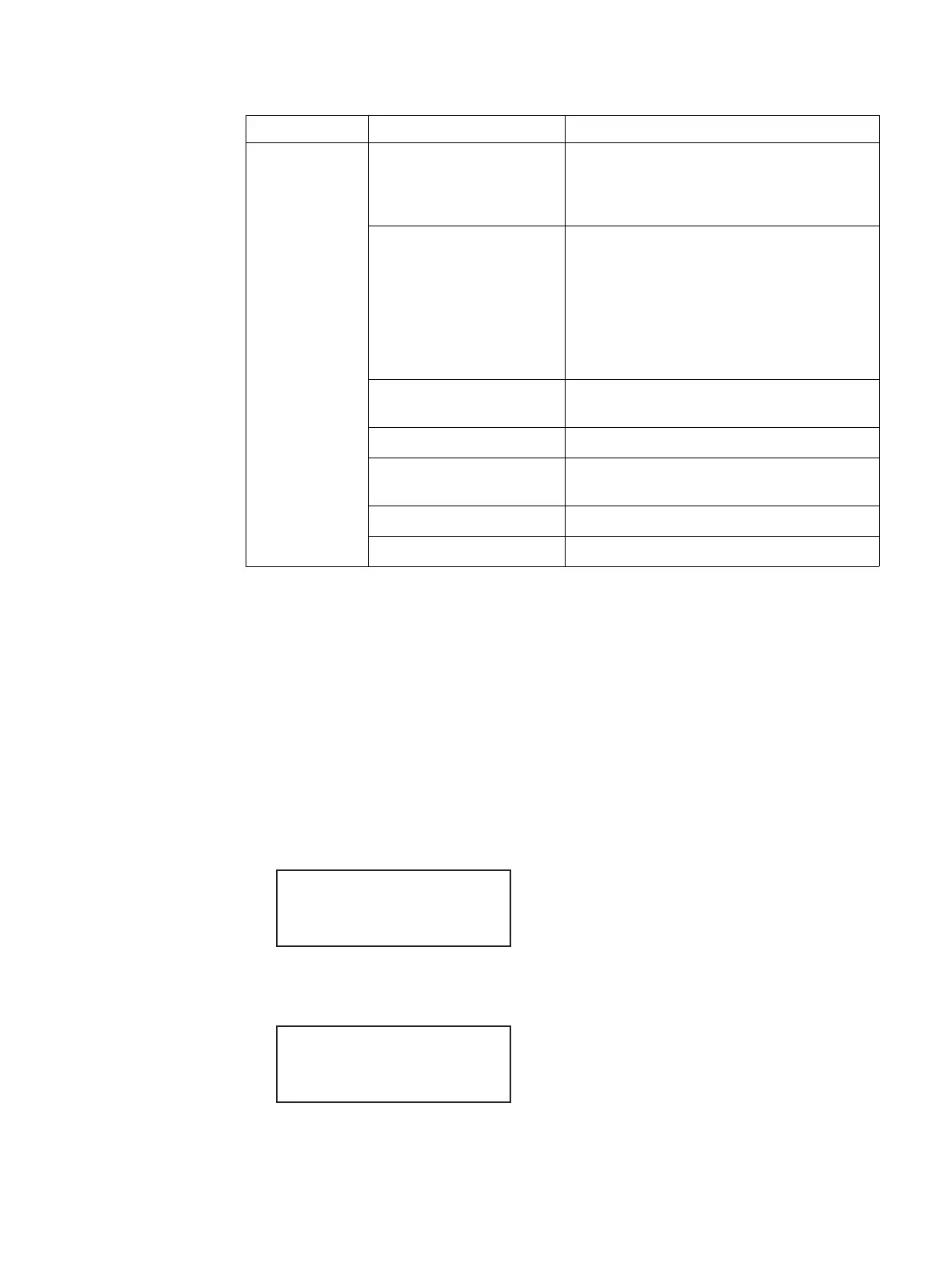
Digital flat panel
(fixed pixel
display)
Pixel anomalies
(stuck pixels, misc sampling)
Flat, Raster, Ramp_B, Ramp_G, and Ramp_R,
Focus_@6, Focus_@7, Focus_@8,
Focus_@9, Text_9, Text_9T, Text_11,
Text_12T, Text_16
Photometry (chrominance,
contrast, levels)
Flat, Flat07, Flat13, Flat20, Flat27, Flat33,
Flat40, Flat47, Flat53, Flat60, Flat67, Flat73,
Flat80, Flat87, Flat93, FlatGray, Flat_01,
Flat_02, Flat_03, Flat_04, Flat_05, Flat_06,
Flat_07, Flat_08, Flat_09, Flat_10, Flat_11,
Flat_12, Flat_13, Flat_14, Flat_15, Flat_16,
Ramp_B, Ramp_G, and Ramp_R, ColorBar,
SMPTEbar, SMPTE133
Luminance SMPTE133 (Grayscale), Grays5, Grays9,
Grays11, Grays16, Grays32, Grays64
Centering Outline0, Outline1, Outline2, Outline3
Resolution BurstTCE, Grill_11, Grill_15, Grill_22, Grill_33,
Grill_44
Persistence Animated images: Persist, Cubes, SlideBox
3D (HDMI only) 3DCRTK, 3DCUBES, custom bitmap images
Display type Display test Recommended images
-Alternate
Red+
-NoGamma Green+
-Noise Blue+
+Alternate
Red+
-NoGamma Green+
-Noise Blue+



 To Next Page