October, 1996 6880902Z36-B
2-11
GM300 Radio Service Software Manual Getting Started
Understanding Computer Basics
2
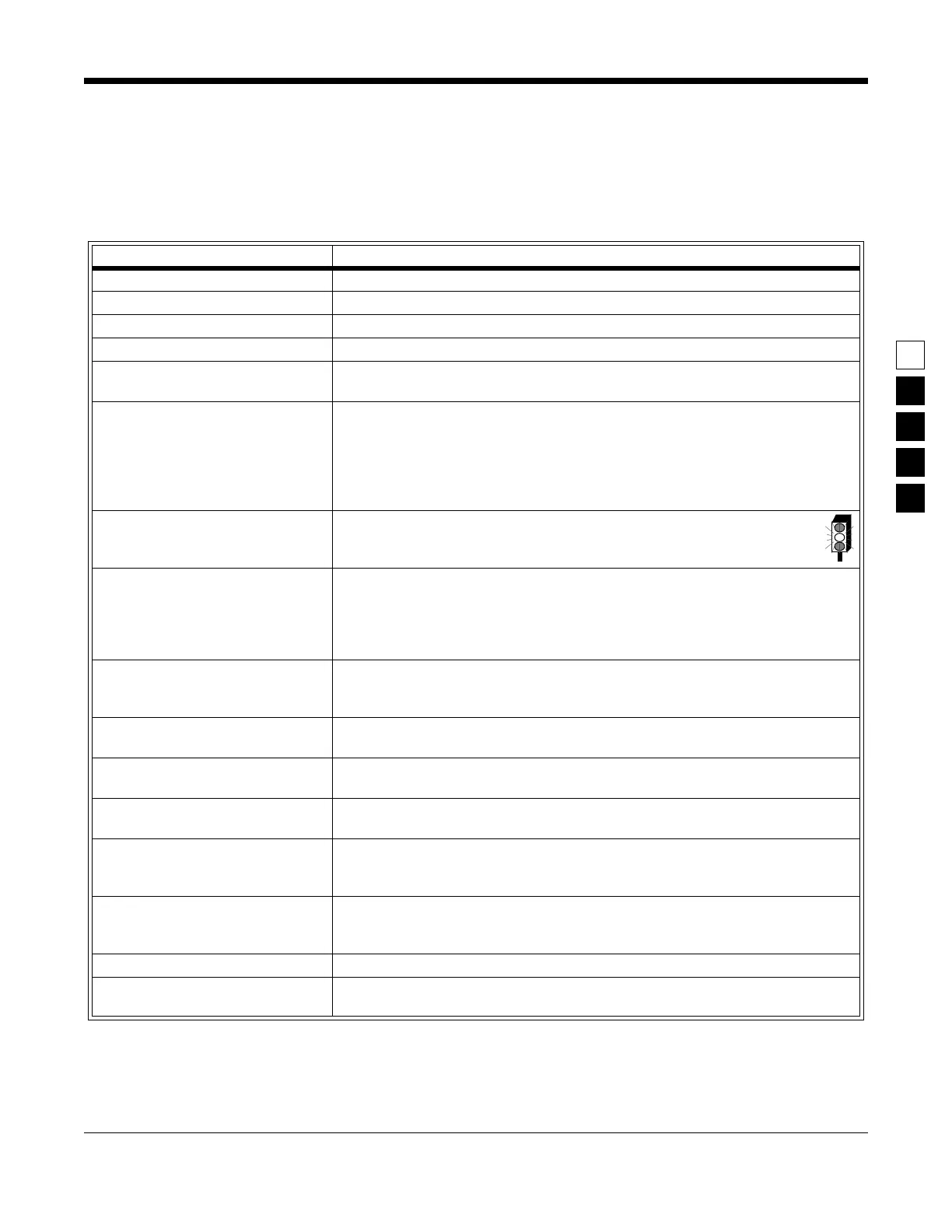
The table below lists some of the DOS commands that you may use now or in the future for RSS work.
Words in italics mean you should substitute that word for the word that is appropriate for your specific
situation (such as your file's name or your directory name). After each command, press the Return (or
Enter) key.
For further information on these and other commands, consult your DOS User's Manual.
Table 2-6. Common DOS Commands
DOS Command What it Means
A: Go to drive “A”.
B: Go to drive “B”.
C: Go to drive “C”
CD\ Return to the root directory.
CHDIR
also works.
CD
DIRNAME
Change directory to the directory named DIRNAME, maximum directory length is
8 characters. CD used alone will display the current working path name.
COPY B:*.* A: Makes an identical copy of all files from root directory of diskette in “B” drive to
root directory of diskette in “A” drive. The *.* means all files within the directory
specified. You can also copy files in the same directory giving the file a different
name as the second argument to the copy command, and you can combine several
files into one file or append files. In all cases, the first argument is the source file
(the one to copy from) and the last argument is the target file (the one to copy to).
DEL *.* Delete all files in current directory. WARNING: files cannot be recovered after exe-
cuting this command without backups located in a different directory!
DIR Lists the files in the current working directory. You can list files in other directories
too by specifying a pathname following the command. If you have more files than
will fit on the display, you can type DIR /P, which will make DOS pause when the
display is full. Pressing any key resumes the listing. DIR /W specifies a wide dis-
play (5 columns) of file names.
DISKCOPY B: A: Copies the contents of the disk in drive B to the disk in drive A. Drives must be of
the same size and density. If your drives are not the same size and density, use the
same drive name twice, such as DISKCOPY A: A:.
FORMAT A: Format an unused, new or old diskette in drive “A” of the computer so it will
accept DOS files.
MD DIRNAME Make a new sub-directory called DIRNAME of 8 characters or less. (You substitute
your own directory name for the italicized word DIRNAME.) MKDIR also works.
PROMPT $P$G Change the display’s prompt to include the current working directory’s drive and
path name, followed by the “>” sign.
PATH Set a command search path (such as PATH=C:\MRSS\GM300\ARCHIVE). This
tells the computer to search this directory after the working directory when a com-
mand is entered.
RD
DIRNAME
Remove a sub-directory called DIRNAME. Removal of the sub-directory requires
that it be empty. Files can be deleted by the DOS DEL command. RMDIR also
works.
VER Prints the DOS version installed on the computer, such as “DOS Version 5.0”.
XCOPY Copies files and directories, including all sub-directories. This command uses disk
space more efficiently and can speed up file access time.



 To Next Page