13. The System Setting Menu „System Setup“
Thebasicsettingsoftheremotecontroltransmitteraremadeinthesystemsetupmenurst.Thesesettingsarenot
referredtoindividualmodels.Thespecicsettingsoftheindividualmodelsareonlymadeafterwardsinthefunction
setting menu (see chapter 14).
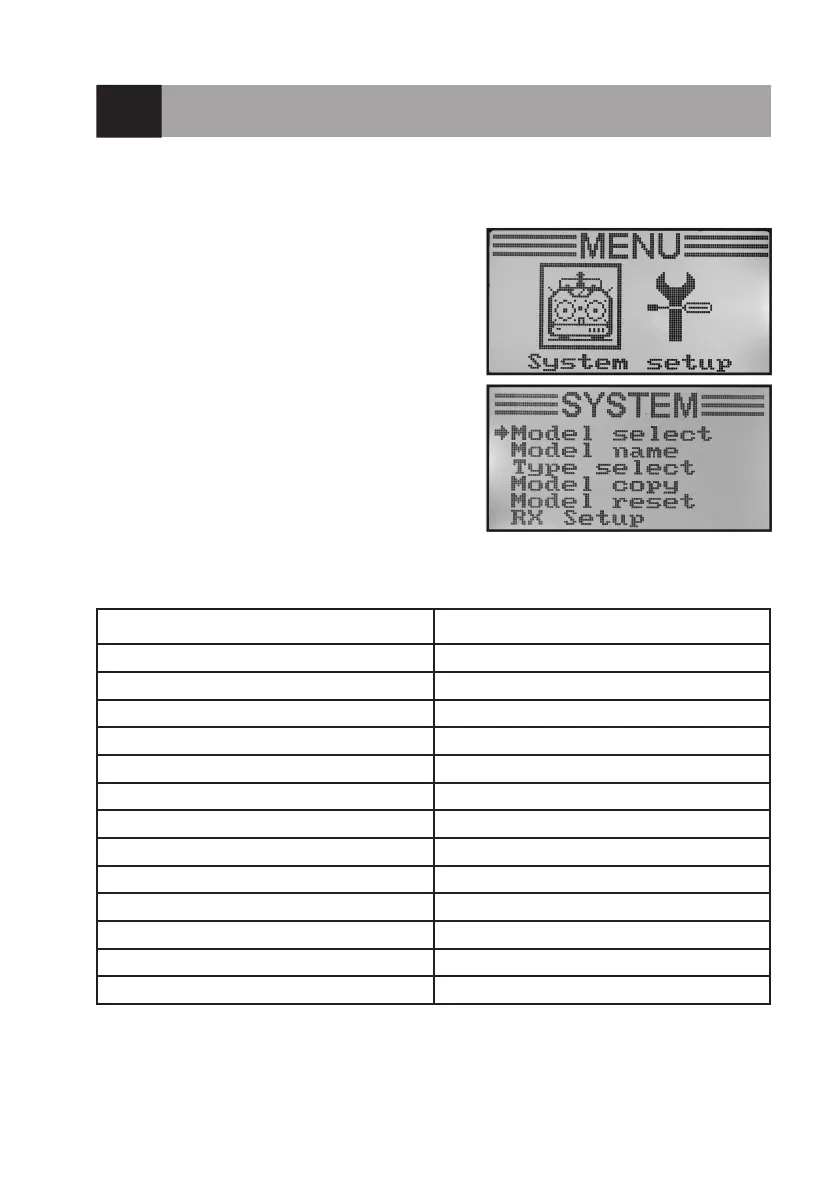
To get to the system settings menu, push the button „OK“ with
the transmitter switched on. The operating display in the display
switches to the menu display. The selection window around the
remote control icon shows that you can call the „System Setup“
menu in this setting.
Brieypushthebutton„OK“againtogettothesystemsettings
menu.
Therst6menuitemsofthesystemsettingmenuarenowdis-
played.
The following setting functions are available for you in the system setting menu:
Function Display
Model memory selection „Model select“
Model name settings „Model name“
Model type selection „Type select“
Copying model memory „Model copy“
Deleting model memory „Model reset“
Receiver programming „RX Setup“
Operation as a trainer transmitter „Trainer mode“
Operation as a student transmitter „Student mode“
Control stick assignment „Sticks mode“
Display brightness „LCD brightness“
Transmitter software version „Firmware ver.“
Transmitter software update „Firmware update“
Factory reset „Factory reset“
Figure 15



 To Next Page