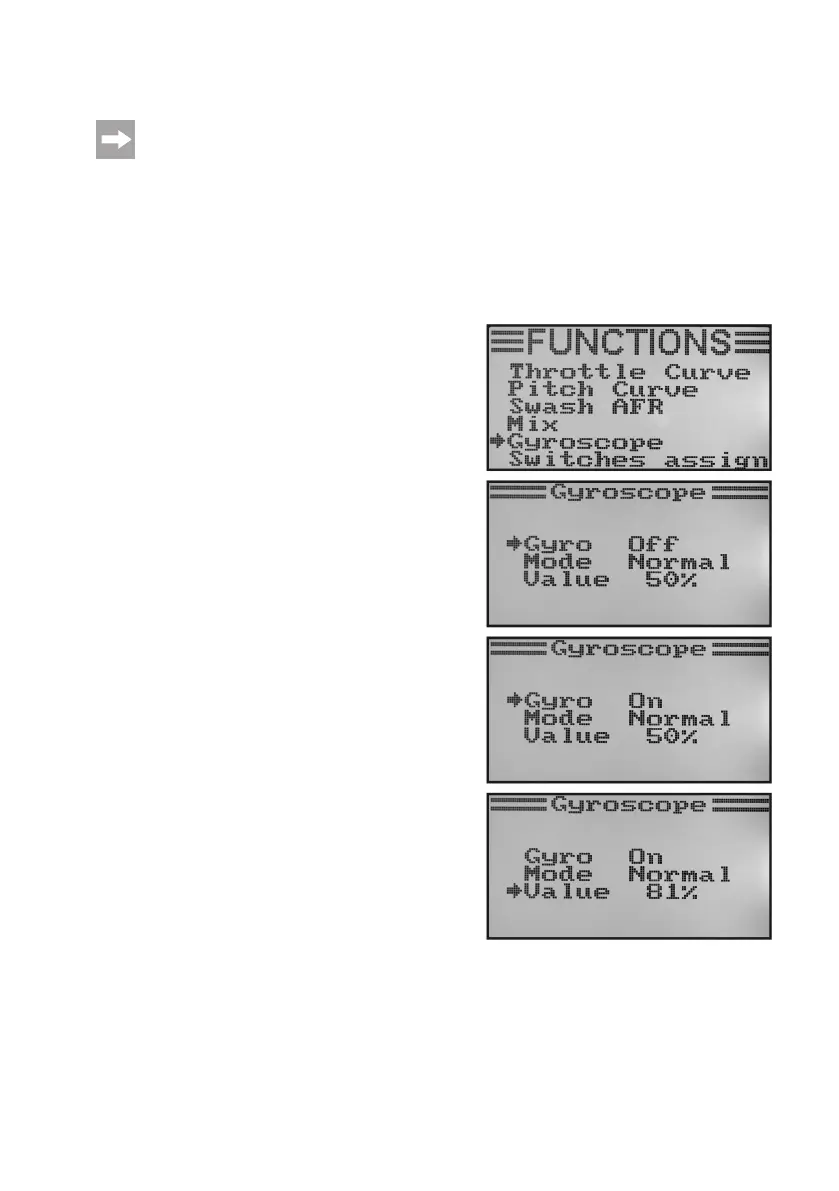
m) Gyro Sensitivity Setting „Gyroscope“
This menu is only available if a helicopter model was selected in the system settings menu!
So-called gyroscope (or gyro) systems are used in order to stabilise the tail of the helicopter in the air. There is a
connection between the receiver and the tail servo. If the tail turns sideways as a result of a wind gust or other external
inuences,thisisrecognisedbythegyroandacorrespondingcontrolcommandissenttothetailservotocounterthe
turn.Gyroscopesystemsthathaveanadditionalcontrollerinputpermitsettingtheindividualsensitivityforeachight
condition separately and independently of each other. This requires the controller input for the gyro to be connected
to channel 5 of the receiver.
For further information, refer to the design documents of the gyro system.
Setting the gyro sensitivity:
• Switchonthetransmitterandcallthefunctionsettingmenu.
• Movethecursorarrowtothemenuitem„Gyroscope“withthe
two buttons „UP“ and „DOWN“.
• Brieypushthebutton„OK“toactivatethemenuitem.
The display shows the current switching condition of the gyro
sensitivity,theightcondition„Normal“(theswitch„SWB“must
be in the front position for this) and the set value. The cursor
arrow in the mixer function shows that the gyro sensitivity now
can be activated or deactivated.
• Pushing the buttons „UP“ or „DOWN“ can activate „On“ or
deactivate „Off“ gyro sensitivity.
• Whenpushingthebutton„OK“,thecursorarrowwilljumpto
the setting value for gyros sensitivity.
• Pushthebuttons„UP“or„DOWN“tosetthegyrosensitivityfor
theightcondition„Normal“.Ifthebutton„OK“ispushedand
held, the factory parameters are called.
Figure 52a



 To Next Page