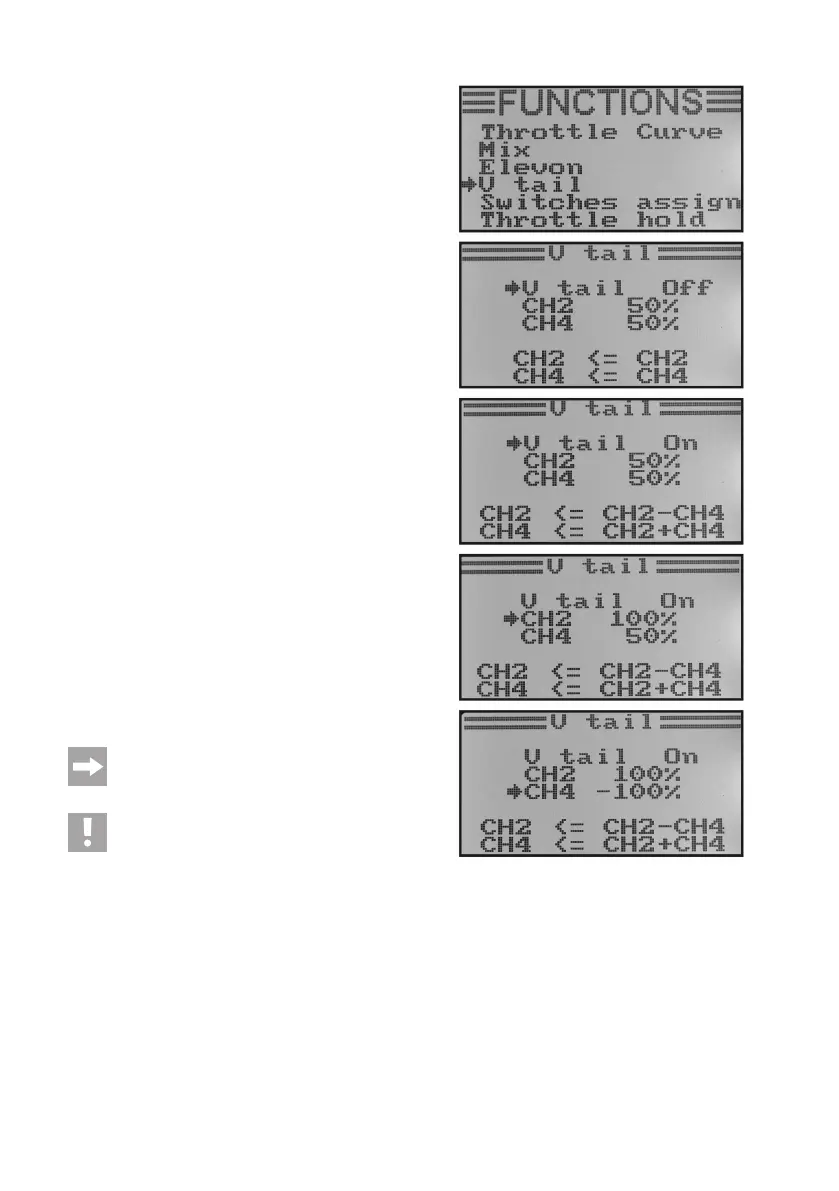
Adjusting the V-tail mixer:
• Switchonthetransmitterandcallthefunctionsettingmenu.
• Movethecursorarrowtothemenuitem„Vtail“withthetwo
buttons „UP“ and „DOWN“.
• Brieypushthebutton„OK“toactivatethemenuitem.
The display shows the mixer indication with pre-set values.
• Pushing the buttons „UP“ or „DOWN“ can activate „On“ or
deactivate „Off“ the mixer.
• Whenpushingthebutton„OK“,thecursorarrowwilljumpto
the defection values for the elevator function (CH2).
• Alternatingly deect the encoder for the elevator function
downoruptothestopandadjustthedesireddeectionva-
lues of both servos by pushing the buttons „UP“ or „DOWN“.
When setting a negative value, the running directions of the
two servos will reverse. If the button „OK“ is pushed and held,
the factory parameters are called.
• When pushing the button „OK“ briey again, thecursor ar-
rowwilljumptothedeectionvaluesfortherudderfunction
(CH4).
• Alternatinglydeecttheencoderfortherudderfunctiononthe
onesidetothestopandadjustthedesireddeectionvalues
of both servos by pushing the buttons „UP“ or „DOWN“. If the
button „OK“ is pushed and held, the factory parameters are
called.
• Keepthebutton„CANCEL“pushedforalongerperiodtosave
the settings. The display then shows the function setup menu
again.
• Pushthebutton „CANCEL“repeatedlyuntilyou getbackto
the operating display.
If one of the two servos runs in the wrong direction,
you can use the reverse setting (see chapter 14. a) to
change the running direction of the servo.
Caution, important!
The remote control transmitter does not permit con-
current operation of the delta and V-tail mixer. In this
case, the following error message will be displayed
when the second mixer is called: „Elevon enabled“ or
„V tail enabled“.
Figure 51



 To Next Page