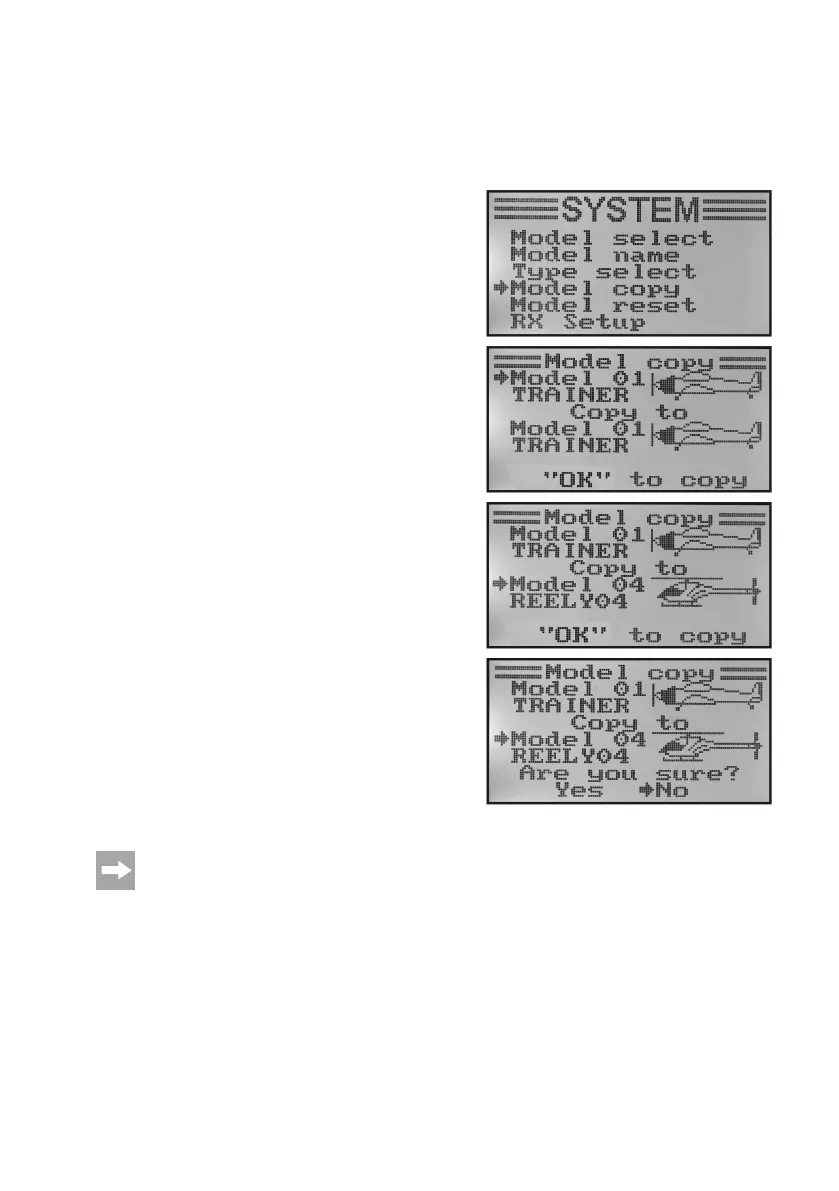
d) Copying Model Memory „Model Copy“
For simple programming of the system you have the option of copying data from one model memory to another. This
helps to easily transfer basic settings and mixer between similar models and you only need to adjust the settings
values to the new model.
Copying model data into another model memory:
• Switchonthetransmitterandcallthesystemsettingmenu.
• Movethecursorarrowtothemenuitem„Modelcopy“withthe
two buttons „UP“ and „DOWN“.
• Brieypushthebutton„OK“toactivatethemenuitem.
The display shows two model memories with the respective
activatedmodelnamesandtheassociatedmodeltypegure.
The model memory above is the data source and the model
memory below is the target memory.
• Usethebuttons„UP“or„DOWN“toselectthemodelmemory
from which the data are to be copied.
• Brieypushthebutton„OK“toswitchtothetargetmemory.
• Usethebuttons„UP“or„DOWN“toselectthemodelmemory
into which the data are to be copied.
• Pushthebutton„OK“forlongertostartcopying.Thedisplay
now shows a safety prompt.
• Pushingthebuttons„UP“or„DOWN“switchesthecursorar-
row from „No“ to „Yes“. Push the button „OK“ again to copy.
The display then shows the system setup menu again.
• Pushthebutton „CANCEL“repeatedlyuntilyou getbackto
the operating display.
Since the model name is also copied, call the model memory into which you copied the data right after
copying and enter the name of the new model there at once. This avoids undesired mistakes among the
model memories.
Figure 20



 To Next Page