16. Binding Function
To enable transmitter and receiver to work together, they must be bound by the same digital code. In the delivery state,
transmitter and receiver are aligned with each other and can be used at once. The binding settings must be renewed
mainly after a replacement of the transmitter or receiver or to remove any interferences.
Before you can bind the receiver to the transmitter, check if the transmitter works in the right digital code (see „RX
setup“ in the system settings menu).
To perform the binding procedure, proceed as follows:
• Transmitterandreceivermustbeindirectproximity(distance
approx. 50 cm).
• Switchoffthetransmitter.
• Disconnectanyservosthatmaybeconnectedfromtherecei-
ver.
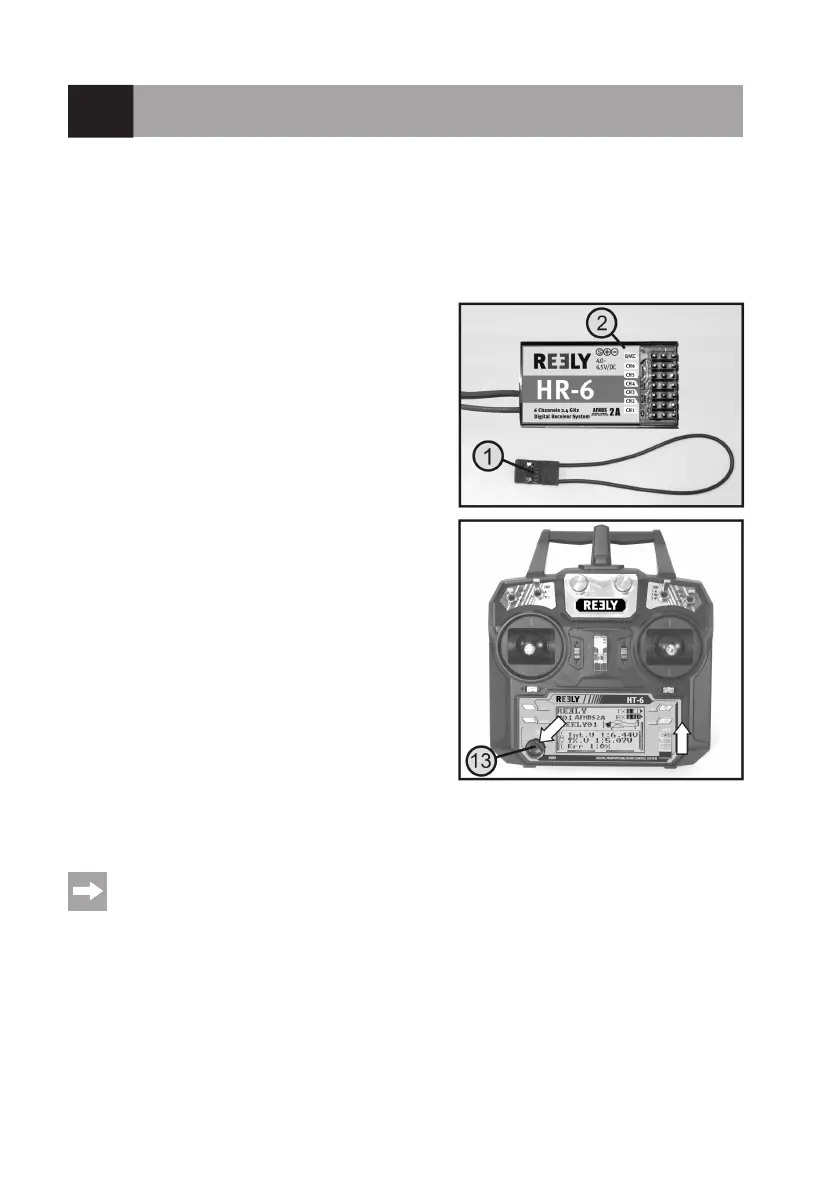
• Connecttheenclosedprogramming plug(1)tothe„B/VCC“
connection of the receiver.
• Thepowersupplyof thereceiver(receiverbatteryorspeed
controller with BEC) is connected to any output of the recei-
ver.
• Switchon the receiver. Thereceiver LED(2) startsto ash
quickly.
• Pressthebindingbuttonatthereceiver(seealsogure1,item
13) and keep the button pressed.
• Switchonthetransmitterwiththeon/offswitchwiththebinding
buttonpushed.Thedisplaybrieyshows„RXBinding“and,at
correct binding, „RXBind OK“. Then the display switches to
operating display.
• TheLEDinthereceive(2)nowashesslowlyandthebinding
process is completed.
• Releasethebindingbuttonatthetransmitter.
• Switchoffthereceiverandthenthetransmitter.
• Removetheprogrammingplugandconnecttheservos/controllerstothereceiveragain.
• Checkthefunctionofthesystem.
The receiver or the servos now must react to the control signals of the transmitter. If this is not the case,
repeat binding or check the digital encoding of transmitter and receiver.
Figure 55



 To Next Page