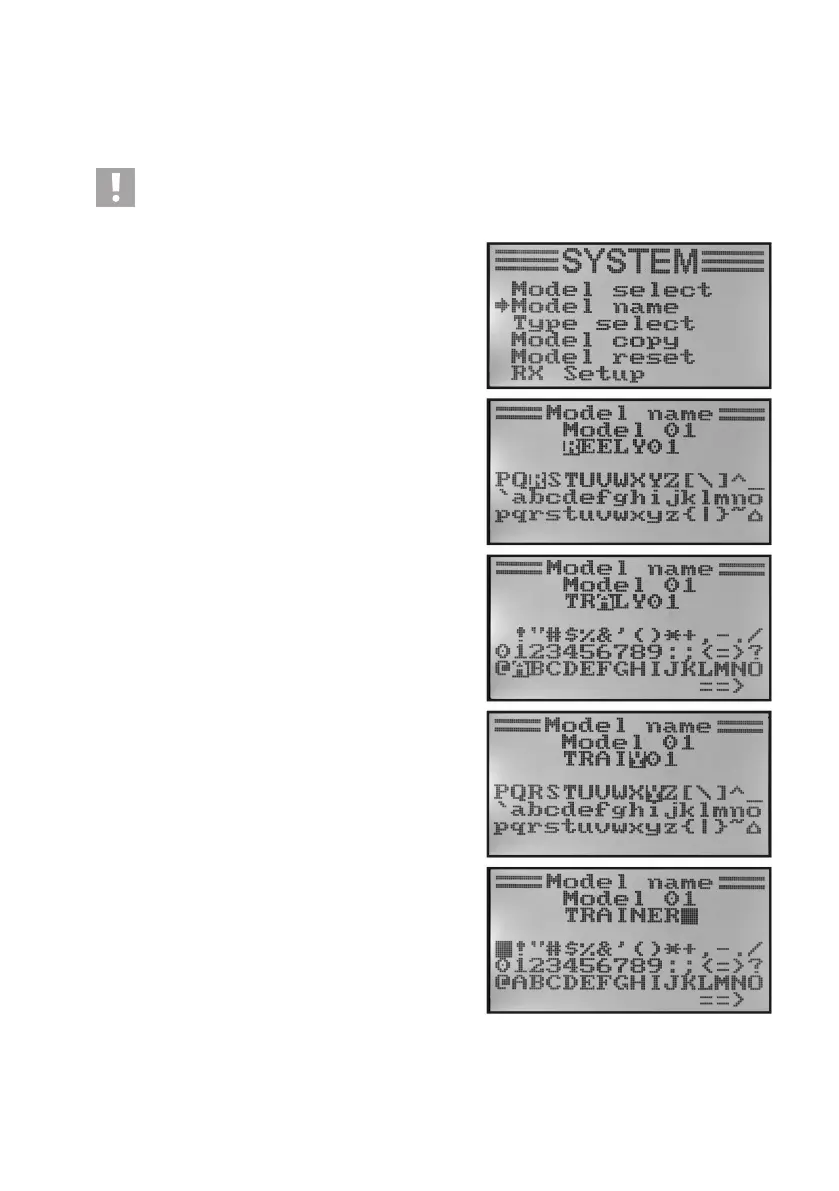
b) Model Name Setting „Model Name“
In order to be able to discern between model memories more easily it makes sense to give the memories the name of
the corresponding models. The name can consist of a combination of up to 8 letters, numbers or characters.
Caution, important!
You can always change only the name of the model memory that is active at the moment. If you want to
changethenameofanothermodelmemory,youneedtocallandactivatethedesiredmodelmemoryrst.
Setting the model name:
• Switchonthetransmitterandcallthesystemsettingmenu.
• Movethecursorarrowtothemenuitem„Modelname“with
the two buttons „UP“ and „DOWN“.
• Brieypushthebutton„OK“toactivatethemenuitem.
The display shows the currently set model memory with the
modelname.Therstletterinthenameisalreadybacklitback
and can be set.
• Pushthebuttons„UP“or„DOWN“toselectthedesiredletter
now. The arrow pointing to the right at the lower display edge
indicates that the remaining letters and special characters are
available on a second display page.
• Toswitch tothesecond letter,briey pushthebutton „OK“.
The second letter then gets a black background. If you push
the button „OK“ and hold it, the model name set ex works is
called.
The second letter is set according to the same pattern as the
rstone.
• Repeattheaboveprocedureuntilthedesiredmodelnamehas
been programmed.
• Keepthebutton„CANCEL“pushedforalongerperiodtosave
the set model name. The display then shows the system setup
menu again.
• Pushthebutton„CANCEL“repeatedlyuntilyoureturntothe
operating display and check if the desired model name is set
correctly.
Figure 18



 To Next Page