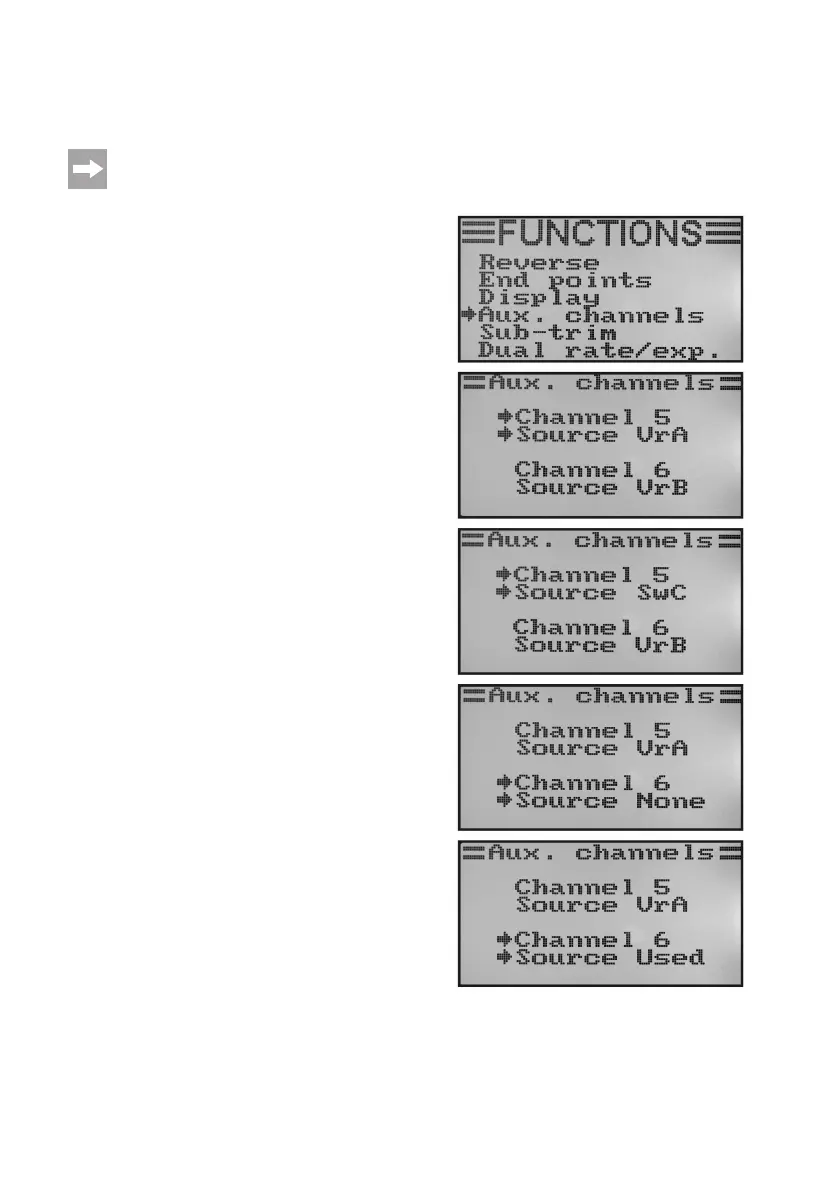
d) Encoder Assignment „Aux. Channels“
For the encoder assignment, you can set individual encoders for channels 5 and 6 (rotary encoder or toggle switch).
If you have any swash plate mixer or variable pitch control activated in the system setting menu, channel
6 is needed for rotor head linkage and therefore cannot be freely assigned. Channel 6 shows the display
„SourceUsed“(alsoseebottom-mostgure38).
Setting encoder assignment:
• Switchonthetransmitterandcallthefunctionsettingmenu.
• Movethecursorarrowtothemenuitem„Aux.channels“with
the two buttons „UP“ and „DOWN“.
• Brieypushthebutton„OK“toactivatethemenuitem.
The display shows channels 5 and 6 in the respective assig-
ned encoders „Source“. The two cursor arrows at channel 5
show that the encoder can be set at once in this channel.
• Pushthe buttons „UP“or „DOWN“ toselect the controlen-
coder now. In addition to the four toggle switches „SwA - SwD“
and the two rotary encoders „VrA“ and „VrB“, the value „None“
can be selected as well when channel 5 is, e.g., not to be
controlled manually but only via a mixer.
• Whenpushingthebutton„OK“,thecursorarrowswilljumpto
channel 6.
• Pushthe buttons „UP“or „DOWN“ toselect the controlen-
coder for channel 6 can be selected now.
• Keepthebutton„CANCEL“pushedforalongerperiodtosave
the settings. The display then shows the function setup menu
again.
• Pushthebutton „CANCEL“repeatedlyuntilyou getbackto
the operating display.
Figure 38



 To Next Page