V-tailmixer(ightmodelsonly) „V tail“
Gyro sensitivity setting (for helicopter models only) „Gyroscope“
Switch assignment „Switches assign“
Throttle switching „Throttle hold“
The menu items listed in the table are not all available in the function menu at the same time. Depending on
the previously selected model type (helicopter or wing model), the menu items not needed or unsuitable for
the required model are not displayed.
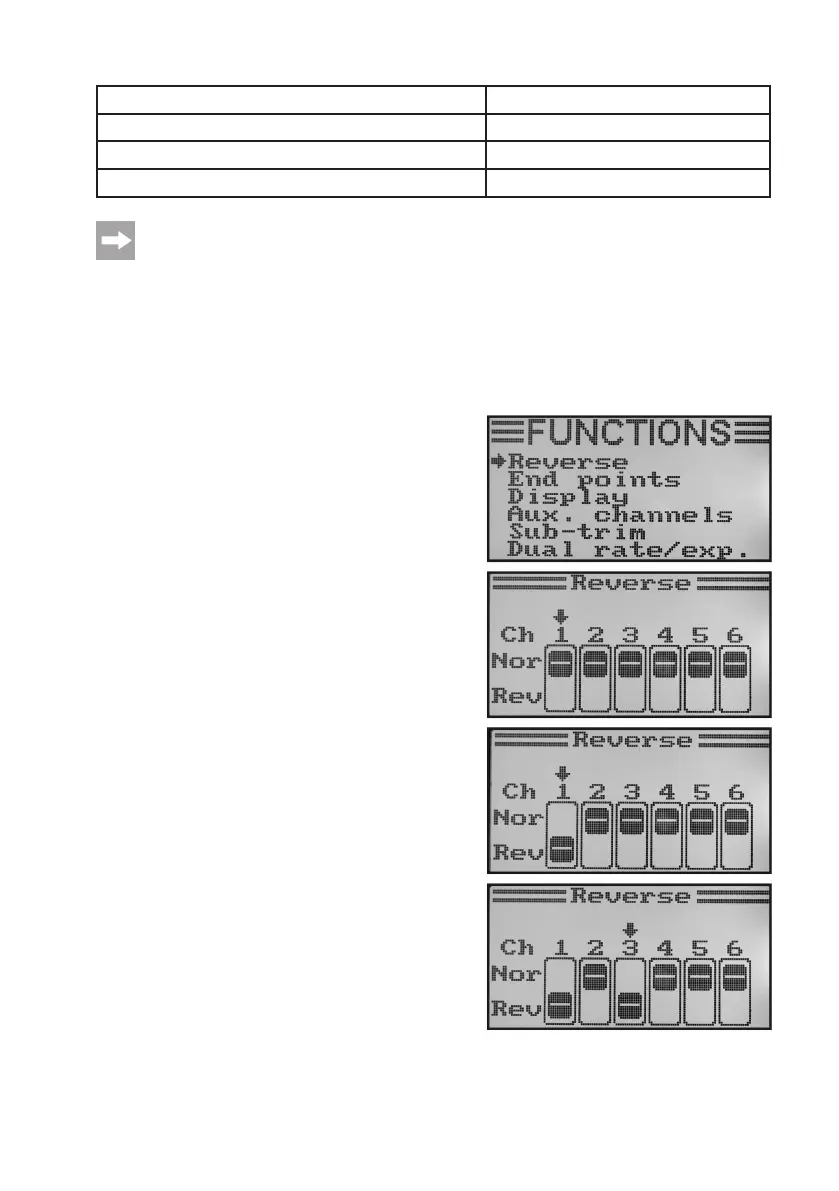
a) Servo Direction Setting „Reverse“
Depending on the position of the servos, a control movement to the left on the transmitter may invoke a steering mo-
vement to the right. This is why the transmitter allows you to individually set and save the rotting or running direction
of every individual servo.
Adjusting the servo running directions
• Switchonthetransmitterandcallthefunctionsettingmenu.
The top menu item „Reverse“ is marked by the cursor arrow.
• Brieypushthebutton„OK“toactivatethemenuitem.
In the display you will see display items for the six control func-
tions with the respective currently set running directions. „Nor“
corresponds to the standard running direction of the servo and
„Rev“ to the reversed running direction.
• Pushingthebutton„UP“or„DOWN“changestherotatingdi-
rection of the servo at channel 1.
• Whenpushingthebutton„OK“,thecursorarrowwilljumpto
channel 2.
• Pushingthebutton„UP“or„DOWN“changestherotatingdi-
rection of the servo at channel 2.
• Brieypushthebutton„OK“toswitchtochannel3.
• Repeathisprocessuntilyouhavesetthecorrectrunningdi-
rection of the servos in all six channels.
• Keepthebutton„CANCEL“pushedforalongerperiodtosave
the settings. The display then shows the function setup menu
again.
• Pushthebutton„CANCEL“repeatedlyuntilyoureturntothe
operating display and check if all servos have the correct run-
ning direction.
Figure 35



 To Next Page