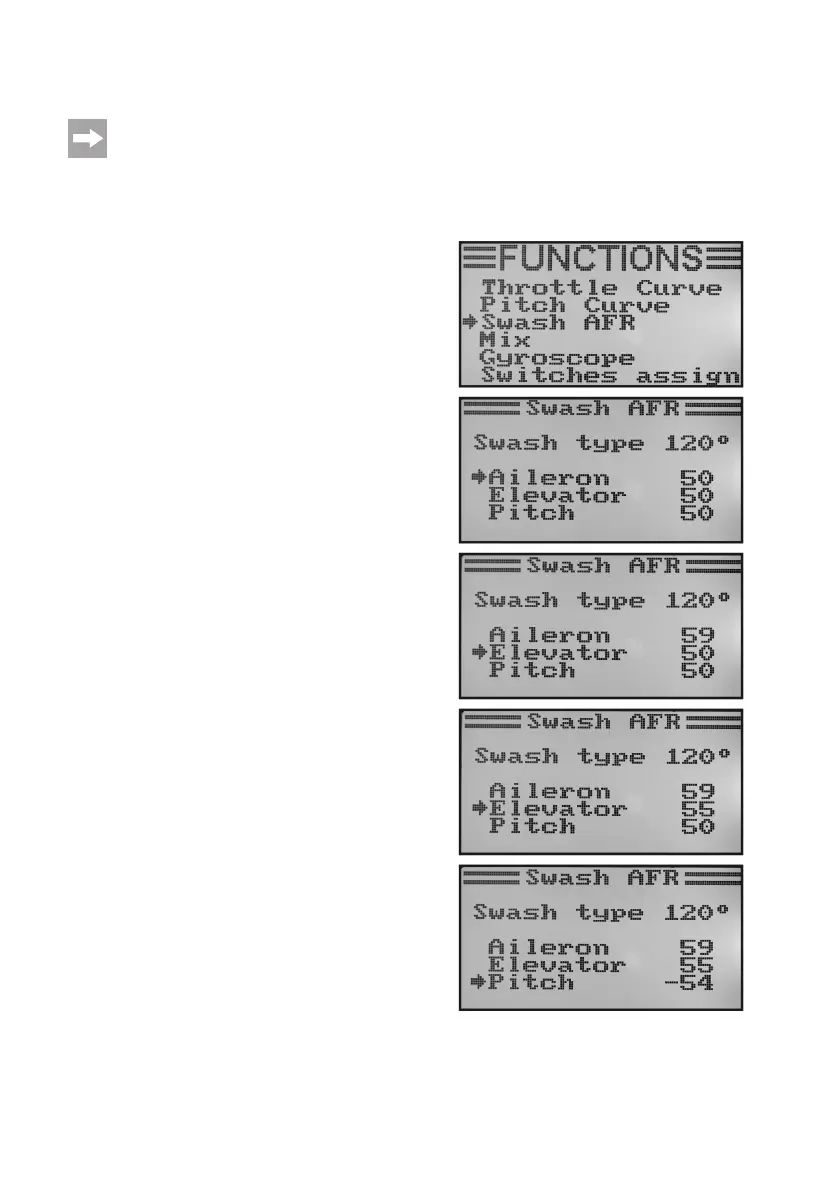
i) Swash Plate Servo Setting „Swash AFR“
This menu is only available if a helicopter with swash 90°, 120° or 140° was selected in the system settings
menu!
In this menu, you can adjust the mixing ratio of the swash plate servos to each other. In this way you can perfectly
setthecorrectmovementdirectionandtherequiredangleofdeectionorshiftpathoftheswashplateinreactionto
the transmitter control signals.
Adjusting the swash plate servos:
• Switchonthetransmitterandcallthefunctionsettingmenu.
• Movethecursorarrowtothemenuitem„SwashAFR“withthe
two buttons „UP“ and „DOWN“.
• Brieypushthebutton„OK“toactivatethemenuitem.
The display shows the currently set swash plate mixer (e.g.
„Swash type 120°“) and the set values for the roll function (Ai-
leron), for the nod function (Elevator) and the pitch function
(Pitch).
• Alternatinglydeectthecontroleverfortherollfunctiontothe
stop and push the buttons up and down to adjust the tipping
movement to the desired inclination by turning the swash plate
to the right and left. If a negative value is entered, the move-
ment direction of the swash plate will change.
The precise values then must be determined and adjusted in
severaltestights.
If the button „OK“ is pushed and held, the factory parameters
are called.
• When pushing thebutton „OK“ briey, the cursor arrow will
jump to the nod function.
• Alternatinglydeectthecontroleverforthenodfunctiontothe
stop and push the buttons up and down to adjust the tipping
movement to the desired inclination by turning the swash plate
to the front and rear. If a negative value is entered, the move-
ment direction of the swash plate will change.
The precise setting values for this function must be determi-
nedbyseveraltestightsaswell.
If the button „OK“ is pushed and held, the factory parameters
are called.
• Whenpushingthebutton„OK“againbriey,thecursorarrow
will jump to the pitch function.
Figure 44



 To Next Page